13
April
2023
Use of RAMdisk to accelerate 1C
16:07

Use of RAMdisk to accelerate 1C

13 April 2023 16:07

Acceleration of 1C launch 30-60 times when moving the Kesh file to the disk in the RAM.

Description of the problem

After upgrading to 1C Enterprise 8.3, performance dropped significantly. Therefore, the database (1C8.1CD files) was moved to an SSD, which increased performance by 2-5 times. However, this proved insufficient: in the morning, when loading multiple program instances simultaneously, there was increased hard drive load with cache files in user profiles (disk queues ranged from 3 to 50) and prolonged login times for 1C, reaching up to 25 minutes.

The bottleneck is the 1C program cache files, which are located in the Windows operating system's user profiles (C:\Users) on the hard drive. I completely resolved the issue by moving the caches to a virtual disk in RAM (RAMdisk).

At various forums, specialists came to the same solution, but no one published working BAT (CMD) files.

Virtual disk in the RAM - IMDISK VIRULAL DISK DRIVER

Loading from developer's website is here: IMDISKINST_2.0.10.EXE

IMdisk is free software (GPL licenses) for Windows NT/2000/XP/Vista/7/8/8.1/10 and Windows Server 2003/2003 R2/2008/2008 R2/2012/2012 R2.

Creation of a virtual RAM-disk V: Windows is made by a command:

imdisk -a -t vm -s 2G -m v: -p "/fs: ntfs /q /y"

Where:
-a - After creating the disk, connect it (attach): "Connect a virtual disc. This key will set up and connect a virtual disk with the specified parameters and mount it in the system"
-t vm - type of disk: vm "The storage for this type of virtual disk is allocated from virtual memory"
-s 2G - set disc's size: 2 GB.
-m v: - A mounding point -m of a virtual disk in a disc with the letter V: will be created
-p "/fs: ntfs /q /y" - after creating, format it with parameters: /fs: ntfs /q /y for the Format command. (Where /q /y - rapid formatting with suppression of confirmation request).

The principle of work

  1. In the morning at 08:50 or when any user is entering or when loading the OS using the Task Manager, the first CMD file "Ramdisk.cmd" is launched - checking and creating a virtual disk V: in RAM with a volume of 2 GB and copying it from the disk C: profile files, folders required for 1C. After that - the creation of a symbolic link from the 1C folder on the hard drive on the same folder on the virtual hard drive V:

  2. During the day, when the sessions are completed (i.e. when output), users using the second CMD file are copying the 1c folder with the Cache Files from the virtual disk V: to the disc C: in the user profile. Also, this command file is launched from the planner at 18:10 - the last one in the day of copying 1C profiles from the disk V is made: to the disk C:.

To distinguish a symbolic link to the Virtual disc “1C” folder, the initial physical catalog on the hard drive from which and in which the “1Cref” is made from the English word “reference”.

Command file No. 1: ramdisk.cmd

  • To create a virtual disk and morning copying from the disk C: on a virtual hard drive.

    @echo OFF
    if exist "V:\" (
    goto cont
    )
    else
    (
    goto makevdisk
    )

    :makevdisk

    imdisk -a -t vm -s 2G -m V: -p "/fs:ntfs /q /y"

    ping -n 7 127.0.0.1 >nul

    :cont

    v:
    cd \

    if not exist "v:\Users\Ivanov" (
    mkdir v:\Users\Ivanov\AppData\Local\1C
    icacls "v:\Users\Ivanov\AppData\Local\1C" /setowner Ivanov /T /C /Q
    icacls "v:\Users\Ivanov\AppData\Local\1C" /grant:r "Ivanov:(OI)(CI)M" /T
    xcopy /e /f /o /s C:\Users\Ivanov\AppData\Local\1Cref v:\Users\Ivanov\AppData\Local\1C
    mklink /d C:\Users\Ivanov\AppData\Local\1C v:\Users\Ivanov\AppData\Local\1C
    )

    if not exist "v:\Users\Petrov" (
    mkdir v:\Users\Petrov\AppData\Local\1C
    icacls "v:\Users\Petrov\AppData\Local\1C" /setowner Petrov /T /C /Q
    icacls "v:\Users\Ivanov\AppData\Local\1C" /grant:r "Petrov:(OI)(CI)M" /T
    xcopy /e /f /o /s C:\Users\Petrov\AppData\Local\1Cref v:\Users\Petrov\AppData\Local\1C
    mklink /d C:\Users\Petrov\AppData\Local\1C v:\Users\Petrov\AppData\Local\1C
    )

ICACLS utility keys:
/setowner - change the owner of a file or catalog
/s - continue execution with errors,
/t - change the owner for subcatals and files in them,
/q - suppress a message about successful execution
/grant: r - give the right to replace existing rights,
"Petrov:(OI)(CI)M" /t` - user and his rights:

  • (OI) - inheritance of the object,
  • (CI) - inheritance of the container,
  • M - access to change (modification).

The line of rights "Petrov:(OI)(CI)M" consists in the CMD file in quotation marks, otherwise when starting the CMD file there will be an error "The unexpected appearance: (CI)M".

It should be noted that the name of the profile and the user name do not always match,
therefore, you need to carefully check this and fix the command, because The following option is possible:
icacls "v:\Users\Petrov\AppData\Local\1C" /setowner PetrovPavel /C /L /Q.


Command file No. 2: Ramdisk2.cmd

  • For evening copying cache files back.

    @echo OFF
    v:
    cd \

    if exist "v:\Users\Ivanov\AppData\Local\1C" (
    xcopy /e /o /s /y v:\Users\Ivanov\AppData\Local\1C C:\Users\Ivanov\AppData\Local\1Cref
    )

    if exist "v:\Users\Petrov\AppData\Local\1C" (
    xcopy /e /o /s /y v:\Users\Petrov\AppData\Local\1C C:\Users\Petrov\AppData\Local\1Cref
    )

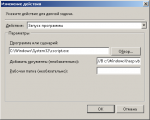
Note: both files in the planner of tasks should be launched on behalf of the user administrator.

Result

Previously, the loading time of the 1C application was up to 25 minutes. The speed of starting the program after entering the password is now 30 seconds.
The load on the head of the hard disk at the launch of 1C also disappeared (and the wear of the HDD mechanics decreased).
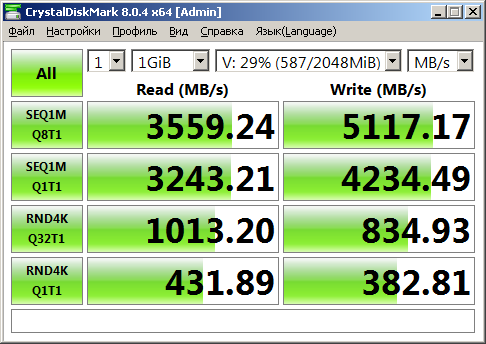
In the photo at the beginning of the article, the measured speed of the virtual hard disk program is Crystaldiskmark.
The size of the disc 2 GB is enough for storing Keshe 1C (busy space 29%, freely 71%).


IMDISK: Description of command options

IMDISK virtual disk driver control program.
For copyright and thanks, enter IMDISK --version

Syntax:
imdisk -a -t type -m mountpoint [-n] [-o opt1[,opt2 ...]] [-f|-F file]
[-s size] [-b offset] [-v partition] [-S sectorsize] [-u unit]
[-x sectors/track] [-y tracks/cylinder] [-p "format-parameters"] [-P]
imdisk -d|-D [-u unit | -m mountpoint] [-P]
imdisk -R -u unit
imdisk -l [-u unit | -m mountpoint]
imdisk -e [-s size] [-o opt1[,opt2 ...]] [-u unit | -m mountpoint]

-a Mount a virtual disk. This configures and mounts a virtual disk
with the specified parameters and attaches it to the system.

-d Detach a virtual disk from the system and release all resources.
Use -D to force deletion, even if the device is in use.

-R Emergency deletion of hung virtual disks. This should only be used as a last resort, when a problem has occurred with the virtual disk, making it impossible to safely detach it. This can happen, for example, with proxy-type virtual disks when proxy communication fails. Note that this does not attempt to unmount the file system or in any way lock the volume, so there is a potential risk of data loss. Use with caution!

-e Edit an existing virtual disk.
Along with the -s parameter, this increases the size of an existing virtual disk. Note that even if a disk can be successfully expanded, the existing file system on it can only be expanded to fill the new size without reformatting if you are using Windows 2000 or later and the current file system is NTFS.
Along with the -o parameter, this changes the media characteristics for an existing virtual disk. The parameters that can be changed on existing virtual disks specify whether the virtual disk's media should be writable and/or removable.

-t type
Selects the backing store for the virtual disk. Where type is one of the following:

  • vm: Storage for this virtual disk type is allocated
    from virtual memory in a system process. If a file is specified with the -f switch,
    this file is loaded into the memory allocated for the disk image.
  • file: The file specified with the -f file switch becomes the backing store for this
    virtual disk.
  • proxy: The actual backing store for this virtual disk type
    is controlled by the ImDisk storage server, accessed by the
    driver on this machine by sending a storage I/O request
    through the named pipe specified with -f.

-f file or -F file
The filename to use as backing storage for a
file-type virtual disk to initialize a virtual disk of the vm type, or the name of a named pipe for I/O communication for client/server for proxy-type virtual disks. For proxy-type virtual disks, "file" can be a COM port or a remote server whose address is specified in the -o option and includes "ip" or "comm". Instead of using the -f switch to specify DOS-style paths, such as C:\dir\image.bin or \server\share\image.bin, you can use the -F switch to specify native NT-style paths, such as \Device\Harddisk0\Partition1\image.bin. This allows you to specify files on disks or communication devices that are not currently assigned drive letters.

-l List configured devices. If specified with -u or -m, display information about this specific device.

-n When printing ImDisk device names, only display the element number without the \Device\ImDisk prefix.

-s size
The size of the virtual disk. Size is a number of bytes unless the suffix is ​​specified.
b, k, m, g, t, K, M, G, or T, which denotes the number of 512-byte blocks,
thousands of bytes, millions of bytes, billions of bytes, trillions of bytes,
kilobytes, megabytes, gigabytes, and terabytes, respectively. The suffix
can also be % to indicate the percentage of free physical memory that
can be used when creating virtual disks of the vm type. Specifying a size is optional unless you are using a file to initialize the virtual disk in a
virtual disk type file that does not actually exist, or when

a virtual disk of the vm type is created without an initialization image file using -f or -F. If a size is specified when creating a file-based virtual disk, the size of the file used as backing storage for the virtual disk will be adjusted according to the size specified for this size option.

The size can be a negative number to specify the amount of free physical memory minus this size. For example, if you specify -400M, the virtual disk size will be equal to
the amount of free physical memory minus 400 MB.

-b offset
Specifies the offset in the image file where the virtual disk begins.
All I/O operations on the virtual disk will be performed relative to this offset. This option is especially useful when mounting a specific partition in an image file that contains an image of a complete hard disk, rather than just a single partition. This option has no effect when creating an empty virtual disk of the vm type. When creating a vm virtual disk type
with a preloaded image file specified with the -f or -F options,
the -b option specifies the offset in the image file to boot from for the vm disk type,
where the virtual disk boot begins.

Specify offset as auto to automatically select an offset for several known
disk image file formats other than raw ones. Currently, automatic selection is supported for Nero .nrg and Microsoft .sdi image files.

-v partition
Specifies which partition to mount when mounting a raw hard disk image file
containing a master boot record (MBR) and partitions.

Partitions are numbered in the order they appear in the primary partition table,
and then in any extended partition tables.

-S sectorsize
Sector size for the virtual disk device. The default value is 512 bytes,
except for CD-ROM/DVD-ROM devices, which use 2048 bytes by default.

-x sectors/track
See the description of the -y option below.

-y tracks/cylinder
The -x and -y options can be used to specify synthetic geometry.
This is useful for creating bootable images for subsequent booting onto
physical devices. Default values ​​depend on the specified device type.
with the -o option. If the 'fd' option is specified, the default values ​​are based on the size of the
virtual disk; for example, a 1440K image gets 2 tracks/cylinder
and 18 sectors/track.

-p "format-parameters"
If the -p option is specified, the 'format' command is invoked to create
the file system when creating a new virtual disk.
"format-parameters" should be a string for the format command, enclosed in
double quotes. The string is added to the command line that runs
'format'. Typically, you would specify something like "/fs:ntfs /q /y", meaning create an NTFS file system
with quick formatting and without user interaction.

-o option
Set or reset options:

ro Creates a read-only virtual disk. For vm type virtual disks, this
option can only be used if the -f option is also specified.

rw Specifies that the virtual disk should be read-write. This
is the default setting. It can be used with the -e option to make
an existing read-only virtual disk writable.

sparse Sets the "sparse" NTFS attribute for the image file. This does not affect proxy
or vm type virtual disks.

rem Specifies that the device should be created with removable media characteristics. This option modifies the device properties returned by the driver to the system.
For example, this affects write cache operations for some file systems.

fix Specifies that the virtual disk's media characteristics should be those of a fixed device, as opposed to a removable device specified with the rem option.
Fixed device is the default setting. The fix option can be used with the -e option to set an existing removable virtual disk as fixed.

saved Clears the 'image modified' flag for an existing virtual disk. This flag is set by the driver when the image is modified and appears in the -l output for the virtual disk. The "saved" option is only valid with the -e option.

Note that virtual floppy disk or CD/DVD-ROM drives are always read-only, and removable devices cannot be modified.

cd Creates a virtual CD-ROM/DVD-ROM. This is the default value if the filename specified with the -f option ends with the .iso, .nrg, or .bin file extensions.

fd Creates a virtual floppy disk. This is the default value if the size of the
virtual disk is any of the following: 160K, 180K, 320K, 360K, 640K, 720K, 820K, 1200K,
1440K, 1680K, 1722K, 2880K, 123264K or 234752K.

hd Creates a virtual partition on a fixed disk. This is the default value if the file extension or size does not meet the criteria for selecting the
default options cd or fd.

raw Creates a device object with an "unknown" device type. The system will not attempt to handle such devices. This may be useful in conjunction with third-party drivers that can provide additional device objects using this virtual disk device as backing storage.

ip Can only be used with proxy-type virtual disks. This option initializes the user-mode service component to connect to the ImDisk storage server using TCP/IP. With this option, the -f switch specifies the remote host, optionally followed by a colon and the port number to connect to.

comm Can only be used with proxy-type virtual disks. This option initializes the user-mode service component to connect to the ImDisk storage server via a COM port. With this option, the -f switch specifies the COM port to connect to,
optionally followed by a colon, a space, and then a device settings string with the same
syntax as the MODE command.

shm Can only be used with proxy-type virtual disks.
With this option, the driver communicates with the storage server on the same computer,
using a shared memory block for I/O data transfer.

awe Can only be used with file-type virtual disks. With this option,
the driver copies the contents of the image file to physical memory. No changes
are written to the image file. If this option is used in combination with
the image file name, the physical memory block will be used without loading
the image file onto it. In this case, the -s option is required to specify
the memory block size. This option requires the awealloc driver, which
is required by Windows 2000 or later.

bswap Instructs the driver to swap every pair of bytes read from or written to the
image file. Useful when examining image files from some embedded systems.
and similar systems where data is stored in little-endian byte order.

shared Instructs the driver to open the image file in shared write mode, even if the
image is opened for writing. This can be useful for mounting each partition of an
image with multiple partitions as separate virtual disks with different offsets and sizes
within the image file. This can lead to file system corruption. If used
with incorrect offset and size parameters, use with caution!

par Parallel I/O. Valid for file-type virtual disks.
With this flag set, the driver sends read and write requests for the virtual disk directly down to
the file system driver handling the image file, within the same
thread context as the original request. In some scenarios, this flag can improve performance, especially when using multiple layers of virtual disks
backed by image files stored on other virtual disks,
network file shares, or similar storage.

This flag is not supported in all scenarios, depending on the other drivers
that need to perform requests to the image file. It can also degrade performance or lead to read and write failures if the underlying drivers
cannot handle I/O requests simultaneously.

buf Buffered I/O. Valid for file-type virtual disks.
With this flag set, the driver opens the image file in buffered I/O mode.
This is typically less efficient, but may be necessary, for example,
if mounting an image file with a smaller sector size than the one on which the image file resides.

-u unit
When combined with the -a switch, requests a specific unit number for the ImDisk device.
Instead of automatic allocation. Combined with -d or -l, specifies the
unit number of the virtual disk to delete or query.

-m mountPoint
Specifies the drive letter or mount point for the new virtual disk,
the virtual disk to query, or the virtual disk to delete. When creating
a new virtual disk, you can specify #: as the mount point, in which case
the first unused drive letter is automatically used.

-p permanent. Along with the switch, -a retains the registry parameters for re-creating
the same virtual disk automatically when the driver loads, which typically
occurs during system startup. Combined with -d or -D, existing such
settings for the deleted virtual disk are also deleted from the registry.
There are some limitations on which settings can be preserved this way. Only functions directly implemented in the kernel-level driver are available.

They are preserved, so, for example, the -p switch for formatting a virtual disk will not be preserved.

ICACLS: description of command options

ICACLS name /save ACL_file [/T] [/C] [/L] [/Q]
Saves the DACLs of files and folders matching the name to an ACL file for

later use with the /restore command. Note that
SACL, owner, and integrity labels are not preserved.

iCacls Catalog [ /Substeite Sidold Sidnew [...]] /Restore acl_fail [/C] [/L] [/Q] Applies saved DACLs to files in the directory. ICACLS name /setowner user [/T] [/C] [/L] [/Q] Changes the owner of all matching names. This option is not intended to force ownership. Use the takeown.exe program. ICACLS name /findsid Sid [/T] [/C] [/L] [/Q] Search for all matching names that include ACLs explicitly containing the given Sid. ICACLS name /verify [/T] [/C] [/L] [/Q] Search for all files whose ACLs are not canonical or whose length does not match the number of ACEs. ICACLS name /reset [/T] [/C] [/L] [/Q] Replace ACLs with the inherited default ACLs for all matching files. icacls name [/grant [:r] sid: resolution [...]] [/deny Sid:permission [...]] [/remove[:g|:d]] Sid[...]] [/T] [/C] [/L] [/Q] [/setintegritylevel level:policy[...]] **/grant[:r] Sid:permission** - Grants the specified access rights to the user. When using the **:r** parameter, these permissions replace any previously granted explicit permissions. If the **:r** parameter is not used, the permissions are in addition to any previously granted explicit permissions. **/deny Sid:permission** - Explicitly revokes the specified access rights for the user. An explicit revocation ACE is added for the granted permissions, and any explicit grant of the same permissions is removed. **/remove[:[g|d]] Sid** - Removes all Sid entries from the ACL. Using the **:g** parameter removes all occurrences of granted rights in this Sid. Using the **:d** parameter removes all occurrences of revoked rights in this Sid. **/setintegritylevel [(CI)(OI)]level** - Explicitly adds an integrity level ACE to all matching files. The level can be one of the following values: **L**[ow]: Low **M**[edium]: Medium **H**[igh]: High Inheritance options for integrity ACEs, which apply only to directories, can be specified before the level. **/inheritance:e|d|r** **e** - Enable inheritance **d** - Disable inheritance and copy the ACE **r** - Remove all inherited ACEs **Note:** SIDs can be represented either numerically or as a friendly name. If a numeric form is specified, prepend ***** to the SID. **/T** - the operation is performed on all matching files and directories located in the directories specified in the name. **/C** - the operation continues on any file errors. Error messages are still displayed. **/L** - the operation is performed on the symbolic link itself, not on its target. **/Q** - the ICACLS command suppresses success messages. ICACLS preserves the canonical order of ACE entries: _Explicit Revocations_ _Explicit Grants_ _Inherited Revocations_ _Inherited Grants_ **permission** is a permission mask that can be specified in one of two forms: a sequence of simple permissions: **N** - no access **F** - full access **M** - modify access **RX** - read and execute access **R** - read-only access **W** - write-only access **D** - delete access a comma-separated list of individual permissions enclosed in parentheses: **DE** - delete **RC** - read **WDAC** - write DAC **WO** - change owner **S** - synchronization **AS** - system security access **MA** - maximum possible **GR** - general read **GW** - general write **GE** - general execute **GA** - all General **RD** - Read data, list folder contents **WD** - Write data, create files **AD** - Add data and subdirectories **REA** - Read extended attributes **WEA** - Write extended attributes **X** - Execute files and traverse folders **DC** - Delete subobjects **RA** - Read attributes **WA** - Write attributes Inheritance permissions can precede any form and apply only to directories: **(OI)** - Inheritance by objects **(CI)** - Inheritance by containers **(IO)** - Inheritance only **(NP)** - Do not propagate inheritance **(I)** - Inherit permissions from the parent container **Examples:** icacls c:\windows\* /save ACL_file /T - Saves the ACLs for all files in the c:\windows directory and its subdirectories to an ACL file. icacls c:\windows\ /restore ACL_file - Restores the ACLs from the ACL file for all files in the c:\windows directory and its subdirectories. icacls file /grant Administrator:(D,WDAC) - Grants delete and write DAC permissions to the user Administrator for the file. icacls file /grant *S-1-1-0:(D,WDAC) - Grants delete and write DAC permissions to the user with SID S-1-1-0 for the file. ### Xcopy: description of command options Copying files and catalog structures. Xcopy source [target_object] [/a | /M] [/d [: date]] [/p] [/s [/e]] [/v] [/w] [/C] [/I] [/Q] [/F] [/L] [/G] [/H] [/R] [/T] [/U] [/K] [/N] [/O] [/X] [/Y] [/-Y] [/Z] [/B] [/EXCLUDE:file1[+file2][+file3]...] **source** Files to copy. **target_object** The location or names of the new files. **/A** Copies only files with the archive attribute set; the attribute itself is not changed. **/M** Copies only files with the archive attribute set; the attribute is cleared after copying. **/D:m-d-y** Copies files modified on or after the specified date. If no date is specified, only destination files older than the source are replaced. **/EXCLUDE:file1[+file2][+file3]...** A list of files containing strings. Each string must be on a separate line. If any of the strings matches any part of the absolute path to the file being copied, that file is excluded from the copy operation. For example, specifying the string \obj\ or .obj will exclude all files in the obj folder or all files with the .obj extension, respectively. **/P** Prompt before creating each new file. **/S** Copy only non-empty directories with subdirectories. **/E** Copy directories with subdirectories, including empty ones. Equivalent to the /S /E switch combination. Compatible with the /T switch. **/V** Check the size of each new file. **/W** Prompt to press a key before copying. **/C** Continue copying regardless of errors. **/I** If the target does not exist and multiple files are being copied, the target is assumed to specify a directory. **/Q** Suppress printing of the names of copied files. **/F** Print the full names of the source and target files. **/L** Print the names of the copied files. **/G** Copy encrypted files to a target directory that does not support encryption. **/H** Copies hidden and system files, among others. **/R** Overwrites read-only files. **/T** Creates a directory structure without copying files. Empty directories and subdirectories are not included in the copy process. To create empty directories and subdirectories, use the /T /E switch combination. **/U** Copies only files that already exist in the target directory. **/K** Copies attributes. Using the XCOPY command typically resets the "Read-only" attributes. **/N** Uses short filenames when copying. **/O** Copies owner information and ACL data. **/X** Copies file audit settings (implies the **/O** switch). **/Y** Suppresses the confirmation prompt before overwriting an existing target file. **/-Y** Prompt for confirmation before overwriting an existing target file. **/Z** Copy network files with resumption. **/B** Copy a symbolic link instead of its target. **/J** Copy using unbuffered I/O. Recommended for very large files. The key **/Y** can be set through the environmental variable COPYCMD. The key **/-Y** command line overrights such a setting.

Related publications