
23
September
2026
Checklist for checking your web browser before visiting sites that collect information about visitors
13:36

Checklist for checking your web browser before visiting sites that collect information about visitors

23 September 2026 13:36

When visiting some websites, I noticed that either captchas “I’m not a bot” began to appear, or the opening of the site was simply interrupted with a message about access to the site being denied without specifying a reason.

There are two ways to respond to this situation:

  • try to “please” the site by giving it all the information about yourself that it asks you to pass on. For example, open in another browser - Chrome or Yandex with Cookies and JavaScript enabled and without using a VPN.
  • convey a minimum of information about yourself, in the hope that the site will take a bypass path when there is no information about the visitor. This article is about the second method.

Information hygiene

There are sites on which advertisements or videos, including those created using AI, open dynamically (Dynamic HTML = JavaScript + DOM+CSS). Such videos can irritate the visitor by presenting negative images that are contrary to morality.

Often large sites host many scripts that intercept mouse movement and scrolling events for analytics or opening the same dynamic videos and advertisements.

Some information is “stolen” from the client: web browser, language, referring page (referer), date of previous visit and last session ID from Cookie, and a Cookie is added to the history to analyze user activity. When visiting again, an already changed set of information data (recommendation technologies) is issued.

All this unnecessary use and abuse of Web technologies to spy on users is not controlled in fact, which cannot but upset. But you can avoid this using information hygiene:

  • do not visit sites that use such methods,
  • do not tell the website a lot of information about yourself and your browser.

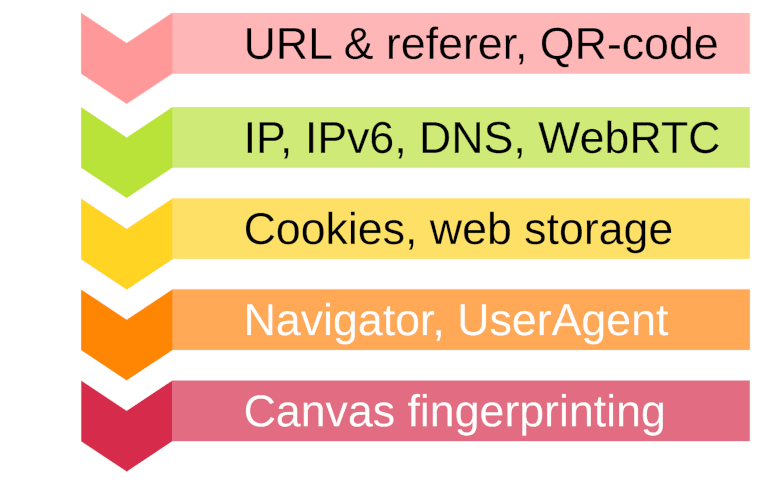
Types of user information leaks

  1. Information collected server about the visitor. Collected by the server and does not require JavaScript enabled.
    referer: <?php print ($_SERVER['HTTP_REFERER']); ?>
    client ip: <?php print ($_SERVER['REMOTE_ADDR']); ?>
    user agent: <?php print ($_SERVER['HTTP_USER_AGENT']); ?>

or another option

<?php
foreach($_SERVER as $key => $value) {
echo '$_SERVER["'.$key.'"] = '.$value."
";
}
?>

Also, all requests to the server are written to the visit log. This legal method is used to analyze visits less and less, giving way to trackers - advanced counters for analyzing traffic.

  1. Information collected by scripts on client- in a web browser. Requires images, JavaScript and Cookies to be enabled. There is complete “chaos” going on here to obtain maximum information about the user, where “all means are good.” For example, dozens of cookies are created (including cross-site cookies), invisible images - “beacons”, many analytical scripts and trackers (the source texts of which are often created dynamically, where <script></script> are sometimes added in real time, “on the fly”), encryption of scripts, use of the clipboard. At the same time, websites often only have a warning about the use of cookies, and the mention of analytics is hidden in the "Privacy Policy" document.

  2. Information collected along the path of traffic - DNS requests are recorded by the provider, because they go to port 53/UDP in the clear.

  3. Since the COVID-19 pandemic, offline information carriers in the form of QR codes have become widely used to navigate to websites. The QR code is printed on paper or film. Although most of them simply contain URLs, some of them are malicious (for example, they supposedly lead to a “house chat” in Telegram). This type of security threat is called an "air gap" because... information is not transmitted over the network.

Checklist

Before visiting sites that use powerful traffic research, I recommend the following checklist:

Label Title Description
WB □ Separate profile or web browser You need to create a separate profile with increased security: in Firefox -P “profile name” or LibreWolf web browser
A1. □ URL Check the link (URL) where you are going. Did the link come from a reliable source? Don't mindlessly click on links in instant messengers or emails - this could be phishing.
A2. □ Referrer It is better to open links in a new tab (copy-paste) in a secure browser. In the URL, remove the extra fields utm_campaign, utm_medium, utm_source, utm_content, utm_term and utm_referer.
A3. □ QR code If a QR code is used, the link text should not contain utm_referer or unique id fields (long strings of letters and numbers). Pay close attention to the site name.
A4. □ IP address It is advisable to connect to home router, so as not to give out your working IP address.
A A5. □ no IPv6 address leak Only the IPv4 address on the site should be determined https://ipchiken.com or https://ifconfig.me/.
A A6. □ no DNS leak Enable DNS over HTTPS in FireFox -> Custom -> https://dns.google/dns-query. Check on the site https://www.dnsleaktest.com/ or web page https://2ip.io/privacy/
A7. □ WebRTC disabled The WebRTC Leak Shield add-on works. Or in about:config specify media.peerconnection.enabled = false
B1. □ Cross-site cookies - disabled In the browser, disable it in FireFox - "Settings" - tracking protection - Cookies -Block cross-site cookies. In LibreWolf: about:preferences#privacy ->Strict.
B B2. □ Delete the Cookie of this domain before going to the site FireFox Cookie Manager add-on: menu "Manage all cookies" - domain name - Delete). Or install a plugin that deletes all cookies after closing the tab -Cookie AutoDelete. Or delete Cookies by clearing your browsing history:Ctrl+Shift+Del. Or in LibreWolf: Privacy and Security - check the box "Delete cookies and site data every time you close LibreWolf" and restart your web browser.
B3. □ Clear temporary files before going to the site Clear cache and clear web storage) to protect against loading time attacks: "this picture was cached and therefore loaded in 10 milliseconds".Ctrl+Shift+Del- Temporary cached files, images and pages.
C1 □ USER_AGENT In the FireFox "Random User Agent/Switcher" add-on or another "User agent switcher and manager" add-on, enter the most common UserAgent value: Mozilla/5.0 (Windows NT 10.0; Win64; x64) AppleWebKit/537.36 (KHTML, like Gecko) Chrome/153.0.0.0 Safari/537.36
C2 □ List of browser languages List of languages ​​for displaying web pages.
D1 □ Set the time The time zone of the operating system must match the preferred language of the browser web pages.
D2 □ Change your display resolution and window size Press Ctrl+Shift+M - select a different output device format - aspect ratio and screen resolution. Or in LibreWolf, turn on Settings - Privacy and Security - Tracking -> "Resist Fingerprinting" and "Use Page Framing (Letterboxing)" See also add-on for FireFox "Canvas Blocker".
E1 □ Enable uBlock origin The FireFox ad and tracker filtering add-on makes analytics difficult and protects against unwanted pop-up videos and trackers.
E2 □ Enhanced Tracking Protection FireFox - Settings - Advanced tracking protection -> Personal -> set the flags and "Cookies - Block all cross-site cookies".
F □ Check https://browserleaks.com,
https://2ip.ru/ru/privacy,
https://coveryourtracks.eff.org/

Short list of TL;DR

  • Connect to your home VPN.
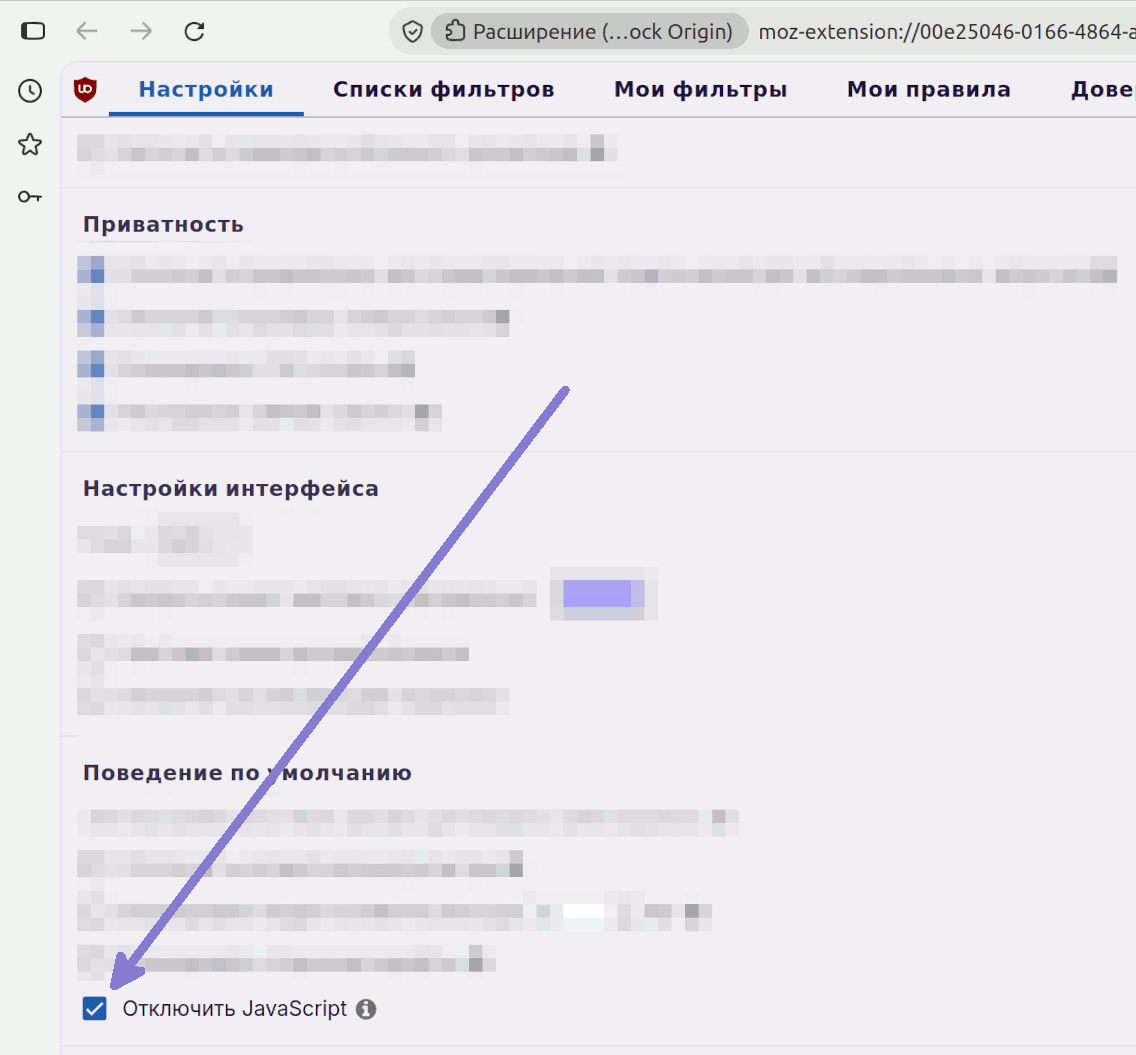
  • Use LibreWolf or a browser with JavaScript disabled (appropriate add-on or in uBlock Origin - Settings - Default Behavior - Disable JavaScript)
    *Ctrl+Shift+Del- Clear browsing history (Cookies, temporary files)
  • Set time zone according to web browser language.

How to disable default JavaScript in FireFox browser

Click on the uBlock origin symbol -> "Settings"
Firefox browser add-on uBlock origin - entering the settings menu
Disable JavaScript by default.
enable the option "JavaScript is disabled by default"
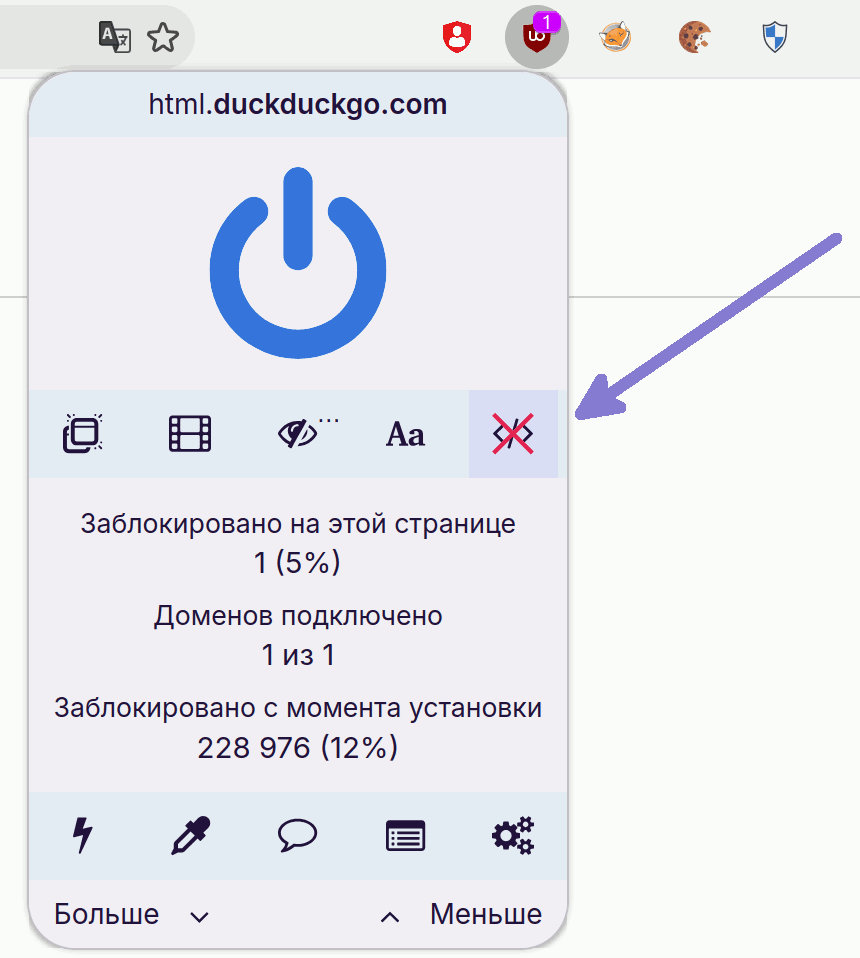
The crossed out </> icon is visible in uBlock origin - JavaScript is disabled.
A crossed out icon is visible on the uBlock origin add-on panel`</\>`- JavaScript is disabled
You can enable JavaScript if needed and reload the page.

Result

The verification systems at the entrance to the site are at a loss.


Related publications