17
July
2026
Enabling Mozilla Firefox to support the EGL API for hardware graphics acceleration
17:03

Enabling Mozilla Firefox to support the EGL API for hardware graphics acceleration

17 July 2026 17:03

EGL allows you to dramatically increase the FPS frame rate in web games and speed up the processing of 3D and 2D graphics and video.

EGLEGL is a cross-platform API developed by Khronos. EGL communicates via MESA and OpenGL with the native Linux graphics card driver for X11. Data when using EGL is written directly to the frame buffer of the video card, which reduces the load on the central processor.
EGL is implemented not only in X11, but also in Windows and Android.

Why doesn't EGL work by default in the Mozilla Firefox web browser on an nVidia and ATI or AMD video card?

EGL disabled for video cards Nvidia entry level that have nVidia version driver below 470.82.0.0.
See list of supported products for Linux Nvidia 470 driver.
Also EGL does not work with the free Nouveau driver (see below).Firefox source text - GfxInfo.cpp).
All ATI video cards are blocked.
AMD- the situation is better. The RadeonSI Gallium3D driver is actively being developed, which is suitable for video cards starting with the Radeon HD 7000 "Southern Islands" series (see the list of video cards below).

Is it possible to enable EGL acceleration in Firefox on an nVidia video card without buying a new one?

First, install the branded video card driver.

Secondly, you about:config

Set new values for the parameters:
*gfx.webrender.all=>true*
layers.acceleration.force-enabled=>true
layers.gpu-process.enabled=>true
layers.gpu-process.force-enabled=>true**
*gfx.x11-egl.force-enabled=>true

The last parameter "gfx.x11-egl.force-enabled" is responsible for forcing EGL to be enabled, even if the old video card is in the Firefox "black list".
You can also enable EGL via an environment variable when launching Firefox from the command line.

MOZ_X11_EGL=1 LIBVA_DRIVER_NAME=nvidia firefox

Where LIBVA_DRIVER_NAME=nvidia with an AMD video card is replaced by LIBVA_DRIVER_NAME=radeonsi

For Intel integrated video cards,depending on generation, parameter LIBVA_DRIVER_NAME может принимать значения i965 или iHD или Xe.

After changing the settings in about:config, you need to restart the Firefox web browser.
To cancel settings, either create a new Firefox profile, or edit

Questions and answers

Which inexpensive nVidia video cards are suitable for hardware acceleration of web pages in Firefox without manually changing settings in about:config?

  • GeForce GTX 690, GeForce GTX 680, GeForce GTX 670, GeForce GTX 660 Ti, GeForce GTX 660, GeForce GTX 650 Ti BOOST, GeForce GTX 650 Ti, GeForce GTX 650, GeForce GTX 645, GeForce GT 640, GeForce GT 635, GeForce GT 630
  • GeForce GTX 780 Ti, GeForce GTX 780, GeForce GTX 770, GeForce GTX 760, GeForce GTX 760 Ti (OEM), GeForce GTX 750 Ti, GeForce GTX 750, GeForce GTX 745, GeForce GT 740, GeForce GT 730, GeForce GT 720, GeForce GT 710
  • Quadro GV100, Quadro GP100, Quadro P6000, Quadro P5200, Quadro P5000, Quadro P4000, Quadro P2200, Quadro P2000, Quadro P1000, Quadro P620, Quadro P600, Quadro P400, Quadro M6000 24GB, Quadro M6000, Quadro M5000, Quadro M4000, Quadro M2000, Quadro K6000, Quadro K5200, Quadro K5000, Quadro K4000, Quadro K4200, Quadro K2200, Quadro K2000, Quadro K2000D, Quadro K1200, Quadro K620, Quadro K600, Quadro K420, Quadro 410.

    Which AMD video cards support EGL?

Radeon HD 7000 "Southern Islands" and newer, which use the RadeonSI Gallium3D driver.
AMD Driver 25.2.3 is suitable for Ubuntu 22.04.5 HWE and 24.04.3 HWE.

Products are shown on AMD website page "AMDGPU-UNIFIED-LINUX...html".

Such as:

  • Radeon HD 7000 series: 7750, 7770, 7850, 7870, 7950, 7970 ("Southern Islands")

  • Radeon HD8000 series ("Sea Islands")

  • Radeon R5 210—230, R7 240—265, R9 270—290 ("Volcanic Islands")

  • Radeon R5 3xx, R7 3xx, R9 3xx ("Pirate Islands", "Caribbean Islands") - R5 310—340, R7 340—370, R9 360—390, Radeon R9 Nano / Fury / Fury X

  • Radeon RX400 series ("Arctic Islands", "Polaris") - R5 420—435, R7 430—450, RX 455—480

  • Radeon RX500 series ("Polaris") - 520—550X, RX 540—590

  • Radeon RX600 series - 610—630, RX 640

  • Radeon RX Vega 10 (iGPU), Radeon RX Vega 11 (iGPU), Radeon RX Vega 56, 64

  • Radeon RX 5000 series ("Navi") - Radeon RX 5300—5700

  • Radeon RX 6000 series ("Big Navi") - Radeon RX 6300M - 6950 XT.

    Which Intel processor integrated graphics processors (iGPUs) support EGL?

  • Intel UHD Graphics 530 / 610 / 620 / 630 / 640 / 650
    Intel UHD G1/G4/G7/Xe
    Intel Iris Plus G1/G4/G7/Xe

  • or newer.

    Which AMD processor built-in graphics processors (iGPUs) support EGL?

*AMD RX Vega all series.

On which entry-level video cards can EGL be enabled when gfx.x11-egl.force-enabled = true is specified?

The following graphics cards can provide 75 frames per second:

  • Intel UHD Graphics 530 / 610 / 620 / 630 / 640 / 650
    Intel UHD G1/G4/G7/Xe
    Intel Iris Plus G1/G4/G7/Xe
  • AMD Radeon HD 8570 / 8670 / 8870
  • AMD Radeon HD 7570 / 7670 / 7730 / 7750 / 7700 / 7790
  • AMD Radeon HD 6500 / 6570 / 6670 / 6700 / 6750 / 6770 / 6790
  • AMD Radeon HD 5600 / 5670 / 5700 / 5750 / 5770
  • AMD Radeon 520 / 530 / 540
  • AMD Radeon RX 5500 / 5500-XT / 5600 / 5600-XT / 5700
    AMD R7 250 / R7 260 / R7 370
    AMD RX Vega 3 Ryzen iGPU, RX Vega 6 Ryzen iGPU, RX Vega 8 Ryzen iGPU, RX Vega 10 Ryzen iGPU, RX Vega 11 Ryzen iGPU
  • Nvidia Geforce GT 220 / 230 / 240 / 430 / 440 / 520 / 530 / 545 / 630 / 635 / 640 / 710 / 720 / 730 / 740
  • Nvidia Geforce GTS 240 / 250 / 450
  • Nvidia Geforce GTX 550-Ti / 650-Ti
    *Nvida Geforce 9800 GT/GX2/GTX
  • Nvidia Geforce 8800 GT / GTS / GS / GTX / Ultra
  • Nvidia GTX 260 / 275 / 280 / 285 / 295
  • Nvidia Quadro 600 / 1000 / 2000 / 3000 / 4000 / 5010

    What does high CPU usage mean for the GPU Process?

There may be several reasons:

  • Insufficient OpenGL performance on an entry-level video card.
  • Mesa 3D version is outdated and does not contain libEGL, libGL, libGLESv1_CM, libGLESv2 libraries.
  • Outdated video card driver (lower than Nvidia 470.82 or AMD lower than 25.20.3).
  • Unsupported operating system (AMD for its video cards recommends ubuntu 22.04.5 HWE, Ubuntu 24.04.3, RHEL 10.0, RHEL 9.6, SLED/SLES 15 SP7).

    How to install EGL libraries on Linux?

For X11 on Ubuntu and Debian:

sudo apt update
sudo apt install libegl-amber0 libegl-dev libegl-mesa0 libegl1 libegl1-mesa libegl1-mesa-dev

For Debian:

sudo apt install eglexternalplatform-dev

For Debian & Nvidia:

sudo apt install nvidia-egl-common

For Debian & Nvidia (Non-free Nvidia 550 driver)

sudo apt install libegl-nvidia0 libnvidia-eglcore

For Wayland & Nvidia on Ubuntu:

sudo apt update
sudo apt install libnvidia-egl-wayland1

Which video cards does the latest Nvidia 550 driver support?

*Nvidia 550 driver download web page-> Supported products.

Checking WebGL functionality in Mozilla Firefox

You can see if EGL is enabled in about:support- lines mentioning EGL and the parameter value:
*X11_EGL- default available, and if "env blocklisted Blocklisted by gfxInfo" is disabled, the forced inclusion of "user force_enabled" is available.

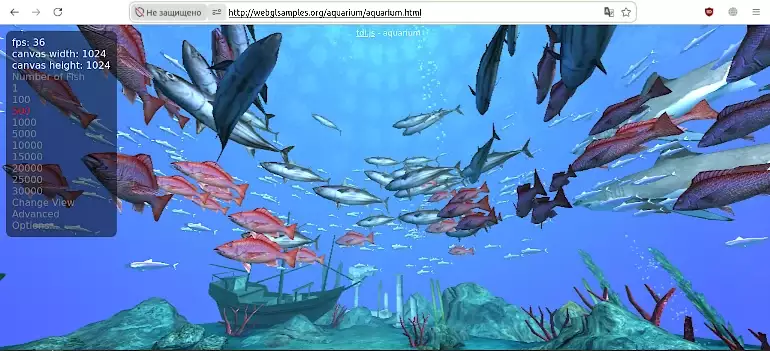
Checking the functioning of the EGL:
*WebGL aquarium[/mark]

Links:

EGL (API) - Wikipedia
Hardware acceleration in Firefox, guide on github.io
Switching from Nouveau to Nvidia driver and back, guide on github.com
Firefox sources showing disabling EGL using driver blacklisting


Last change: 07/20/2026


Related publications