
---
title: 'Installing antiX on an encrypted LUKS partition'
url: 'https://ra1ahq.blog/en/ustanovka-antix-na-zashifrovannyi-razdel-luks'
markdown: 'https://ra1ahq.blog/en/ustanovka-antix-na-zashifrovannyi-razdel-luks.md'
lang: en
date: '2026-07-15'
description: 'LUKS is a disk partition encryption system for Linux. Instal'
taxonomy:
  category:
    - blog
  tag:
    - Linux
  archives_month:
    - jul_2026
  archives_year:
    - '2026'
---

# Installing antiX on an encrypted LUKS partition

15 

 July 

 2026 

 ![Installing antiX on an encrypted LUKS partition](https://ra1ahq.blog/images/1/a/a/b/a/1aabaa06a7482a303b2cc9c63f9d335ff0364a37-luks1.png)17:36

### Installing antiX on an encrypted LUKS partition

 [Linux](https://ra1ahq.blog/en/tag:Linux) 

15 July 2026 17:36

LUKS is a disk partition encryption system for Linux.

### Installing antiX on an encrypted LUKS partition

I installed antiX on the LUKS partition in my own way.

0\) Loading antiX from LiveCD.

1\) Disk partitioning in GParted

- /dev/sda1 bios\_grub - 8 MB unformatted, bios\_grub flag
- /dev/sda2 boot partition - 1500 MB ext4 type, boot flag
- esp partition - 500 MB for UEFI only, esp flag. We do not create for outdated PCs with a BIOS system.
- /dev/sda3 swap partition - 4 GB linux-swap type
- /dev/sda4 is the main partition for the operating system (contains the root / and the home folder /home).

2\) Enable LUKS encryption for the main partition on the hard drive and connect it to the OS loaded from the LiveCD:

```
cryptsetup -y -v --type luks2 luksFormat /dev/sda4
cryptsetup luksOpen /dev/sda4 home
```

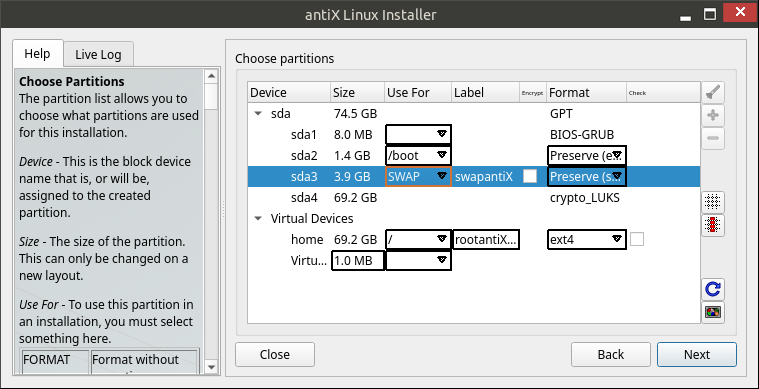
3\) Install antiX on physical and logical partitions according to the diagram in the picture or tables:
[ ![new-luks-antix](https://ra1ahq.blog/images/c/e/4/9/3/ce493b99f8540aae7f240725852b63461165cda1-new-luks-antix.png "new-luks-antix")](https://ra1ahq.blog/images/c/e/4/9/3/ce493b99f8540aae7f240725852b63461165cda1-new-luks-antix.png)

**Physical hard drive sda:**

| section | size | for | label | Encrypt | Format |
|---|---|---|---|---|---|
| /dev/sda1 | 8 MB |  |  | - | GPT |
| /dev/sda2 | 1.4 GB | **/boot** |  | - | ext4 (Preserve) |
| /dev/sda3 | 3.9 GB | **SWAP** | swapantiX | - | swap (Preserve) |
| /dev/sda4 | 69.2 GB |  |  | - | crypto\_LUKS |

**Virtual devices:**

| section | size | for | label | Encrypt | Format |
|---|---|---|---|---|---|
| home | 69.2 GB | **/** | rootantiX | - | ext4 |

Where the physical encrypted partition crypto\_LUKS is mounted with the luksOpen command as a virtual device "home", which will be mounted to the root "/" when the OS boots.

4\) Reboot (remove the bootable LiveCD media and in BIOS Setup select the priority of devices to boot: instead of a “flash drive” - a hard drive).

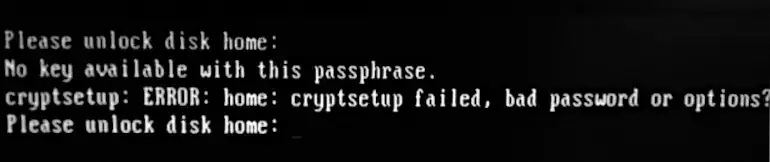
5\) When loading the OS after the Grub menu, the message “Please unlock disk home” will be displayed on the screen.
![crypto_ask_passphrase](https://ra1ahq.blog/images/9/a/1/0/5/9a105e87f150fa9dc93760fa8323e23ef94ed7c7-cryptoaskpassphrase.webp "crypto_ask_passphrase")
Enter the answer passphrase using the keyboard.

6\) After entering the password, the LUKS virtual partition named "home" will be decrypted and antiX Linux will boot normally from the root partition "/".

### Changing the LUKS partition passphrase

The passphrase for the encrypted LUKS partition can be changed while in the operating system loaded from the LUKS partition.

1\) Find out the name of the LUKS section

```
lsblk
```

My LUKS partition name is "/dev/sda4", but it may be different. For example, "/dev/sda3".

2\) Find out the LUKS slot number

```
sudo cryptsetup open -v -test-passphrase /dev/sda4
```

or

```
sudo cryptsetup luksDump /dev/sda4
```

where instead of /dev/sda4 you need to specify the name of the LUKS partition (see point 1).

In the extended message, due to the use of the -v (--verbose) switch, the slot number will be displayed.
For example: "Key slot 0 is unlocked."

This means the slot number is 0.

3\) Setting a new passphrase for the encrypted LUKS partition

```
sudo cryptsetup luksChangeKey /dev/sda4 -S 0
```

where instead of "/dev/sda4" you need to specify the *partition name* LUKS from step 1,
and instead of "0" you need to indicate the *slot* number from step 2.

I entered the old LUKS password and the new one and confirmed the new password - the LUKS section received a new passphrase.

On antiX / Debian / Ubuntu, you can use the Disks snap-in (gnome-disks) to change the LUKS password.

```
sudo apt install gnome-disk-utility
sudo gnome-disks
```

Select the LUKS section - the "gear" icon - click the "Change password..." menu item.

---

Sources:

- [How To Linux Hard Disk Encryption With LUKS](https://www.cyberciti.biz/security/howto-linux-hard-disk-encryption-with-luks-cryptsetup-command/)
- [How to change LUKS disk encryption passphrase in Linux](https://www.cyberciti.biz/security/how-to-change-luks-disk-encryption-passphrase-in-linux/)

### Related publications

 [ ![](https://ra1ahq.blog/images/f/3/a/2/c/f3a2c07ef5b32c0308ab703405a5a5ca87b75283-archer-ac600-728.webp) Установка драйвера ядра для Wi-Fi адаптера TP-Link после обновления ОС Debian ](https://ra1ahq.blog/en/ustanovka-draivera-yadra-dlya-wi-fi-adaptera-tp-link-posle-obnovleniya-os-debian) 

 [ ![](https://ra1ahq.blog/images/d/2/5/c/7/d25c7282750b398f71041fb8b90640b692e7e4b8-decibelfmtitle.png) Linux Cinnamon Desktop Applets for Listening to Internet Radio Stations ](https://ra1ahq.blog/en/applety-dlya-rabochego-stola-linux-cinnamon-dlya-proslushivaniya-internet-radiostancii) 

 [ ![No picture](https://ra1ahq.blog/user/themes/mytheme/images/no-image.png) Passing a parameter to a Linux module/driver ](https://ra1ahq.blog/en/peredacha-parametra-modulyu-draiveru-linux) 

 [ ![](https://ra1ahq.blog/images/5/c/4/e/a/5c4ea9c8c3f0b4dd890116d8fe7cbadfdb9814ba-archer-ac600.webp) Installing the TP-Link Archer T600U Nano Wi-Fi adapter driver in Debian 13 "Trixie" ](https://ra1ahq.blog/en/ustanovka-draivera-wi-fi-adaptera-tp-link-archer-t600u-nano-v-debian-13-trixie) 

 [ ![](https://ra1ahq.blog/images/b/f/f/0/f/bff0f99f5897e0420fac9a6eef7254247f39c29d-pulseaudio-equalizer.png) Installing the audio equalizer pulseaudio-equalizer-ladspa on Linux ](https://ra1ahq.blog/en/ustanovka-v-linux-ekvalaizera-zvuka-pulseaudio-equalizer-ladspa) 

[ Backward](https://ra1ahq.blog/en/ustanovka-sparky-linux-debian-na-razdel-lvm "Previuous page")

[ Forward ](https://ra1ahq.blog/en/vklyuchenie-v-mozilla-firefox-podderzhki-api-egl "Next page")

## Languages

- [Русский](https://ra1ahq.blog/posts/ustanovka-antix-na-zashifrovannyi-razdel-luks)
- [English](https://ra1ahq.blog/en/ustanovka-antix-na-zashifrovannyi-razdel-luks)
- [Deutsch](https://ra1ahq.blog/de/posts/ustanovka-antix-na-zashifrovannyi-razdel-luks)
- [Français](https://ra1ahq.blog/fr/posts/ustanovka-antix-na-zashifrovannyi-razdel-luks)
- [中文 (简体) (cn)](https://ra1ahq.blog/zh-cn/posts/ustanovka-antix-na-zashifrovannyi-razdel-luks)

## Theme

## RSS feeds

 [ Atom 1.0](https://ra1ahq.blog/en/.atom) [ RSS](https://ra1ahq.blog/en/.rss) 

## Popular tags

 [APRS](https://ra1ahq.blog/en/tag:APRS) [CW](https://ra1ahq.blog/en/tag:CW) [DX](https://ra1ahq.blog/en/tag:DX) [FM](https://ra1ahq.blog/en/tag:FM) [Linux](https://ra1ahq.blog/en/tag:Linux) [VHF](https://ra1ahq.blog/en/tag:VHF) [antennas](https://ra1ahq.blog/en/tag:antennas) [firefox](https://ra1ahq.blog/en/tag:firefox) [morse](https://ra1ahq.blog/en/tag:morse) [soundtrack](https://ra1ahq.blog/en/tag:soundtrack) [video](https://ra1ahq.blog/en/tag:video) [windows](https://ra1ahq.blog/en/tag:windows) [youtube](https://ra1ahq.blog/en/tag:youtube) [КВ](https://ra1ahq.blog/en/tag:%D0%9A%D0%92) [ТВ](https://ra1ahq.blog/en/tag:%D0%A2%D0%92) [УКВ](https://ra1ahq.blog/en/tag:%D0%A3%D0%9A%D0%92) [антенны](https://ra1ahq.blog/en/tag:%D0%B0%D0%BD%D1%82%D0%B5%D0%BD%D0%BD%D1%8B) [безопасность](https://ra1ahq.blog/en/tag:%D0%B1%D0%B5%D0%B7%D0%BE%D0%BF%D0%B0%D1%81%D0%BD%D0%BE%D1%81%D1%82%D1%8C) [длинные волны](https://ra1ahq.blog/en/tag:%D0%B4%D0%BB%D0%B8%D0%BD%D0%BD%D1%8B%D0%B5%20%D0%B2%D0%BE%D0%BB%D0%BD%D1%8B) [путешествия](https://ra1ahq.blog/en/tag:%D0%BF%D1%83%D1%82%D0%B5%D1%88%D0%B5%D1%81%D1%82%D0%B2%D0%B8%D1%8F) [религия](https://ra1ahq.blog/en/tag:%D1%80%D0%B5%D0%BB%D0%B8%D0%B3%D0%B8%D1%8F) [соревнования](https://ra1ahq.blog/en/tag:%D1%81%D0%BE%D1%80%D0%B5%D0%B2%D0%BD%D0%BE%D0%B2%D0%B0%D0%BD%D0%B8%D1%8F) [спутники](https://ra1ahq.blog/en/tag:%D1%81%D0%BF%D1%83%D1%82%D0%BD%D0%B8%D0%BA%D0%B8) [средние волны](https://ra1ahq.blog/en/tag:%D1%81%D1%80%D0%B5%D0%B4%D0%BD%D0%B8%D0%B5%20%D0%B2%D0%BE%D0%BB%D0%BD%D1%8B) [схемы](https://ra1ahq.blog/en/tag:%D1%81%D1%85%D0%B5%D0%BC%D1%8B) [тесты](https://ra1ahq.blog/en/tag:%D1%82%D0%B5%D1%81%D1%82%D1%8B) [трансивер](https://ra1ahq.blog/en/tag:%D1%82%D1%80%D0%B0%D0%BD%D1%81%D0%B8%D0%B2%D0%B5%D1%80) [управление](https://ra1ahq.blog/en/tag:%D1%83%D0%BF%D1%80%D0%B0%D0%B2%D0%BB%D0%B5%D0%BD%D0%B8%D0%B5) [фотографии](https://ra1ahq.blog/en/tag:%D1%84%D0%BE%D1%82%D0%BE%D0%B3%D1%80%D0%B0%D1%84%D0%B8%D0%B8) 

## Random post

 [ I'll be lucky!](https://ra1ahq.blog/en/random) 

## Archive of posts

- [ October 2026 ✒ 4 ](https://ra1ahq.blog/en/archives_month:oct_2026)
- [ September 2026 ✒ 9 ](https://ra1ahq.blog/en/archives_month:sep_2026)
- [ August 2026 ✒ 6 ](https://ra1ahq.blog/en/archives_month:aug_2026)
- [ July 2026 ✒ 13 ](https://ra1ahq.blog/en/archives_month:jul_2026)
- [ June 2026 ✒ 8 ](https://ra1ahq.blog/en/archives_month:jun_2026)
- [ May 2026 ✒ 2 ](https://ra1ahq.blog/en/archives_month:may_2026)
- [ April 2026 ✒ 6 ](https://ra1ahq.blog/en/archives_month:apr_2026)
- [ March 2026 ✒ 3 ](https://ra1ahq.blog/en/archives_month:mar_2026)
- [ February 2026 ✒ 7 ](https://ra1ahq.blog/en/archives_month:feb_2026)
- [ January 2026 ✒ 8 ](https://ra1ahq.blog/en/archives_month:jan_2026)
- [ December 2025 ✒ 12 ](https://ra1ahq.blog/en/archives_month:dec_2025)
- [ November 2025 ✒ 9 ](https://ra1ahq.blog/en/archives_month:nov_2025)
- [ October 2025 ✒ 8 ](https://ra1ahq.blog/en/archives_month:oct_2025)
- [ September 2025 ✒ 5 ](https://ra1ahq.blog/en/archives_month:sep_2025)
- [ August 2025 ✒ 8 ](https://ra1ahq.blog/en/archives_month:aug_2025)
- [ July 2025 ✒ 6 ](https://ra1ahq.blog/en/archives_month:jul_2025)
- [ June 2025 ✒ 10 ](https://ra1ahq.blog/en/archives_month:jun_2025)
- [ May 2025 ✒ 4 ](https://ra1ahq.blog/en/archives_month:may_2025)
- [ April 2025 ✒ 4 ](https://ra1ahq.blog/en/archives_month:apr_2025)
- [ March 2025 ✒ 4 ](https://ra1ahq.blog/en/archives_month:mar_2025)
- [ February 2025 ✒ 11 ](https://ra1ahq.blog/en/archives_month:feb_2025)
- [ December 2024 ✒ 8 ](https://ra1ahq.blog/en/archives_month:dec_2024)
- [ November 2024 ✒ 2 ](https://ra1ahq.blog/en/archives_month:nov_2024)
- [ October 2024 ✒ 8 ](https://ra1ahq.blog/en/archives_month:oct_2024)
- [ September 2024 ✒ 3 ](https://ra1ahq.blog/en/archives_month:sep_2024)
- [ August 2024 ✒ 5 ](https://ra1ahq.blog/en/archives_month:aug_2024)
- [ July 2024 ✒ 9 ](https://ra1ahq.blog/en/archives_month:jul_2024)
- [ June 2024 ✒ 6 ](https://ra1ahq.blog/en/archives_month:jun_2024)
- [ May 2024 ✒ 7 ](https://ra1ahq.blog/en/archives_month:may_2024)
- [ April 2024 ✒ 5 ](https://ra1ahq.blog/en/archives_month:apr_2024)
- [ March 2024 ✒ 5 ](https://ra1ahq.blog/en/archives_month:mar_2024)
- [ February 2024 ✒ 5 ](https://ra1ahq.blog/en/archives_month:feb_2024)
- [ January 2024 ✒ 6 ](https://ra1ahq.blog/en/archives_month:jan_2024)
- [ December 2023 ✒ 7 ](https://ra1ahq.blog/en/archives_month:dec_2023)
- [ November 2023 ✒ 4 ](https://ra1ahq.blog/en/archives_month:nov_2023)
- [ October 2023 ✒ 8 ](https://ra1ahq.blog/en/archives_month:oct_2023)
- [ September 2023 ✒ 7 ](https://ra1ahq.blog/en/archives_month:sep_2023)
- [ August 2023 ✒ 4 ](https://ra1ahq.blog/en/archives_month:aug_2023)
- [ July 2023 ✒ 7 ](https://ra1ahq.blog/en/archives_month:jul_2023)
- [ June 2023 ✒ 7 ](https://ra1ahq.blog/en/archives_month:jun_2023)
- [ May 2023 ✒ 5 ](https://ra1ahq.blog/en/archives_month:may_2023)
- [ April 2023 ✒ 6 ](https://ra1ahq.blog/en/archives_month:apr_2023)
- [ March 2023 ✒ 5 ](https://ra1ahq.blog/en/archives_month:mar_2023)
- [ February 2023 ✒ 2 ](https://ra1ahq.blog/en/archives_month:feb_2023)
- [ January 2023 ✒ 5 ](https://ra1ahq.blog/en/archives_month:jan_2023)
- [ December 2022 ✒ 7 ](https://ra1ahq.blog/en/archives_month:dec_2022)
- [ November 2022 ✒ 8 ](https://ra1ahq.blog/en/archives_month:nov_2022)
- [ October 2022 ✒ 6 ](https://ra1ahq.blog/en/archives_month:oct_2022)
- [ September 2022 ✒ 9 ](https://ra1ahq.blog/en/archives_month:sep_2022)
- [ August 2022 ✒ 8 ](https://ra1ahq.blog/en/archives_month:aug_2022)
- [ July 2022 ✒ 4 ](https://ra1ahq.blog/en/archives_month:jul_2022)
- [ June 2022 ✒ 9 ](https://ra1ahq.blog/en/archives_month:jun_2022)
- [ May 2022 ✒ 7 ](https://ra1ahq.blog/en/archives_month:may_2022)
- [ April 2022 ✒ 3 ](https://ra1ahq.blog/en/archives_month:apr_2022)
- [ March 2022 ✒ 4 ](https://ra1ahq.blog/en/archives_month:mar_2022)
- [ February 2022 ✒ 6 ](https://ra1ahq.blog/en/archives_month:feb_2022)
- [ January 2022 ✒ 7 ](https://ra1ahq.blog/en/archives_month:jan_2022)
- [ December 2021 ✒ 7 ](https://ra1ahq.blog/en/archives_month:dec_2021)
- [ November 2021 ✒ 7 ](https://ra1ahq.blog/en/archives_month:nov_2021)
- [ October 2021 ✒ 7 ](https://ra1ahq.blog/en/archives_month:oct_2021)
- [ September 2021 ✒ 10 ](https://ra1ahq.blog/en/archives_month:sep_2021)
- [ August 2021 ✒ 6 ](https://ra1ahq.blog/en/archives_month:aug_2021)
- [ July 2021 ✒ 7 ](https://ra1ahq.blog/en/archives_month:jul_2021)
- [ June 2021 ✒ 7 ](https://ra1ahq.blog/en/archives_month:jun_2021)
- [ May 2021 ✒ 7 ](https://ra1ahq.blog/en/archives_month:may_2021)
- [ April 2021 ✒ 4 ](https://ra1ahq.blog/en/archives_month:apr_2021)
- [ March 2021 ✒ 4 ](https://ra1ahq.blog/en/archives_month:mar_2021)
- [ February 2021 ✒ 3 ](https://ra1ahq.blog/en/archives_month:feb_2021)
- [ January 2021 ✒ 4 ](https://ra1ahq.blog/en/archives_month:jan_2021)
- [ December 2020 ✒ 8 ](https://ra1ahq.blog/en/archives_month:dec_2020)
- [ November 2020 ✒ 2 ](https://ra1ahq.blog/en/archives_month:nov_2020)
- [ October 2020 ✒ 3 ](https://ra1ahq.blog/en/archives_month:oct_2020)
- [ September 2020 ✒ 3 ](https://ra1ahq.blog/en/archives_month:sep_2020)
- [ August 2020 ✒ 5 ](https://ra1ahq.blog/en/archives_month:aug_2020)
- [ July 2020 ✒ 5 ](https://ra1ahq.blog/en/archives_month:jul_2020)
- [ June 2020 ✒ 8 ](https://ra1ahq.blog/en/archives_month:jun_2020)
- [ May 2020 ✒ 10 ](https://ra1ahq.blog/en/archives_month:may_2020)
- [ April 2020 ✒ 4 ](https://ra1ahq.blog/en/archives_month:apr_2020)
- [ March 2020 ✒ 2 ](https://ra1ahq.blog/en/archives_month:mar_2020)
- [ January 2020 ✒ 1 ](https://ra1ahq.blog/en/archives_month:jan_2020)
- [ December 2019 ✒ 2 ](https://ra1ahq.blog/en/archives_month:dec_2019)

## Search

## Weather forecast

[На 14 дней](https://world-weather.ru/pogoda/russia/saint_petersburg/14days/)
[world-weather.ru](https://world-weather.ru/)

---

## Navigation

- Parent: [RA1AHQ](https://ra1ahq.blog/en/index.md)
- Previous: [Enabling Mozilla Firefox to support the EGL API for hardware graphics acceleration](https://ra1ahq.blog/en/vklyuchenie-v-mozilla-firefox-podderzhki-api-egl.md)
- Next: [Установка Sparky Linux (Debian) на раздел LVM](https://ra1ahq.blog/en/ustanovka-sparky-linux-debian-na-razdel-lvm.md)