
9
May
2020
Use XASTIR for APRS in Linux
14:57

Use XASTIR for APRS in Linux

9 May 2020 14:57

This article is devoted to setting up the XASTIR program for radio amateur package transmission of GPS coordinates called APRS at a ground frequency of 144.800 MHz.

Introduction

APRS is a coordinate transmission system and short messages in the amateur radio based on the digital type of Packet. The APRS network consists of amateur APRS Radio APRS, packet relayers on the air or, abbreviated as digi) and reception (RX-OLY) or two-controlled (RX/TX) I-Gate gateways on the global computer Internet. 100% of the messages are regional in nature - the icons on the map indicate the stations, including moving. It is possible to transmit text messages similar to SMS or news (immediately to all stations, or stations of a particular group).

Linux has all the necessary components for working in the APRS VHF - as a node, digital relay or bridge from the broadcast on the Internet I -Gate. The AX.25 transmission system for a long time has long been part of the Linux nucleus, so Linux is largely preferable to Windows for APRS. With the development of Raspberry Pi microcomputers, new versions of programs and packages for APRS under the Linux operating system began to be released. All programs are launched both under Raspberry PI and on desktop computers, because The initial texts are the same.

The XASTIR program is a universal tool for working with APRS on a desktop computer:

  • display of information about stations on a detailed map of the area
  • Sending and receiving messages (including official) through the interface of the transceiver, i.e. On the air
  • Automatic processing of requests of other stations (including an answering machine)
  • Management of KISS modems and external TNC modems
  • maintaining a queue of messages, a list of the heard stations, etc.
  • Display of various icons of any APRS objects or their traces (“tracks”), drawing azimuts at the station, determining distances.
  • Management of topographic cards (choice, download from the Internet, caching)
  • maintaining messages.
  • And much more. :-)

XASTIR work is possible in different versions:

  • via the Internet TCP-IP
  • Through a radio station using a software KISS or hardware modem (TNC), or MKISS network modem.

I consider the option here - the transmission and receiving APRS through a radio station (transceiver) at a frequency of 144.800 MHz using software Modem Kiss/SoundModem, which can generate and decode a sound signal with AFSK 1200 modulation.

Installation and setting XASTIR and SOUNDMODEM

1. Install all the necessary programs

su -
apt update
apt install xastir soundmodem

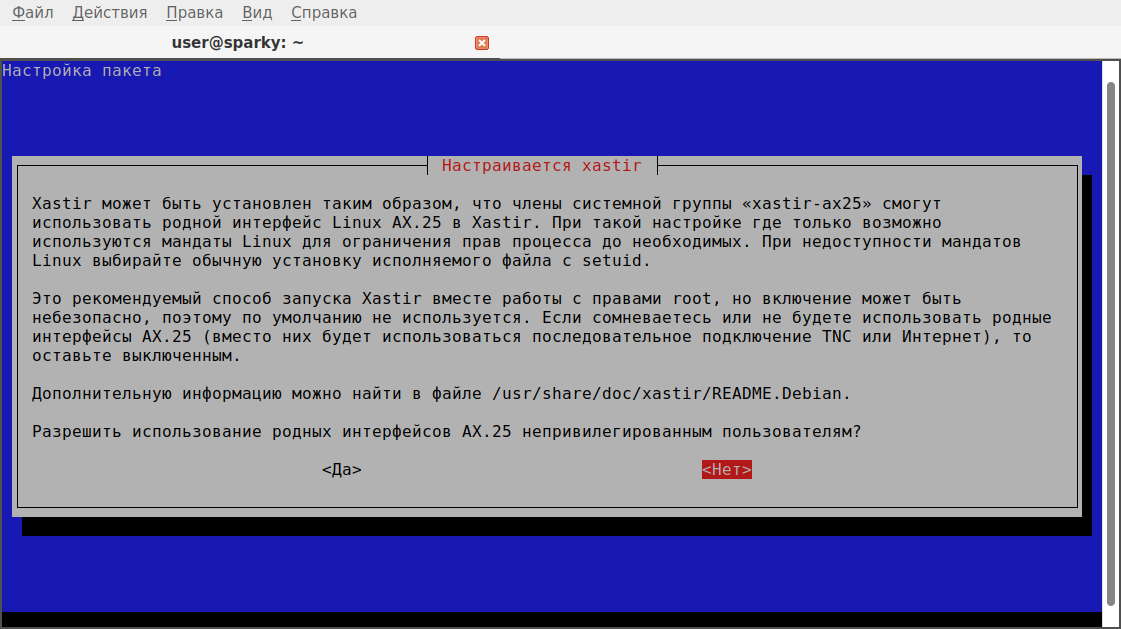
Note: During installation on the clean Debian system, a window arose, with a choice of how to launch the program.

The choice of the AX-25 option
ВыбRal is the first option - "yes" , allow unavailable users to use AX.25. A group of users 'XASTIR-AX25'.

2. Give us the right to launch the program

To start XASTIR, we need rights 4755 - where 4 means the transfer of ROOT rights to the program when it should be.

Ot named after root (sudo) you need to execute commands:

su -
chmod 4755 /usr/bin/xastir
usermod -a -G dialout user

(where "user" - replace in the name of the account under which you usually work (for example, vladimir))

usermod -a -G xastir-a25 user

(where "user" is replaced in the name of a specific user, under the account of which you work (for example, vladimir)) .

logout

3. Launch the program and perform preliminary setting

xastir

The XASTIR program should normally start without Root rights. If the launch with the rights of an ordinary user did not occur - see paragraph 2.

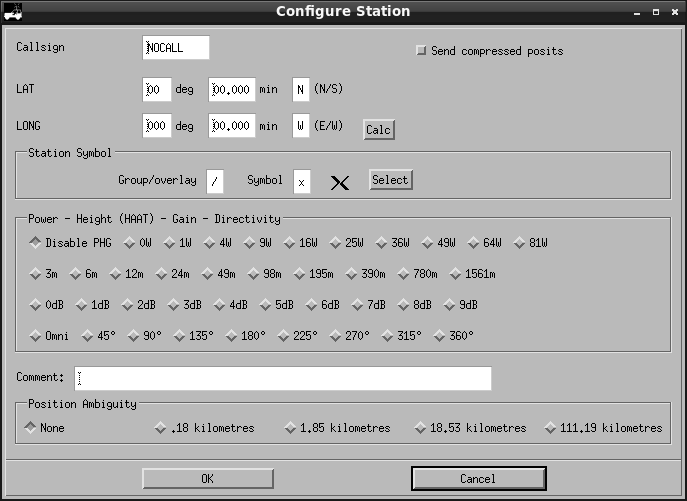
Okno

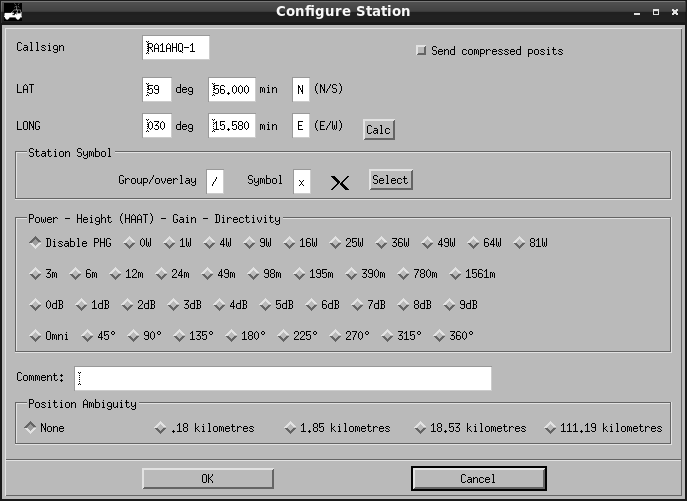
In the configuration window, we indicate our call sign with the prefix Minus one: “ -1 ” ( ssid -1 means the main QTH or “home” station) and the station coordinates -latitude and long -term, power and reinforcement of the antenna.
In the Long Long Long Field, instead of W, the letter E is to enter the eastern hemisphere.

To find out the coordinates of your home, you can use the Qth locator map TK5EP:

    1. We go to TK5EP: And we find our QTH on the map.
    1. In the second window of the browser we open the site page Traveleu.ru, enter the numbers into the fields of the form,
  1. The coordinates obtained using the TK5EP service in the form of 59 ° 56 '26.44 "30 ° 15' 09.45" transfer to Traveleu to another type by pressing the "Convert" button.
  2. The result is coordinates in the form of 59 ° 56.441 '30 ° 15.158' entered from the keyboard to the XASTIR program window.
  3. Do not forget to change the sign of the eastern hemisphere - E

There is a simplified way - to indicate approximate coordinates in XASTIR with an accuracy of degrees, for example, 60 N 30 E, and move the station to the right place using the mouse - see the next item "4. Setting up of the terrain".

It should turn out approximately like this:
Okno2
Click OK

4. Settings of the map of the area

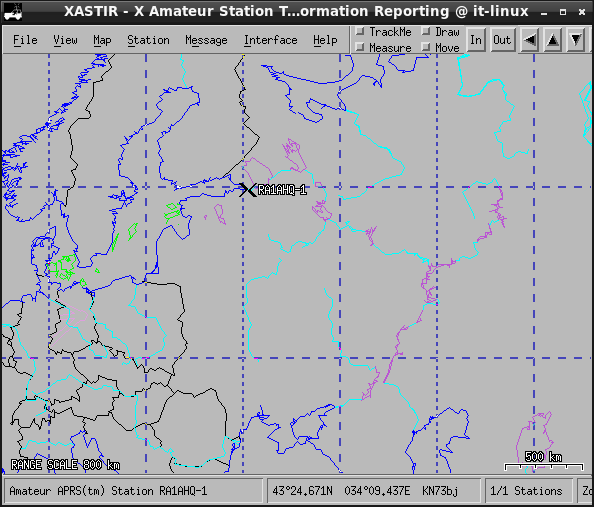
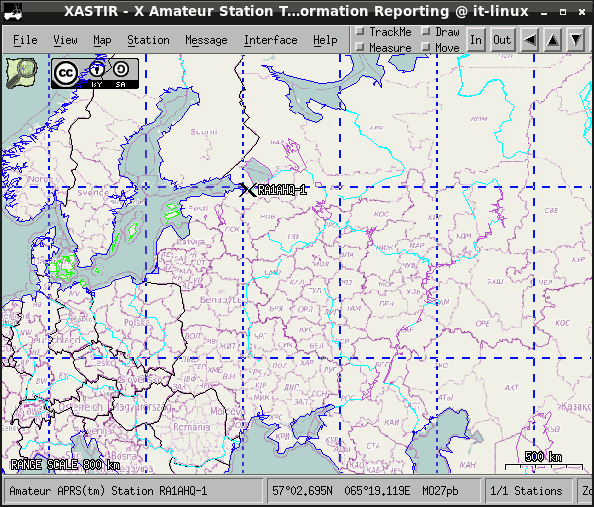
We highlight the rectangle with the mouse with the map of the map, where the call sign is marked (where we are). This fragment will be scaled in full screen.
Karta . If necessary, buttons in and out in the upper part of the window, set the desired scale of the card.

In the menu "Map" - "Map Chooser" you can change the type of card from a simplified vector to a more beautiful, topographic openstreetmap: indicate osm_tled_fosm.geo and press OK.
A new map will be downloaded via the Internet.
Karta2

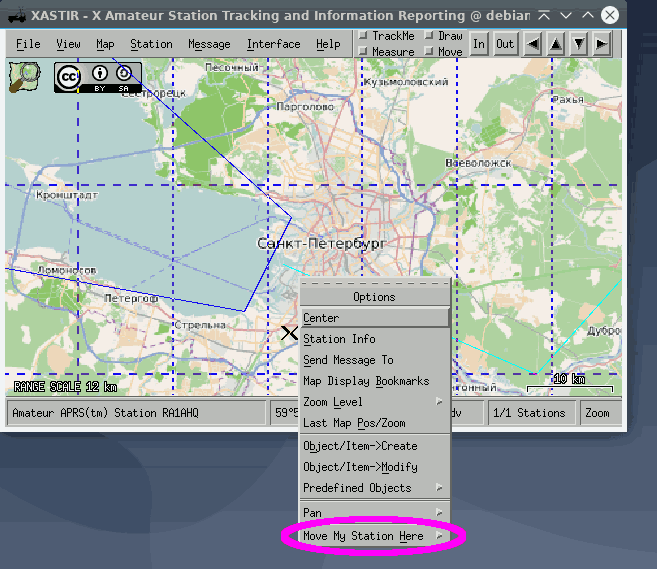
If you need to move the station icon to another point - make an increase in scale using in/out buttons and buttons with arrows (to the right - left, up - down), set the cursor at the right point and press the right mouse button. Select the context menu item "Move My Station Here" - "Move My Station Here" .
Moving the station mark

6. Determining the name of the COM port to control the transceiver

  • DOSCOPTENE CABL YAESU CT-62 (or RPC-Y857)-a cable that provides a transceiver through the port of the COM port) from the port of the USB port
  • launch dmesg Remember the last lines.
  • DOOKE CABL YAESU CT-62 (or RPC-Y857)-a cable that provides a transceiver through the port of the COM port) to the port of the USB computer.
  • launch dmesg We look at the last lines - there should be a mention
    /DEV/TtyUSB0 or /DEV/TTYUSB1 . Copy this value (Ctrl+C).

    5. SoundModem settings

To configure the modem, you need to start the SoundModemConfig program from the shell of the Su super -player:

su
soundmdemconfig

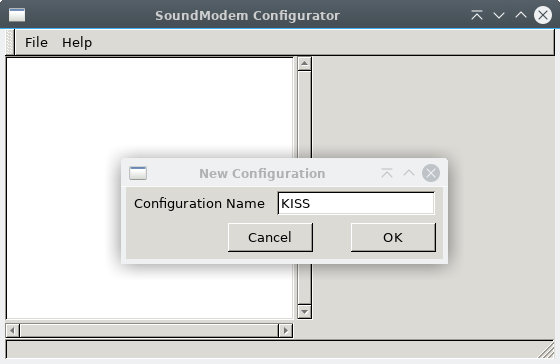
We create a new configuration file - New - Configuration

We indicate the name of the configuration - kiss and click ok .
Config Kiss

We perform a double click on the created configuration.
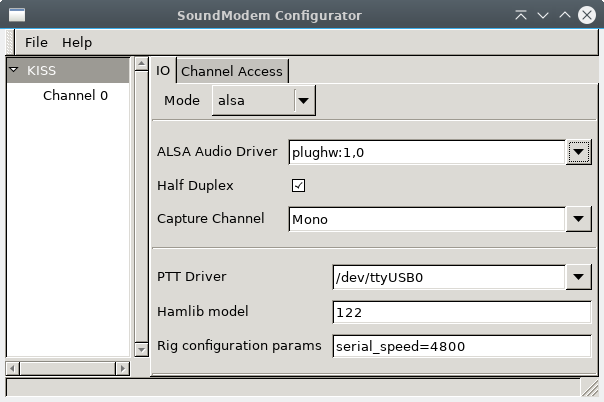
On the first tab, indicate the operating mode alsa .

Before the next setting in the terminal, we find out the name of the sound card:

aplay -l

From the conclusion of the team you can guess that the system has two sound cards 0 - built -in and 1 - external.
The first of which is indicated by 0.0, and the second 1.0.

In the " Audio Driver " alsa " plughw: 1.0 ", if it is an external (USB) sound card or " hW: 0.0 **" for the built -in.
Alsa

You need to install a checkmark in the Half duplex field - turn on.

In the field " ptt driver " insert ctrl+v port name /dev/ttyusb0

In the field " Hamlib Model " we indicate the number. For the Yaesu FT-857, this number 1022 is a new, current identifier of the FT-857 Hamlib Library (the old number 122 is not suitable). The full list of models is available on the page
Supported-Radios.

In the field " Rig Configuration Params " I entered " serial_Speed = 38400 " - corresponds to the speed of the sequential port of the transceiver in the menu 019: 38400BPS .

Note: CAT management can work at any speed that you indicate - 4800, 9600 or 38400 BPS. The main requirement is the coincidence of the speed of transmitting commands of the radio station and the consistent interface of the computer of the computer. Then, you need to set speed in the transceiver menu as in the program so that they are equal.


We create a channel: the menu item "File" - "New" - "New Channel"
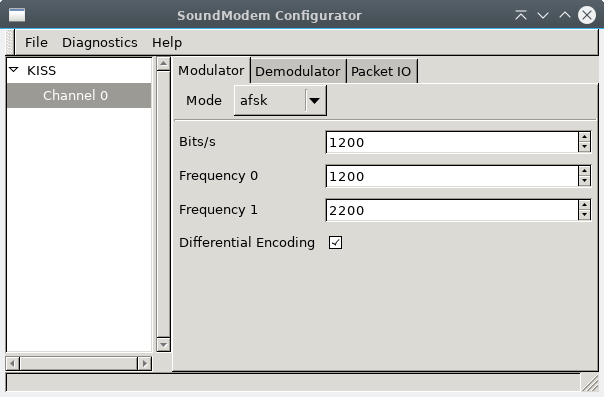
Select the new channel "Channel 0", the type of modulation indicate the AFSK, speed 1200, frequency 0 - 1200 Hz, 1 - 2200 Hz.

Mode - AFSK
Bits/s - 1200
Frequency 0 - 1200
Frequency 1 - 2200
*Differential Encoding - Face set (enabled)
AFSK modulator

On the tab " demodulator " we indicate the same as on the laying " modulator ".
AFSK Demodulator

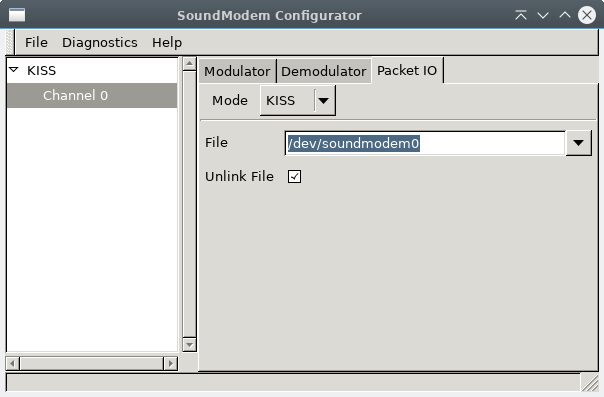
On the tab " Packet I/O " Specify the type - kiss
We set the file name:
/DEV/SoundModem0
AFSK modem
A checkmark against the item " unlink File " should be installed.

You can not put checks against "Init Kiss on Startup" and "Full Duplex" - remove the checkmarks.


Perform sound diagnosis.

  1. We connect the cable from the DATA radio station to the sound board, the CT-62 control cable to the CAT connector.
  2. Choosing Channel0 in SoundModemodemoconfig
  3. We turn on the receiver in PKT (FM) mode, open the noise supplier (Squelch).
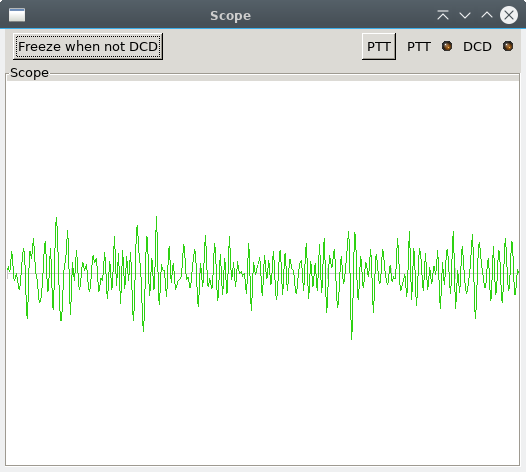
  4. In the menu we perform the "Diagnostics" - "Scope"
    If the modem is configured correctly, there will be no errors. A spectrum of white noise with a good level will be displayed.
    diagnostics

If an error occurs "Cannot Start Audio I/O" (which often happens with a advanced program that already uses the sound):

  1. Close the browser and other programs working with sound.
  2. Complete SoundModem (Ctrl+C).
  3. Stop the Pulseaudio server under the user account (not Root) using the terminal command "Pulseaudio -k" .

Ultimately, you need to achieve the lack of errors and the correct operation of the signal spectrum: kiss - channel 0 - Display - Scope

After setting up SoundModem, be sure to save its settings: File - quit.

If errors occur during testing, check the correctness of filling the field with the name Plughw: 1.0 sound card, as well as use the recommendation about the restart of Pulseaudio -k.

If the input signal level is weak, check the connection of the wires (to the external or internal sound card) and the corresponding name of the sound card.


In the terminal, launch SoundModem from under the account of the administrator of the SU - so more reliable:

su -
soundmodem

Diagnostic messages should not contain errors:

read_block(): RX 1 bytes

0000 f0

ft857: ack received (-16)

rig_force_cache_timeout called

ALSA: Using sample rate 9600, sample format 2, significant bits 16, buffer size 4800, period size 144

ALSA: Using sample rate 9600, sample format 2, significant bits 16, buffer size 4800, period size 144

Correction of configuration errors

If there are errors, we understand the name of the port /dev /ttyusb0 or /dev /ttyusb1, using the Dmesg command, we correct the SoundModemConfig configuration (on behalf of SU).

  1. If the error "SM [1570]: Cannot Start Ptt Output"
  • This error means that the SoundModem program was not able to send the transceiver management commands.
  • Check Cat Rate
  • Check the transceiver model:

    su
    soundmdemconfig

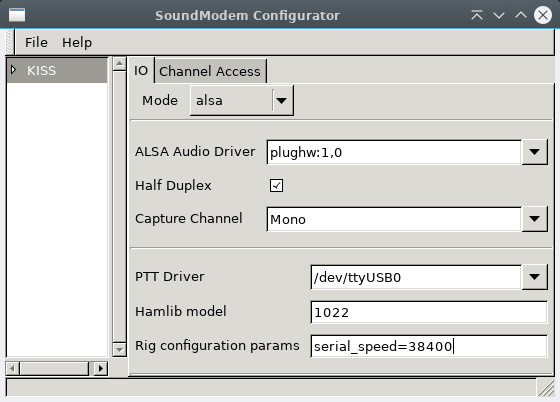
On the Kiss - ISO tab, we change the parameter for TTYUSB0:

serial_speed=38400

See drawing.

Io

Also, you need to check the model number according to the table Supported Radios

After changing the speed of the COM port, we maintain the configuration of SoundModem: File-Quit.

Launch SoundModem again, only under the user:

sudo soundmodem
  1. If the error "ALSA: Error Opening PCM Device Plughw: 1.0"
  • ОThe wool means that the SoundModem program cannot connect to the Plugww: 1.0 device.
    Нужно закрыть браузер и другие программы, работающие со звуком и выполнить команду:

    pulseaudio -k


Perform XASTIR : "Start" - "amateur radio" - XASTIR

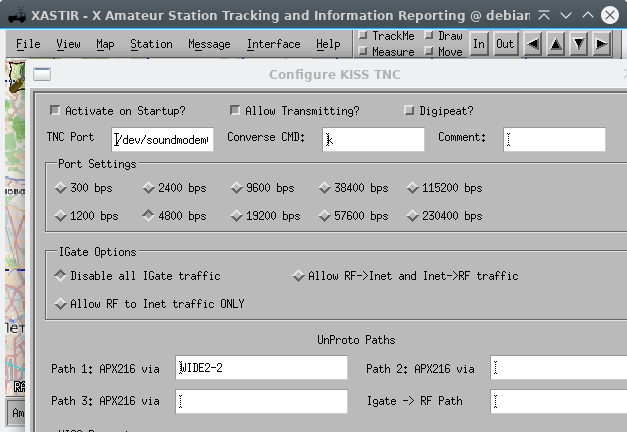
In the Interface menu - Interface Control we set up:

  • Add
    * serial kiss tnc
  • Add
    * TNC Port - /Dev/SoundModem0 *
    4800
    allow transmitting
    Disable All Igate Traffic **
    * wide 2-2
  • Ok

In the "Comment" field you can enter a brief explanation (it is not transmitted on the air). For example, "Local" - for 144.800.

Interface menu

Close the shape of the interface parameters. We select the just created interface in the list of "Interfaces" and click the " Start " button
After that, from the state of the Down, the interface will be converted into the up operating mode.

If the interface has not moved to the UP state, then the transceiver is not included, the SoundModem is not launched or the interface properties are indicated not the name that follows: check the value /DEV /SoundModem0.


The setting of the program is completed!

Settings of a transceiver

Frequency - 144.800, button "LOCK" block its change by the VALKODER.
The buttons on the front panel of the transceiver transferred the mode to " pkt " (which means Packet).
The menu "071 PKT 1200" - the amplification value left the default value of 50 , because At low PKT levels, 1200 = 1-2 on WebsDR shows that the transmission power is lower.

We perform the main team:

Interface - Transmit Now!

The package was transmitted, the digital relay received it and answered (a similar short sound on the air).

I check the success of the APRS transmission on the site https://aprs.fi
.

Improving the quality of reception and transmission

The quality of communication in Packet mode is influenced by the volume or strengthening of the sound card, but not as much as in SSB.

  1. I launched on the computeralsamixer (от имени su -), having selected a sound card (F6) in it, the value of the playback volume set to 20%, the recording level value is 7%, since the sound through the USB card was too loud.
  2. I left alsamixer Using the ESC key.
  3. Saved value in the configuration file alsactl store also on behalf of su -.
  4. Launched SoundModem .
  5. Start - amateur radio - XASTIR.
  6. In "Interface" - Start.
  7. I picked up a portable radio station configured to 144.800.
  8. Completed APRS "Transmit Now" in XASTIR,
  9. I watched my signal in Websdr, in dynamics I heard the response of a digital relay.
  10. As for reception, you can check it in Scope mode of the soundmodemconfig utility under the superuser su.

Or in the "View" - "All Stations" menu, where after taking packages from the air, new stations should occur.

frequency of transmission

The packet transfer period is indicated in the "File" menu - "configure" - "timing" , 30 minutes are set for a stationary object.

Continuation

The second article will tell you about work through ISS 145.825 MHz and other satellites on 145.825 MHz and briefly about APRS on short waves 10.1 and 14.1 MHz.

It is also possible to replace the “SoundModem” modem with a more perfect, sensitive modem “Direwolf”.


Related publications

