
14
February
2023
Installing the DVD authoring application "DVDStyler" on Linux
21:43

Installing the DVD authoring application "DVDStyler" on Linux

14 February 2023 21:43

The article talks about how to install the "DVDStyler" application on Linux to prepare DVD discs for recording in a home video studio.

Introduction

This month, my friends brought DVDs, one wanted to “select and copy a fragment from his birthday for WhatsApp,” another colleague asked to “convert the DVD to MP4.” In order to train not on the disks of friends, but on my own, I decided to burn my own DVD. :) It turned out that there is an excellent cross-platform tool for styling the contents of DVDs - DVDStyler.
DVD authoring is the process of preparing a disc for playback on standard DVD players.
DVD content processing may involve transcoding video and audio files if the original's settings are different from those allowed (for example, the bit rate is too high for the DVD drive to handle).

DVD Styler allows you to create a thumbnail of the opening menu from various templates, write a title for the menu and DVD chapter titles in your native language.
Chapters are parts of a video film that play one after another without stopping, but can be called up from the menu, at the request of the viewer. Also, a “Play” button has been implemented to start playing the entire disc from the DVD menu on the TV or computer screen.
After completing the formation of the material, the DVD disc can be burned (“burned”) onto a DVD-R or DVD+R disc in the same application.

DVDStyler home page -https://www.dvdstyler.org/ru/, download page -SourceForge - DVDStyler.

For Windows, the program is supplied as a ready-made EXE file for installation, and for Linux it can be installed from a PPA repository.

Method 1: Install from a PPA repository

First of all, this method is suitable for Ubuntu, Linux Mint, runtu Lite, etc. Ubuntu based systems,
not designed for Debian. Secondly, it is important to understand what the version letter is, because The program in the repository is not available for all operating systems. You can find out the name of the distribution with the command:

lsb_release -a

The correspondence between Linux Mint versions and the Ubuntu codebase used can be found in Wikipedia article

The most common versions of Linux Mint OS Ubuntu Codename
21.1 "Vera", 21 "Vanessa" 22.04 LTS Jammy Jellyfish
20.3 "Una", 20.2 "Uma", 20.1 "Ulyssa", 20 "Ulyana" 20.04 LTS Focal Fossa
Linux Mint 18.3 "Sylvia", 18.2 "Sonya", 18.1 "Serena", 18 "Sarah" 16.04 LTS Xenial Xerus

Domestic OS RUNTU Lite - based on 20.04 "focal".

Repository dVDStyler contains directories for versions:

  • 21 "jammy"
  • 20 "focal"
  • 19 "bionic"
  • 18 "xenial"
    and others

The DVDStyler repository has files for all Ubuntu releases.

Installing DVDStyler on Ubuntu 20.04 "focal" and earlier

sudo add-apt-repository -y ppa:ubuntuhandbook1/dvdstyler
sudo apt-get update &&  sudo apt-get install -y dvdstyler

Installing DVDStyler on Ubuntu 22.04 LTS and Linux Mint 21.1 "Vera" and later

sudo add-apt-repository -y ppa:ubuntuhandbook1/dvdstyler

In Linix Mint 22.1 there is an error that prevents the following command from being executed: "sudo apt-get update && sudo apt-get install dvdstyler"

"gpg: Failed to get keys from server: Invalid URI"

Solution No. 1

"Start" - "System" - "Application sources"- enter root password

*"PPA repositories"*- "ubuntuhandbook1/dvsstyler" - uncheck and tick
OK**

The package update will begin and fail.
From the text of the error you need to copy from the text NO_PUBKEY 4C1CBE14852541CB copy the value - the key fingerprint. Now I import the key with fingerprint 4C1CBE14852541CB:

sudo apt-key adv --keyserver hkp://keyserver.ubuntu.com:80 --recv-keys 4C1CBE14852541CB

Solution No. 2

wget -O DVDStyler.gpg https://ppa.launchpadcontent.net/ubuntuhandbook1/dvdstyler/ubuntu/dists/jammy/Release.gpg
sudo apt-key add DVDStyler.gpg

Adding a GPG key for a PPA manually: It is not recommended to use the "apt-key" command:
The reason is that the apt-key add command will soon be excluded from the OS, and sudo apt-key add is also prohibited.

After which, I added the key to the “keychain” with a new command

cat DVDStyler.gpg | sudo gpg --dearmor -o /usr/share/keyrings/dvdstyler-keyring.gpg

sudo chmod a+r /usr/share/keyrings/dvdstyler-keyring.gpg

Continue installation in solutions 1 and 2

In file /etc/apt/sources.list.d/ubuntuhandbook1-dvdstyler-jammy.list удаляем текст [arch=amd64 signed-by=/etc/apt/keyrings/ubuntuhandbook1-dvdstyler-jammy.gpg]

Thus, the file "ubuntuhandbook1-dvdstyler-jammy.list" takes the following form:

deb https://ppa.launchpadcontent.net/ubuntuhandbook1/dvdstyler/ubuntu jammy main

deb-src https://ppa.launchpadcontent.net/ubuntuhandbook1/dvdstyler/ubuntu jammy main

In "Application Sources" check that the "ubuntuhandbook1/dvsstyler" repository is enabled:
sources

Now the error does not appear and the program is installed with the apt-get install command:

sudo apt-get update
sudo apt-get install dvdstyler

Чтение списков пакетов… Готово
Построение дерева зависимостей… Готово
Чтение информации о состоянии… Готово
Будут установлены следующие дополнительные пакеты:
  dvdauthor dvdisaster dvdisaster-doc dvdstyler-data libdirectfb-1.7-7 liblavfile-2.1-0 liblavjpeg-2.1-0 liblavplay-2.1-0
  libquicktime2 libva-glx2 libvcdinfo0 libwxgtk-media3.0-gtk3-0v5 libwxsvg3 libxine2 libxine2-bin libxine2-ffmpeg
  libxine2-misc-plugins libxine2-plugins libxine2-x mjpegtools mjpegtools-gtk xine-ui
Предлагаемые пакеты:
  libdirectfb-extra libxine2-doc
Следующие НОВЫЕ пакеты будут установлены:
  dvdauthor dvdisaster dvdisaster-doc dvdstyler dvdstyler-data libdirectfb-1.7-7 liblavfile-2.1-0 liblavjpeg-2.1-0 liblavplay-2.1-0
  libquicktime2 libva-glx2 libvcdinfo0 libwxgtk-media3.0-gtk3-0v5 libwxsvg3 libxine2 libxine2-bin libxine2-ffmpeg
  libxine2-misc-plugins libxine2-plugins libxine2-x mjpegtools mjpegtools-gtk xine-ui
Обновлено 0 пакетов, установлено 23 новых пакетов, для удаления отмечено 0 пакетов, и 1 пакетов не обновлено.
Необходимо скачать 19,1 MB архивов.
После данной операции объём занятого дискового пространства возрастёт на 40,2 MB.
Хотите продолжить? [Д/н]

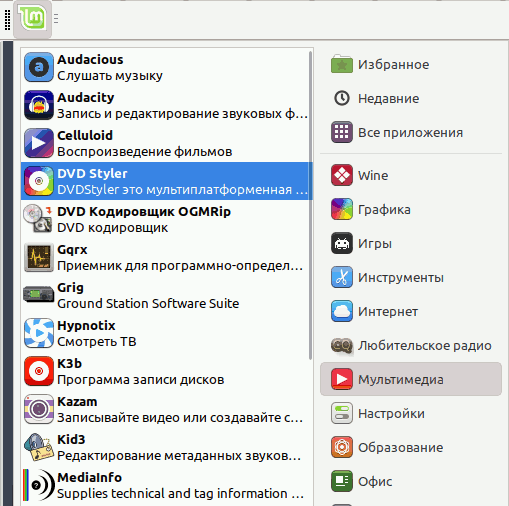
Launch DVDStyler - in the menu "Start" - "Audio and Video" (or "Multimedia") - "DVD Styler":

menu

The main window of the DVDStyler program in the Linux version is practically no different from the Windows version:
dvdstyler-main

Method 2. Compiling with DVDStyler assembly from source codes

Archive with source texts "DVDStyler-3.2.1.tar.bz2" I uploaded DVDStyler project pages on SourceForge and unpacked it into the ~/DVDStyler-3.2.1 folder.

Previously, I learned how to compile programs - see article Console cloud player Tyzonia.

In general, the compilation order is as follows:

./configure
make
sudo make install

The README file in the DVDStyler-3.2.1.tar.bz2 archive does not say anything about the assembly; I will use the standard sequence of commands given above.

cd DVDStyler-3.2.1

Main stage:

./configure

Error:
checking for wx-config... no
configure: error:
        Please check that wx-config is in path, the directory
        where wxWidgets libraries are installed (returned by
        'wx-config --libs' command) is in LD_LIBRARY_PATH or
        equivalent variable and wxWidgets is version 3.0 or above.

Thus, a problem arose with the dependence on the wxWidgets library and the method of building from source codes turned out to be more difficult than expected. A search for wxWidgets directed me to the site https://www.wxwidgets.org/, i.e. You must first build and install the wxwidgets LIB file, and then DVDStyler.

There are pre-built binaries for Debian 11 "bullseye" and Ubuntu 20.04 "focal" and Ubuntu 22.04 "jammy", at:
*https://docs.codelite.org/wxWidgets/repo320/#ubuntu-and-debian

The following method of installing wxwidgets is tested in ubuntu 20.04 "focal":

sudo apt-key adv --keyserver hkp://keyserver.ubuntu.com:80 --recv-keys 6856E1DB1AC82609

sudo apt-remove-repository -r 'deb https://repos.codelite.org/wx3.2.0/ubuntu/jammy universe'

sudo apt-add-repository 'deb https://repos.codelite.org/wx3.2.0/ubuntu/focal universe'

We do not pay attention to the Notice message
"N: Skipping getting configured file " universe/binary-i386/Packages " because repository " https://repos.codelite.org/wx3.2.0/ubuntu focal InRelease " does not support architecture " i386 ""

Then I install the wxwidgets library:

sudo apt-get install libwxbase3.2-0-unofficial libwxbase3.2unofficial-dev libwxgtk3.2-0-unofficial libwxgtk3.2unofficial-dev wx3.2-headers wx-common libwxgtk-media3.2-0-unofficial libwxgtk-media3.2unofficial-dev libwxgtk-webview3.2-0-unofficial libwxgtk-webview3.2unofficial-dev libwxgtk-webview3.2-0-unofficial-dbg libwxbase3.2-0-unofficial-dbg libwxgtk3.2-0-unofficial-dbg libwxgtk-media3.2-0-unofficial-dbg wx3.2-i18n wx3.2-examples

After that, I ran ./configure from the DVDStyler source folder.

Error:
lex (flex).
Please check that flex is in path.

sudo apt-get install flex

This solved the problem, but new requirements arose:

No package 'libavformat' found
No package 'libavcodec' found
No package 'libavutil' found
No package 'libswscale' found
No package 'libavfilter' found

I couldn't find these packages, so I stopped building from source.


Source:
*https://ubuntuhandbook.org/..../install-dvdstyler-ubuntu-20-04-lts/


Related publications

