31
December
2024
Installing Chirp Next on an antiX bootable USB flash drive
23:01

Installing Chirp Next on an antiX bootable USB flash drive

31 December 2024 23:01

Chirp Next is a well-known PC application for programming channels in the radio's memory.

Installation procedure on Debian on which the OS is based antiX, corresponds to the instructions on the website "Chirp: www.chirpmyradio.com":

*https://chirpmyradio.com/projects/chirp/wiki/ChirpOnLinux

1) First of all, you need to run antiX from a bootable flash drive in one of the modes Persistence- for example, Persist root.

2) You need to update the package cache

sudo apt update

2) Installed dependencies

sudo apt install python3-wxgtk4.0 pipx -y

3) Downloaded the latest Chirp as a WHL package for installation in pipx (you need to select the latest version, enter the subdirectory and save the *.whl file).

4) Installed the chirp next package using the command "pipx install file_name.whl":

pipx install --system-site-packages ./chirp-20241227-py3-none-any.whl

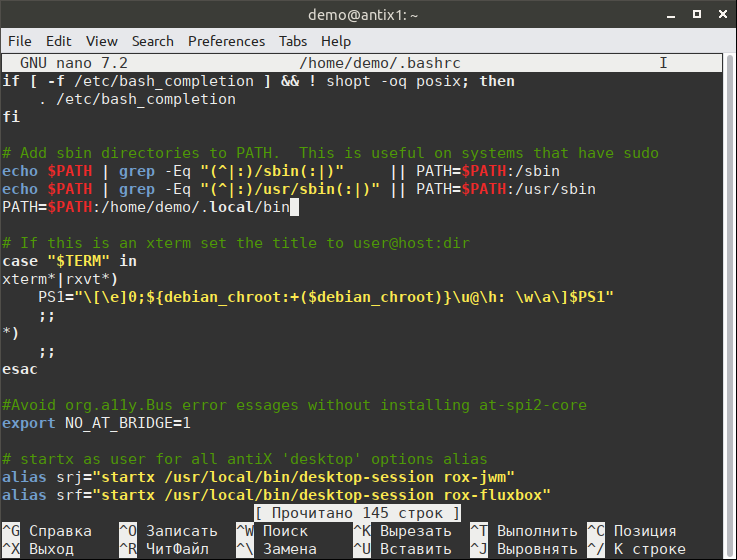
5) To be able to run chirp from the command line, you need to add the path to the executable file to the .bashrc profile launch command file:

nano ~/.bashrc

we find the terms where the PATH variable is and after them we add

PATH=$PATH:/home/demo/.local/bin

edit_bashrc

Save Ctrl+O , Ctrl+X

6) Launch the Chirp program:

chirp

Before programming the station, turn it off, then connect the USB connector of the programming cable to the PC and to the radio station (insert tightly), turn on the radio station, tune both receivers to an empty frequency, for example 139000, and turn up the volume to maximum.

7) then to the menu "Station - Load from station" select:

  • Port: USB-Serial Controller D (ttyUSB0)
  • Manufacturer: (select radio manufacturer)
  • Model: (select model)

In my case the Manufacturer/Model is Baofeng/UV-5R.

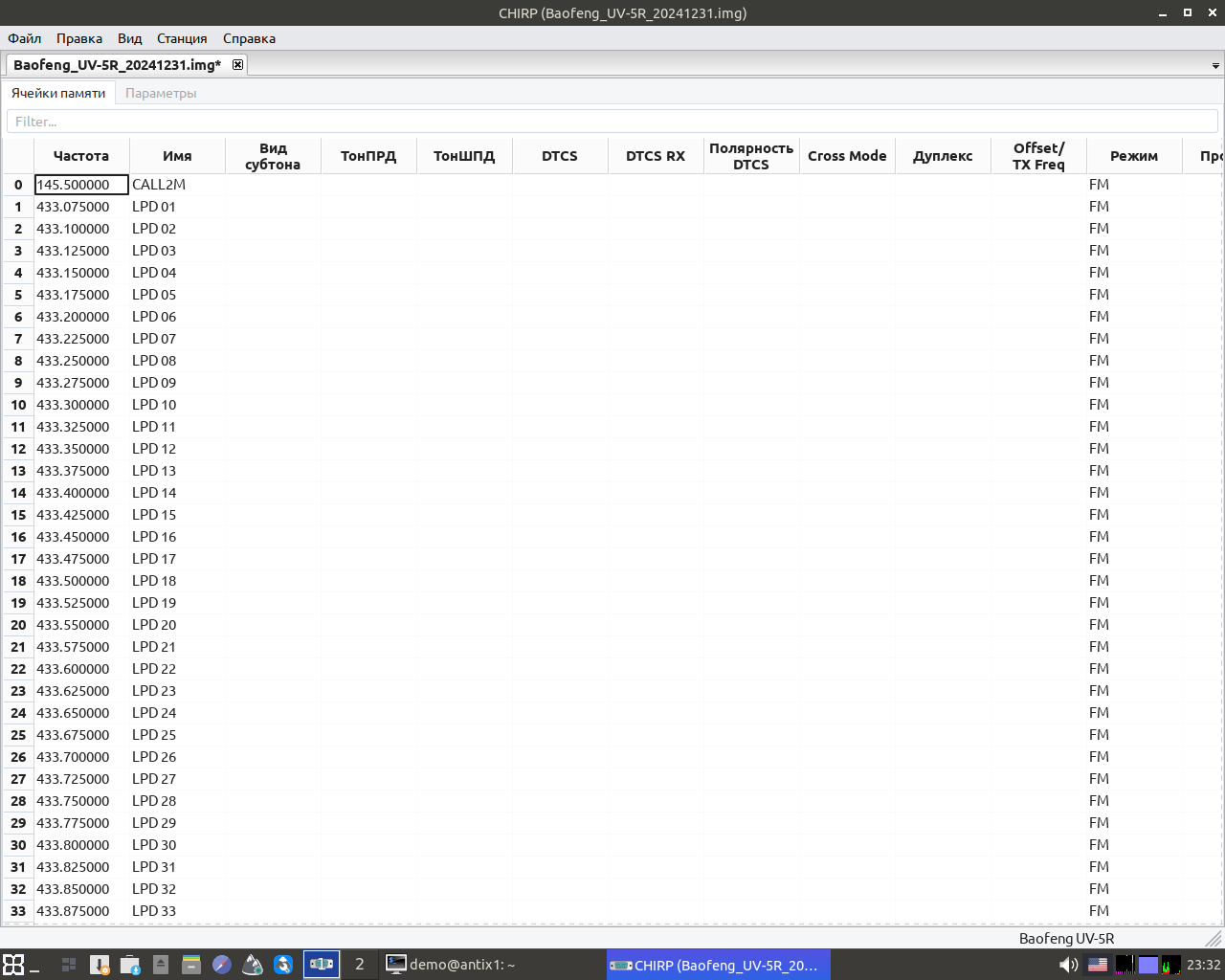
8) After pressing OK, reading the station memory will begin, and the channel grid will be displayed on the screen.

setka

Edit channels or paste from the clipboard from a CSV file opened in LibreOffice Calc.

Standard channel grids are available in the menu "File" - "Open preset configuration". They can be used to create your own channel grid - also copied and pasted via the clipboard.

My channel options for UV-5R, LPD/PMR, repeaters are only amateur radio frequencies.
*my-baofeng-uv5r.zip

9) After recording to the station (I won’t tell you how), I closed chirp and logged out of it. Turned off the transceiver.

10) In the antix menu, perform “persist-save”, or in the menu item Start - Applications - antiX - Record save changes. What is needed to write an installed application to a flash drive. The “Save root folder” operation took about 10 minutes, because... USB Flash writing is slower than reading.

The total size of rootfs changes, which is obtained after installing chirp next, is 209...220 MB. Therefore, the size of the persistence partition must be chosen between 250 and 500 MB.

I checked that when using the option F4-toram(loading the OS into RAM), you can use the same USB port to first start the operating system and then connect the radio programming cable.

After programming, changes to the persistence file can be made when logging out if the IMG and CSV files have not been changed. When completing work: the question “Proceed?” - the answer is “No”.

Addition from 01/02/2025:

  • You can reduce the size of rootfs and transfer the program to linuxfs using the "remastering" procedure (reassembling the bootable flash drive).
  • At the same time, you can include the user’s “/home” folder in the new image of the antiX boot disk. Then, before creating a new image of the operating system (“remastering”), you need to customize the appearance of the user’s “Desktop”.
  • I carry out the “remastering” operation after a major update of the operating system. Before installing operating system updates, it is advisable to increase the rootfs partition to 2-3 GB. After running the remaster, the used rootfs size was reduced to 0 MB (this means that the changes were transferred to linuxfs). Later, the physical size of the rootfs file can be reduced from 2-3 GB to hundreds of MB in the Configure Persistence utility.
  • Running a remaster to create new rootfs and linuxfs results in a prompt to create new Debian OS passwords for administrator root and user demo. You can make passwords simple - root/root, demo/demo, or complex.
  • Rebuilding ("remastering") the operating system image also reduces antiX's RAM requirements to approximately 300 MB and significantly reduces the time it takes to boot the operating system from a USB drive.


Related publications

