
3
June
2026
Working with Flatpak or APT through a proxy server
18:49

Working with Flatpak or APT through a proxy server

3 June 2026 18:49

The article discusses the possibility of running Flatpak and APT through a proxy server.

Introduction

In the last month I've been having problems with Flatpak:

1) website Flathub.org began to slow down at the TLS handshake stage, worked very slowly and the download often froze with an error.
2) it was not possible to update the application from the dl.flathub.org website from the command line using the "flatpak install" command.
3) when reinstalling Flatpak, the installation of the Flathub app store repository did not work (the "flatpak remote-add" command froze).

Flathub is a store of Linux applications in Flatpak format, published by developers. Some applications that are not included in the main Linux distribution can only be installed from Flatpak or Snap.

Reason Flatpak's first problem I found an incorrectly working extension for Mozilla FireFox called "Block-site" I deleted it. After which the web browser slowdown stopped.

Second problem with Flatpak- at startup "flatpak install" the team ended with a timeout. There was a connection failure to dl.flathub.org. I don't know the reason for this error.

The third problem with Flatpak- it is impossible to reinstall the Flathub repository when reinstalling Flatpak, because the following command was hanging:
"flatpak remote-add --if-not-exists flathub https://flathub.org/repo/flathub.flatpakrepo"

F: Loading https://flathub.org/repo/flathub.flatpakrepo using libsoup
F: Should retry request (remaining: 5 retries), due to transient error:
Socket I/O timed out

I. Solving Flatpak problems - enabling a proxy server

How to use Flatpak through a proxy server

1) Find on the Internet a working proxy server like "http"(for example,here) and check it for website checker.net or mobileproxy.space. The address format for verification is: http://123.45.67.89:8080.

2) Environment variable that is used by flatpak to specify the proxy server:

http\_proxy- specify the proxy and port.

2.1)For temporary (for a given session) use of a proxy server: on the command line, run the command:

export http_proxy=server:port

where instead of "server" - specify the IP address of the http proxy server,
instead of "port" - specify the proxy server port.


2.2)For permanent use of a proxy server:
Edit the file /etc/environment(for all users) or ~/.profile (for current user only):

sudo nano /etc/environment

or

nano ~/.profile

or create a .sh script in the directory /etc/profile.d/ to set the environment variable.

Add the line to the end of the file

export http_proxy=http://server:port

where instead of "server" - specify the IP address of the http proxy server,
instead of "port" - specify the proxy server port.

3) Run the installation of the Flatpak application. To see diagnostic messages on the screen during the installation process, you can add the "-v" switch - from the word "verbose" - verbose.

For example:

flatpak -v install de.haeckerfelix.Shortwave.flatpakref 

Where is de.haeckerfelix.Shortwave.flatpakref - previously downloaded from the site https://flathub.org installation file .flatpakref.

Also, you can install the application without the .flatpakref file, using the full system name (ID) of the Flatpak application. For example:

flatpak -v install de.haeckerfelix.Shortwave

Now, when using a proxy server (a valid proxy server is specified in the http_proxy environment variable), the program was installed with the "flatpak install" command without problems.

Solving the problem with the slow operation of the FlatHub app store - working through a proxy server

This method involves using the Flathub store from the command line (Terminal):

1) Flatpak must be installed.

How to install or update Flatpak

sudo add-apt-repository ppa:flatpak/stable
sudo apt update
sudo apt install flatpak

2) To enable the proxy server, as written above, you need to add the "http_proxy" environment variable.
On the command line, run the command

export http_proxy="http://server:port"

where instead of "server" - specify the IP address of the http proxy server,
instead of "port" - specify the proxy server port.

Or solve the issue in the way indicated in clause 2.2.

3)Adding the Flathub repository to Flatpak if it hasn't been added before:

flatpak -v remote-add --if-not-exists flathub https://flathub.org/repo/flathub.flatpakrepo

Result:

flatpak -v remote-add --if-not-exists flathub https://flathub.org/repo/flathub.flatpakrepo
F: Opening system flatpak installation at path /var/lib/flatpak
F: Loading https://flathub.org/repo/flathub.flatpakrepo using curl
F: Received 4040 bytes

4) Search for an application in Flathub from the command line

Before running the following command, maximize the Terminal window to full screen.

flatpak search application

where instead of application we write the package we are interested in, for example, using the keyword “notes”.

flatpak search notes

or

flatpak search shortwave

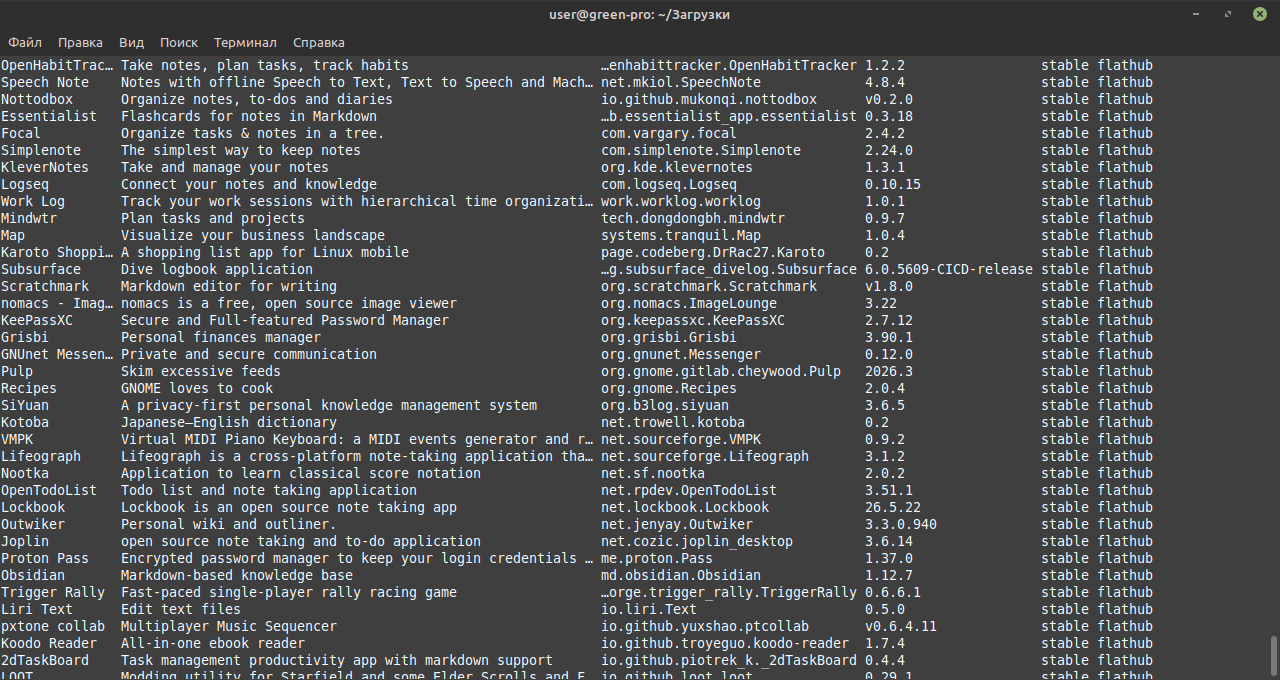
The search result will also be in text form:
notes

Application ID listed in third column. For example, "com.vargary.focal" or "de.haeckerfelix.Shortwave".

5) Install the application of interest by its ID.

flatpak install flathub app_id

where app_id is the Flatpak app ID in the Flathub app store.

For example:

flatpak install flathub com.vargary.focal

or

flatpak install de.haeckerfelix.Shortwave

Result:

flatpak install flathub com.vargary.focal
Finding matches...

com.vargary.focal permissions:
    ipc    network    fallback-x11    wayland    x11    dri    tags [1]

    [1] proprietary

        ID                          Ветвь            Оп           Удалённый репозиторий           Загрузка
 1.[✓] com.vargary.focal stable i flathub 16.0 MB / 18.0 MB

Installation is complete.

We installed the Flatpak app using a proxy!

6) Launch the Flatpak application:

flatpak run app_id

where app_id is the unique ID of the Flathub application. For example, com.vargary.focal.

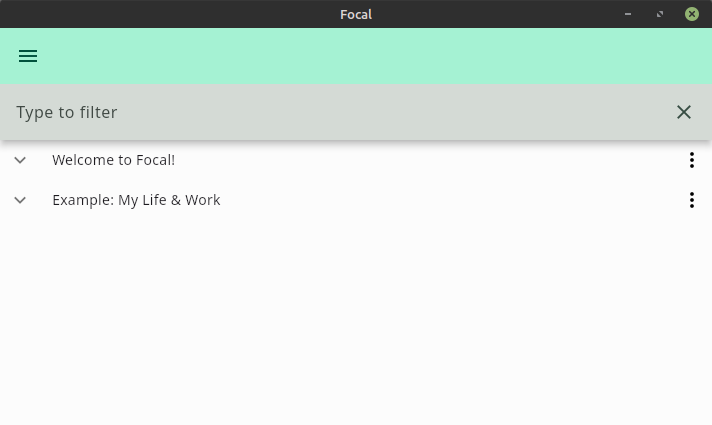
Result:
focal

7) Disabling the proxy server.

After finishing working with flatpak, you can disable the proxy server on the system with the command:

export http_proxy="" 

How can I explicitly specify the proxy server when calling the "flatpak run" command?

Answer: you need to use a key --env. " (From the " flatpak " command help: Set an environment variable in the application. It overrides the Context section of the application metadata. This parameter can be used multiple times.)"

flatpak run --env=http_proxy=http://server:port app_id

where instead of "server" - specify the IP address of the http proxy server,
instead of "port" - specify the proxy server port,
app_id - Flatpak application identifier.

II. Solving the APT problem - enabling a proxy server

Linux command line utilities apt-get и apt they can also work through a proxy server.
But the proxy server is specified in one of the following ways:

  • edit the file /etc/apt/apt.conf.d/01proxy or
  • edit the file /etc/apt/apt.conf.

    sudo nano /etc/apt/apt.conf

Add the lines to it:

Acquire::http::Proxy "http://proxy.example.com:8080";
Acquire::https::Proxy "http://proxy.example.com:8080";

where instead of "server" - specify the IP address of the proxy server,
instead of "port" - specify the proxy port.

Using a proxy using username and password

For any of the above options, use an extended entry that includes proxy login information if a username and password are required.

"http://username:password@server:port";

where username is the user name, password is the password,
instead of "server" - specify the IP address of the proxy server,
instead of "port" - specify the proxy server port.

The most famous lists of proxy servers (according to Habr.com)

The list of services that http proxy servers provide is given in the article on Habr.com:
*I made a target list of 4 free browser proxies so you don't have to

(Note: “Tierlist” is an unclear word, apparently the author meant “tier list”, which means a list of levels - a ranking system for anything in levels).

Of these, I only have one site that opens, which distributes proxy servers for free:
*Webshare- requires registration via GMail mail, gives 10 free proxy entries, protected by username and password.

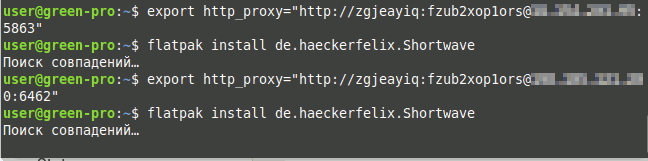
Despite the fact that Webshare's http proxies pass verification, I was unable to launch the resulting proxy servers with Flatpak.
Proxy server is not working

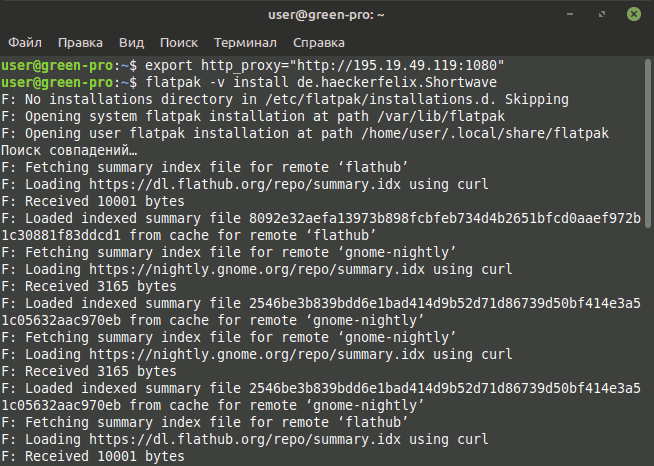
Via Russian proxy server, Flatpak works.
Russian proxy server is working

Unfortunately, finding a working proxy server is difficult.


Sources:
https://flathub.org/setup/
[Linux Mint: SOLVED
Flatpak Command Reference
Ubuntu: Configure proxy for APT?
*Mastering Linux APT Proxy: A Comprehensive Guide


Related publications