
29
December
2023
Getting 'Proposed updates' in Linux
16:07

Getting 'Proposed updates' in Linux

29 December 2023 16:07

Repositories "proposed" существуют в Ubuntu Linux и Debian. What are they needed for?

The appointment of the repository of the proposed updates (Proposed)

Proposed repositories (proposed or planned updates) are used to obtain updates to the future release to the current stable version of the distribution. There is no need to turn them on. They are rarely necessary, only for the “accelerated” correction issued by the developer for the old supported version of the distribution.

According to the documentation of the repository community, the proposed repository is:

  • area of testing for the updates. This repository is recommended only to those who are interested in helping in testing updates and feedback.

According to the documentation of the reverse port community, the proposed repository is:

  • area of testing for the updates. Several people should leave positive reviews about these packages before they are allowed to updates. This repository is recommended only to those who are interested in helping in testing updates and providing reviews. Since they actually test updates, the probability of defective updates in this repository is higher .

Explanation from the Ubuntu forum:

  • When the Ubuntu version is released and is considered stable, the updates of the stable release simply do not load into the archive. So, let's say, part of the software needs to be updated, after undergoing the process of updating the stable release, they are loaded into the “proposed” pocket .

An example when you need to turn on the "proposed" repository

Situation:

  • Installed the current version of Linux Mint "Victoria" или "GrEen Linux " - 21 based on Ubuntu 22.04 LTS
  • The future version of Ubuntu 23.04 has not yet been released. In version 23.04, a new component, which should be ahead of schedule in 22.04 LTS.
  • The operating system when starting the component "Package Update" writes about the presence of update for the package "Python3-UPDate-manager", who is not in these repositories.

    Detailed description of the problem:
    In Linux Green, an error began to be issued
    sudo apt upgrade
    Reading packet lists ... Ready
    Building a tree of addictions ... ready
    Reading information about the state ... ready
    Calculation of updates ... Ready
    The following packages will be left unchanged:
    python3-update-manager
    Updated 0 packages, 0 new packages were installed, 0 packages were noted for removal, and 1 packages were not updated.

"The proposed" repository is disabled by default at Linux Green.

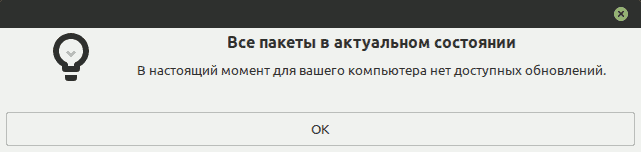
The package is also not installed in the graphical program "Update Manager". See the screenshot before the article title.

Solution

0) find out the code name of your distribution

lsb_release -cs

Correspondence of versions:

Mint Ubuntu No. Ubuntu
S.arah, Serena, Sonya, Sylvia xenial 16.04
Tara, Tessa, Tina, Tricia bionic 18.04
Ulyana, Ulyssa, Uma, Una focal 04.04
Vanessa, Vera, Victoria jammy 04.22

For Linux Mint, "Victoria" - which correspondents Ubuntu "jammy".

1) created a file for the Proposed-Roads of the "proposed" updates:

nano /etc/apt/sources.list.d/ubuntu-proposed.list

To which he added the line:

deb http://en.archive.ubuntu.com/ubuntu jammy-proposed restricted main universe multiverse

In the line I checked the value jammy, что оно соответствует кодовой базе моей версии GrEen Linux.
I saved the file.

2) created a file /etc/apt/preferences.d/proposed-updates

nano /etc/apt/preferences.d/proposed-updates

And the text added to it:

# Configure apt to allow selective installs of packages from proposed
Package: *
Pin: release a=jammy-proposed
Pin-Priority: 400

And saved the file.

File "proposed-updates" с Pin-Priority: 400 includes imports updating only critical updating of packages with a high priority.

3) Updated Kesh APT packets:

apt update

At the same time, you can see. that the new repository is connected, because The terminal is given a message:

Сущ:1 http://en.archive.ubuntu.com/ubuntu jammy-proposed InRelease

4) checked that new packages can be updated (update simulation without installation)

apt list --upgradable
sudo apt upgrade -s

5) you can install packets one by one (instead of sudo apt-get upgrade, which updates everything at the same time):

The first package has updated:

sudo apt-get install --only-upgrade python3-update-manager

The second package too.

sudo apt-get install --only-upgrade mintsources

6) in the graphic application "System" - "Update of packages", there are no more new packages to installation. Python3-update-manager package warning no longer occurs.

Result. All packages are in full condition

Repository of proposed updates in Debian

On a Debian operating system, packages in the "proposed-updates" repository will appear when developers upload the appropriate packages to it. If the main, current distribution is Debian Bookworm, its repository for proposed updates is installed on the system as follows:

1) open the file for editing /etc/apt/sources.list

nano /etc/apt/sources.list

2) Add to it a line that will include proposed-updates - predicted updates:

  • If your system has not free components (with a closed source), add the line to obtain the proposed updates:
deb https://deb.debian.org/debian bookworm-proposed-updates main contrib non-free non-free-firmware
  • If you need components are with the exception of firmware with closed source code, add the line:
 deb http://deb.debian.org/debian bookworm-proposed-updates main contrib non-free
  • If only components with open source code are needed, add the line:
deb https://deb.debian.org/debian bookworm-proposed-updates main contrib

3) execute in Debian:

su -
apt update
apt upgrade

Sources:


Related publications

