7
June
2023
How to link LibreOffice Base with MySQL
15:45

How to link LibreOffice Base with MySQL

7 June 2023 15:45

In this article I talk about how to transfer information from MySQL to Libreoffice Base on Linux.

Preface

LibreOffice is included with many, if not all Linux distributions. Also, it can be installed from the repository and upload as DEB or RPM file.

Introduction

At work, about once a month I checked the source Excel file with the MySQL database. Communication with MySQL was implemented using LibreOffice Base and the ODBC connector.

LibreOffice Base is an analogue of the MS Access program.
The database is registered in the Linux operating system under a unique name, accessible from LibreOffice Calc, Writer and LibreOffice Basic.

Between the MySQL DBMS and LibreOffice Base I used the ODBC connector. Later, I managed to use the connection via JDBC.

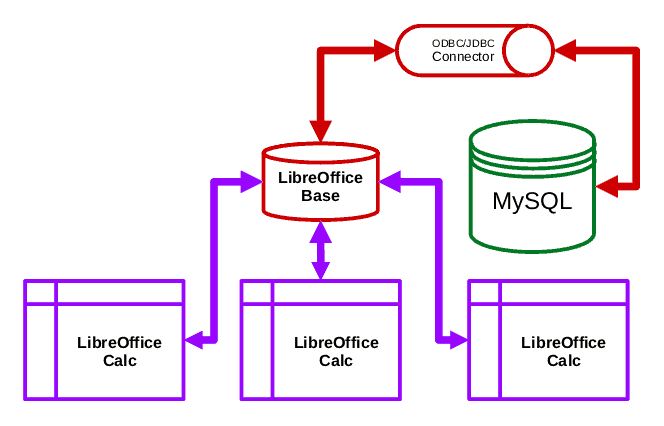
Program connection diagram

shema

DBMS MySql <-> mysql ODBC/JDBC connector <-> LibreOffice Base <-> Libreoffice Calc

0. Installing MySQL and LibreOffice

Installing MySQL was discussed in the previous article about MySQL.
How to install LibreOffice package on Linux - see.wiki article.

1. Database

Databases, as everyone knows, are designed to store information. As a rule, they are a set of interconnected tables (relational database). In simple databases, one of the tables is necessarily the main one (for example, a transaction log or goods in a warehouse) - the rest are just reference books. In my case, I used one main table “offers”, from which I made a selection using queries.

For testing purposes, I'll show with an example rather than a real database. The composition of the fields is simplified for the sake of example.

Table offers

  • ID - integer (unique key field)
  • NAME - name
  • DESCRIPTION - description
  • PRICE - price
  • DISPLAY - sign (0 or -1 - do not show (hidden entry / sold), 1 or 2 - display (on sale / promotion)

CREATE DATABASE primer;

USE primer;

DROP TABLE IF EXISTS offers;
CREATE TABLE offers (
offer_id int(11) NOT NULL AUTO_INCREMENT,
name varchar(256) COLLATE utf8_unicode_ci DEFAULT NULL,
description varchar(4096) COLLATE utf8_unicode_ci DEFAULT NULL,
price int(11) DEFAULT NULL,
display int(11) DEFAULT '1',
PRIMARY KEY (offer_id)
) ENGINE=InnoDB AUTO_INCREMENT=546 DEFAULT CHARSET=utf8 COLLATE=utf8_unicode_ci;

INSERT INTO offers VALUES (1,'AAAA', '', 10000, 1),(2,'BBBB', '', 80, 1),(3,'CCCCC', '', 555, 0),(4,'DD', '', 7, 1);

DB dump file primer for MYSQL:
primer.sql.zip

To create a database, run this script as the database user root:

mysql -u root -p
source primer.sql

2. Ways to connect to MySQL

All programmatic ways to connect to MySQL are listed on the page https://www.mysql.com/products/connector/- there are proprietary drivers ADO.NET, JDBC, ODBC, Python and those developed by the PHP Drivers for MySQL community, etc.

I checked the connection method to MySQL - ODBC or JDBC.
I gave preference to ODBC, because I've been using it for a long time.

But you can install it in any of the following ways:

  • ODBC connector for MySQL - see paragraph 2.1
  • JDBC connector for MySQL - see paragraph 2.2

2.1 Installing the ODBC connector for MySQL

Find out the OS version number:

lsb_release -a

Download the ODBC connector distribution for your version of Ubuntu or Debian.
To do this, go to the following page:
https://dev.mysql.com/downloads/connector/odbc/
Where do we download the ODBC connector distribution for MySQL for our operating system:

If the distribution is Linux Mint, find out the package base.request in a search engine.
For example, for Limux Mint 21.1 - the Ubuntu codebase is 22.04.

That is, for Linux Mint 21.x you need to download Ubuntu Linux 22.04 (x86, 64-bit), DEB Package(mysql-connector-odbc_8.2.0-1ubuntu22.04_amd64.deb) without debug symbols (dbg) 1.9 MB in size. On the next page click "No thanks, just start my download".

Install the downloaded ODBC connector package (DEB file) by double-clicking on the dependencies (3 pcs.).

Run the executable file from the terminal myodbc-installer- it will display help on using the connector from the command line:

myodbc-installer

When calling myodbc-installer without parameters, help for the program will be displayed.

[ERROR] Not enough arguments given
+---                                                                   
 myodbc-installer v8.02.0000                                 
+---                                                                   

 Description                                                          

    This program is for managing MySQL Connector/ODBC configuration   
    options at the command prompt. It can be used to register or      
    unregister an ODBC driver, and to create, edit, or remove DSN.    

    The program has been designed to work across all platforms        
    supported by Connector/ODBC, including MS Windows and             
    various Unix-like systems.                                        

    The program requires that unixODBC version 2.2.14 or newer        
    has already been installed on the system.                         
    UnixODBC can be downloaded from here:                             
    http://www.unixodbc.org/                                          

 Syntax                                                               

    myodbc-installer   [Options]                      

 Object                                                               

     -d driver                                                        
     -s datasource                                                    

 Action                                                               

     -l list                                                          
     -a add (add/update for data source)                              
     -r remove                                                        
     -h display this help page and exit                               

 Options                                                              

     -n                                                         
     -t                                             
        if used for handling data source names the  
        can contain ODBC options for establishing connections to MySQL
        Server. The full list of ODBC options can be obtained from    
        http://dev.mysql.com/doc/connector-odbc/en/                   
     -c0 add as both a user and a system data source                  
     -c1 add as a user data source                                    
     -c2 add as a system data source (default)                        

 Examples                                                             

    List drivers                                                      
    shell> myodbc-installer -d -l                                     

    Register a Unicode driver (UNIX example)                          
    shell> myodbc-installer -d -a -n "MySQL ODBC 8.2 Unicode Driver" \ 
              -t "DRIVER=/path/to/driver/libmyodbc8w.so;SETUP=/path/to/gui/myodbc8S.so"

      Note                                                            
         * The /path/to/driver is /usr/lib for 32-bit systems and     
           some 64-bit systems, and /usr/lib64 for most 64-bit systems

         * driver_name is libmyodbc8a.so for the ANSI version and     
           libmyodbc8w.so for the Unicode version of MySQL ODBC Driver

         * The SETUP parameter is optional; it provides location of   
           the GUI module (libmyodbc8S.so) for DSN setup, which       
           is not supported on Solaris and Mac OSX systems            

    Add a new system data source name for Unicode driver              
    shell> myodbc-installer -s -a -c2 -n "test" \                  
              -t "DRIVER=MySQL ODBC 8.2 Unicode Driver;SERVER=localhost;DATABASE=test;UID=myid;PWD=mypwd"

    List data source name attributes for 'test'                       
    shell> myodbc-installer -s -l -c2 -n "test"                    
+---  

Please note that the ODBC connector version 8.0.2 corresponds to the mysql server version - 8.0.35.

Our goal is to create a DSN data source!

DSN settings for ODBC are stored in a text configuration file /etc/odbc.ini

First, let's check the installed ODBC drivers:

myodbc-installer -d -l

Result:
MySQL
MySQL ODBC 8.2 Unicode Driver
MySQL ODBC 8.2 ANSI Driver

Adding a new system ODBC data DSN source named "primer"
connected to the mysql database "primer" (execute with sudo!).
Please pay attention to the connection parameters passed in the -t switch:

Brief command- after this you will need to edit /etc/odbc.ini:

sudo myodbc-installer -s -a -c2 -n "primer" -t "DRIVER=MySQL ODBC 8.2 Unicode Driver;SERVER=localhost;DATABASE=primer;Socket=/var/run/mysqld/mysqld.sock" 

Full team(recommended) - after it edit the file /etc/odbc.ini no need.

 sudo myodbc-installer -s -a -c2 -n "primer" -t "DRIVER=MySQL ODBC 8.2 Unicode Driver;SERVER=localhost;DATABASE=primer;UID=root;PWD=11111;Port=3306;Socket=/var/run/mysqld/mysqld.sock" 

If you need to remove the erroneous data source, the command is: sudo /myodbc-installer -s -r -n primer_err

where -c2 means system data source (not user). Database=primer - database name in MYSQL

Verifying data source creation (list output)

myodbc-installer -s -l

Result:
primer - MySQL ODBC 8.2 Unicode Driver

Data source in ODBC connector successfully created. The ODBC Data Source is now available within the operating system of this PC.

Editing /etc/odbc.ini

If you do not set the Socket=/var/run/mysqld/mysqld.sock parameter, an error will be generated when connecting to the database connector
[MySQL][ODBC 5.3(a) Driver]Can't connect to local
MySQL server through socket '/tmp
mysql.sock' (2)./connectivity/source/drivers/odbc/
OTools.cxx:357

Correct odbc.ini by adding the missing lines.
An example of a correct file with DSN for the "primer" source:

odbc.ini does not contain no password

[primer]
DRIVER=MySQL ODBC 8.2 Unicode Driver
DATABASE=realty
NO_SCHEMA=1
PORT=3306
PWD=55555
SERVER=localhost
SOCKET=/var/run/mysqld/mysqld.sock
UID=root

odbc.ini with cleartext password

[primer]
DRIVER=MySQL ODBC 8.2 Unicode Driver
DATABASE=realty
NO_SCHEMA=1
PORT=3306
PWD=55555
SERVER=localhost
SOCKET=/var/run/mysqld/mysqld.sock
UID=root
PWD=11111

The difference between the two options, as you might guess, is that “with password” you do not need to enter a username and password when retrieving data from the database (it somewhat reduces security).

The presence of the line SOCKET=/var/run/mysqld/mysqld.sock in /etc/odbc.ini is mandatory!

2.2 Installing the JDBC connector for MySQL

1) You need to download the JDBC connector distribution from the Connector/J page
as a DEB or RPM file (depending on the OS), for your Linux distribution:

Connector/J download page:
https://dev.mysql.com/downloads/connector/j/

2) Install the DEB or RPM file.

3. Creating a LibreOffice Base database and connecting it to MySQL

In any LibreOffice program, call the menu item

  • File - New - Database

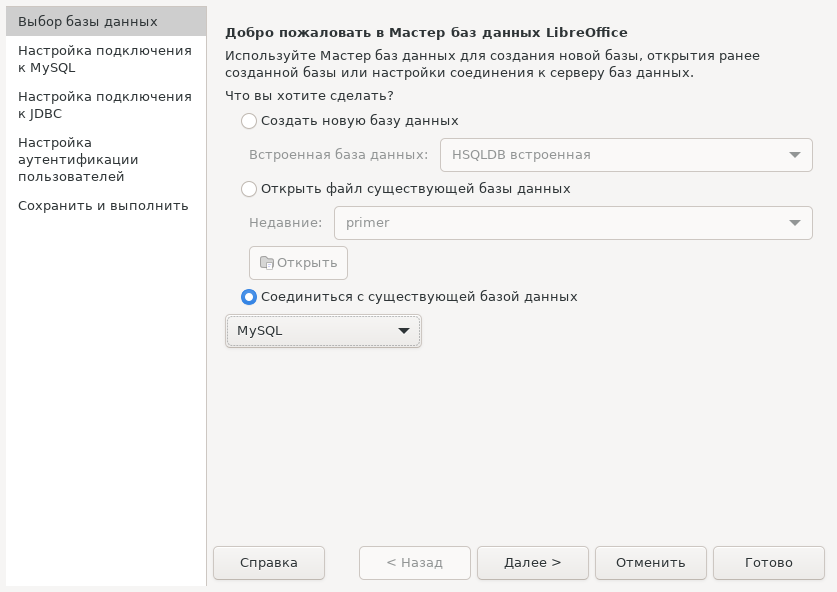
On the first step "Welcome to the LibreOffice Database Wizard" choose "Connect to existing database"-MySQL
step 1 - connect to existing mysql database

3.1 Option: using ODBC connector

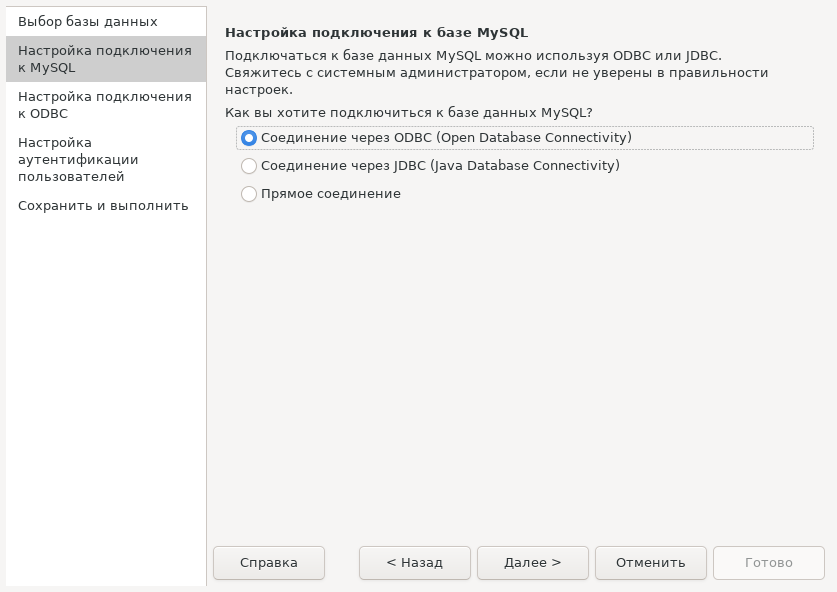
In the second step, select - using the odbc connector "Connection via ODBC (Open Database Connectivity)":
step 2 - odbc

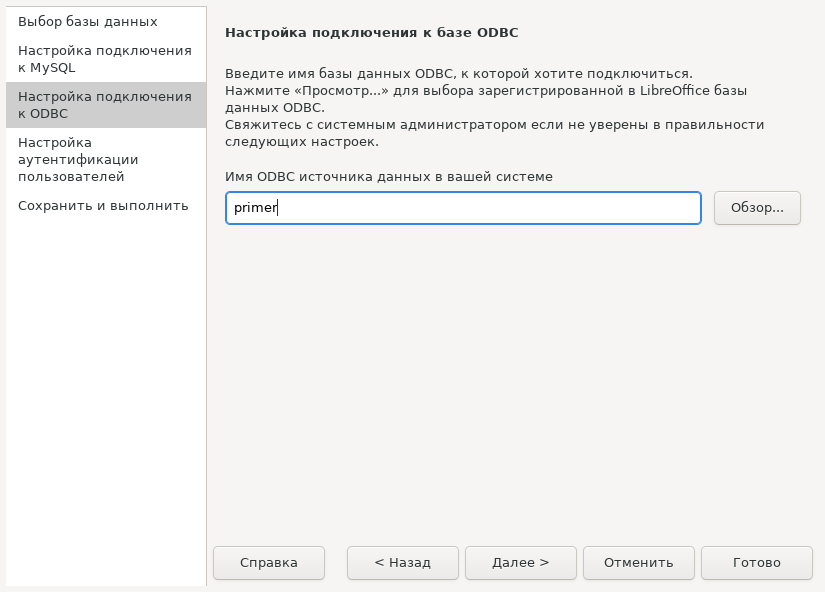
At the next, third step of the Wizard, enter the name or select using the "Browse..." button the DSN name previously specified for the ODBC connector
step 3 - odbc data source selection

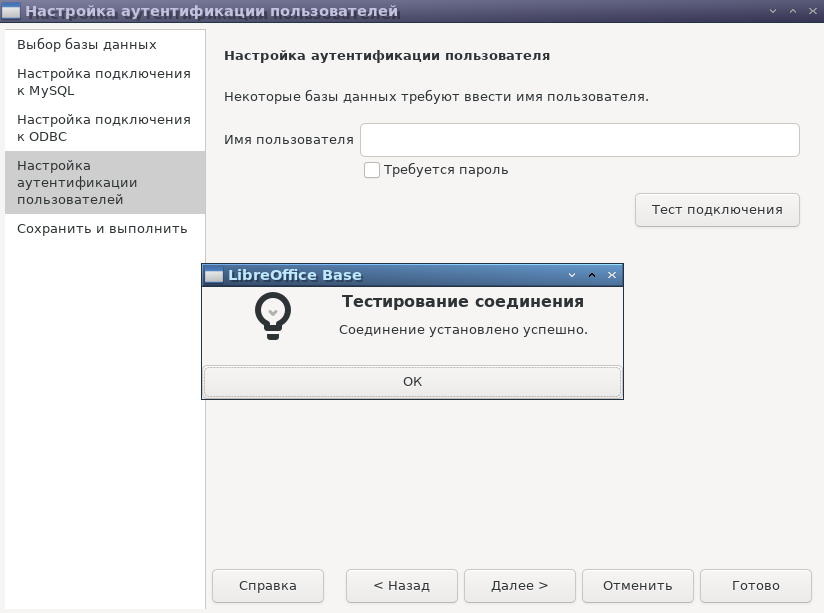
In the penultimate, fourth step, we perform testing. If the username and password are saved in /etc/odbc.ini, you do not need to enter them.
step4-odbc-test

If /etc/odbc.ini is configured correctly, there will be no errors. Otherwise, edit the odbc.ini file and test again.

Press the button "Ready!" at the bottom of the wizard window and save the database to an ODF database file in the user’s local folder.

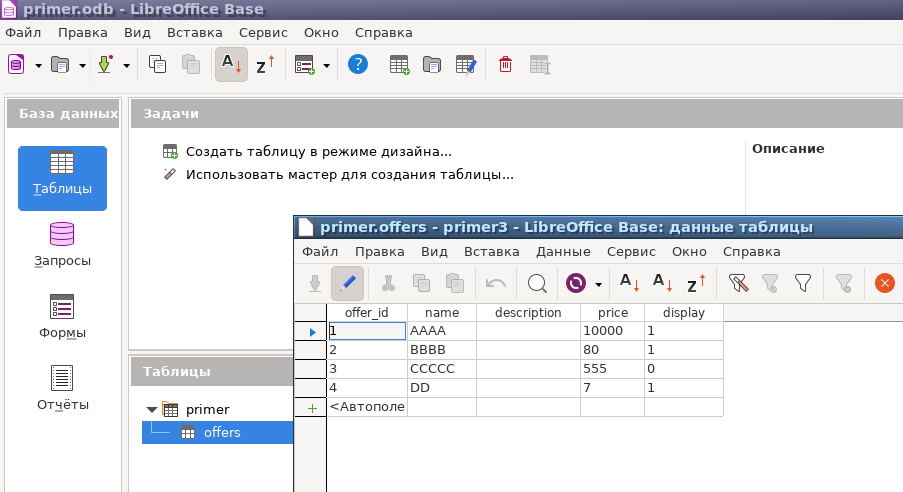
A database with external tables from MySQL will open. You can open tables and view data:
open

The connection between LibreOffice Base and MySQL is now up and running.

3.2 Connecting LibreOffice Base to MySQL using JDBC

The MySQL JAR class is installed in the /usr/share/java/ folder with the name mysql-connector-java-8.0.33.jar

Go to LibreOffice Calc - Tools - Options - Libreoffice - Advanced options to add the path to the java.sql.driver class: "Class Path" button - open the root of the Computer in the address bar - specify the path /usr/share/java/mysql-connector-java-8.0.33.jar

In (Tools - Options - LibreOffice - Advanced). Check mark "Use the Java Virtual Machine" must be enabled.

Creating a database in LibreOffice Base with communication via JDBC

File - Create - Database
Step 1 is the same for ODBC and JDBC - "connect to an existing MySQL database
step 1 - connect to existing mysql database

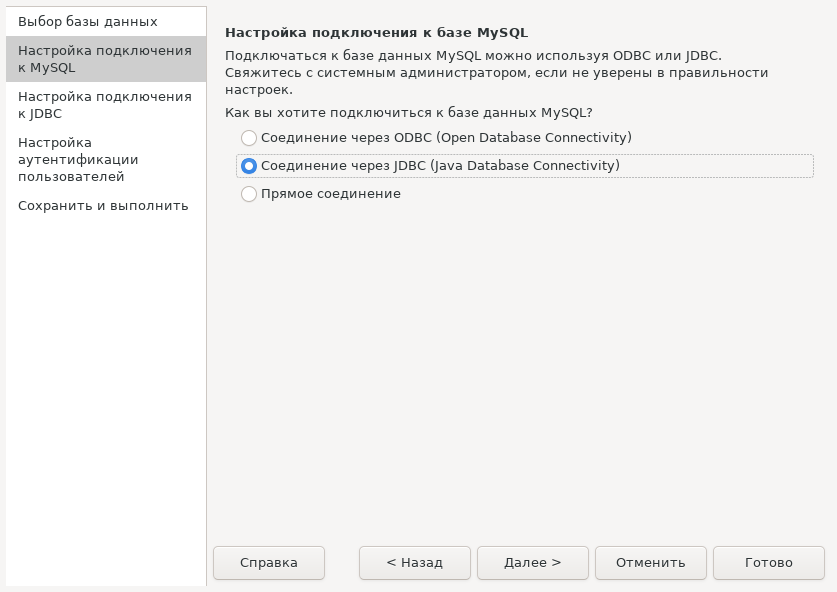
In step 2, select JDBC:
step 2 - Connecting via JDBC - Java DataBase Connectivity

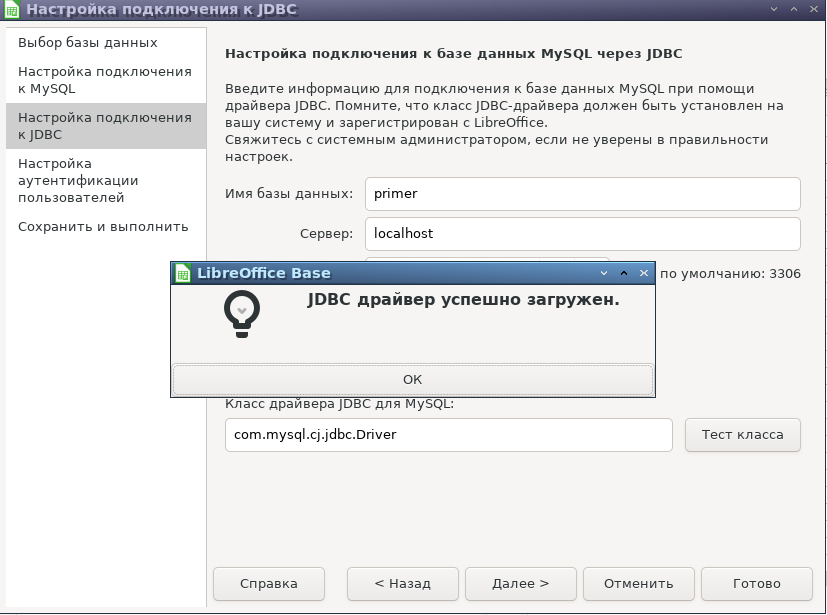
At step 3 you need to specify the parameters: database name, server and MySQL port:

  • primer
  • localhost
  • 3306

In the "Class name" field, correct org.mariadb.jdbc.Driver to com.mysql.cj.jdbc.Driver

Attention: the class indicated in some manuals java.sql.Driver wrong, use class name "com.mysql.cj.jdbc.Driver"

Click "Class Test" - The driver has been successfully loaded.
jdbc3

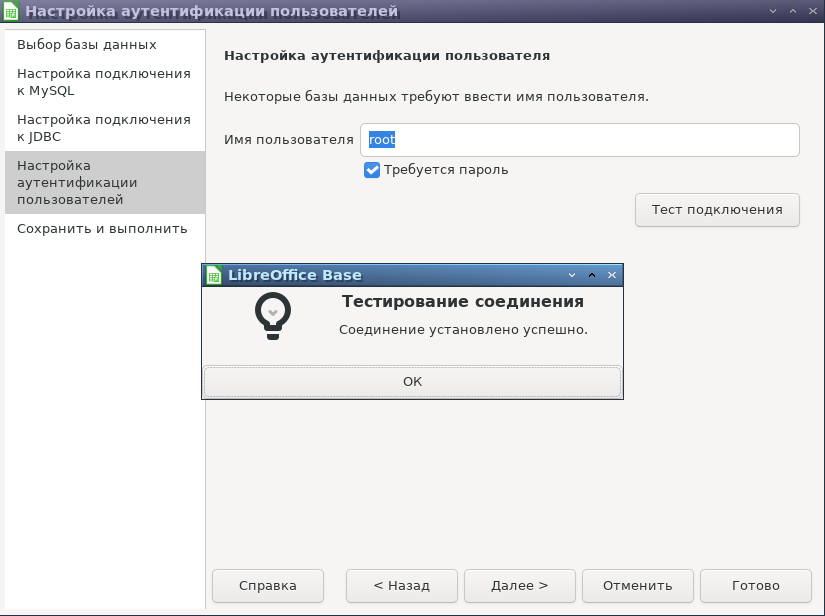
In step 4, specify the user name, a password is required and click “Test connection”
jdbc-success

Finish by saving the LibreOffice database to a file on your hard drive.

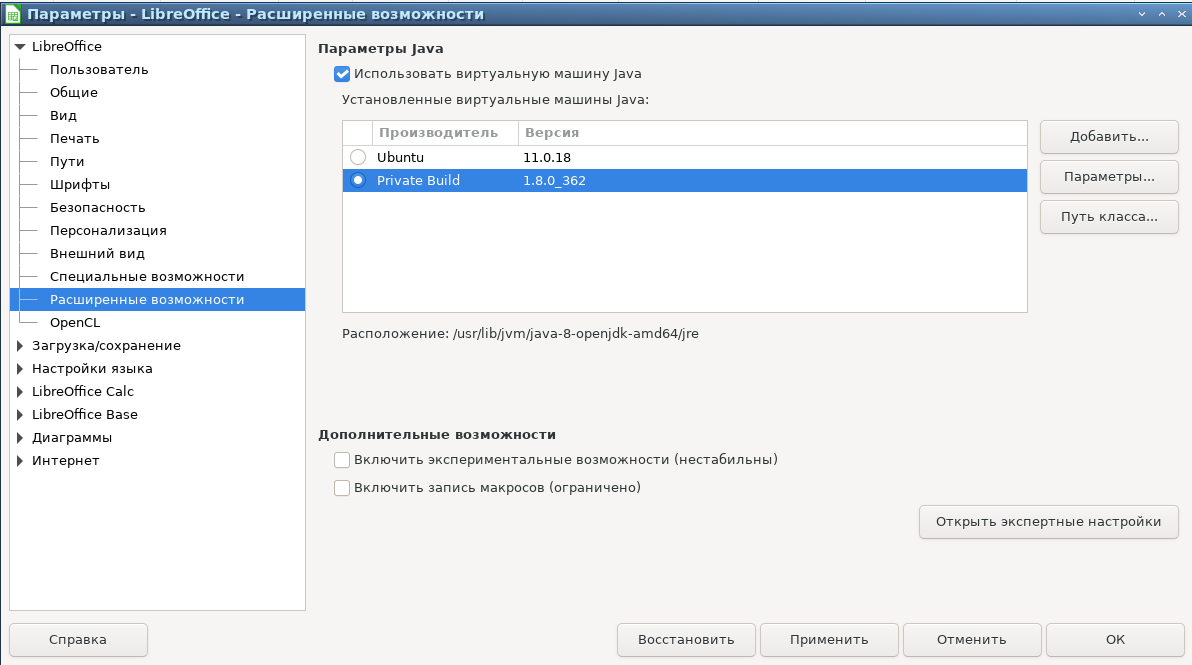
If the error occurs "The driver class 'java.sql.Driver' cannot be loaded. ./connectivity/source/drivers/jdbc/JConnection.cxx:685"
or "'com.mysql.jdbc.driver' cannot be loaded".
Solution:change java on private build 1.8, restart LibreOffice:
private
The class name in step 3 as stated above should be com.mysql.cj.jdbc.Driver
and the class file is specified in Tools - Options - Libreoffice - Advanced options add the path to the java.sql.driver class: the path to mysql-connector-java-8.0.33.jar or mysql-connector-j-8.0.33.jar should be /usr/share/java/mysql-connector-java-8.0.33.jar or mysql-connector-j-8.0.33.jar

Note: The java class in jar format is installed when you run the connector DEB file, but it can also be downloaded from https://dev.mysql.com/downloads/connector/j/-Platform independent- archive tat.gz in it mysql-connector-j-8.0.33.jar extract it to your home folder first without paths, then move the jar to /usr/share/java/.

Result with JDBC

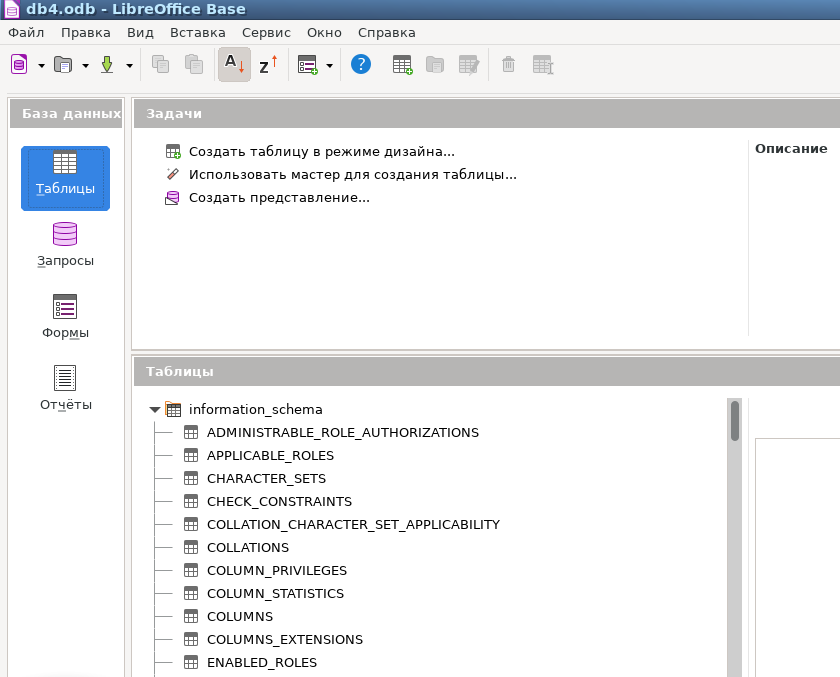
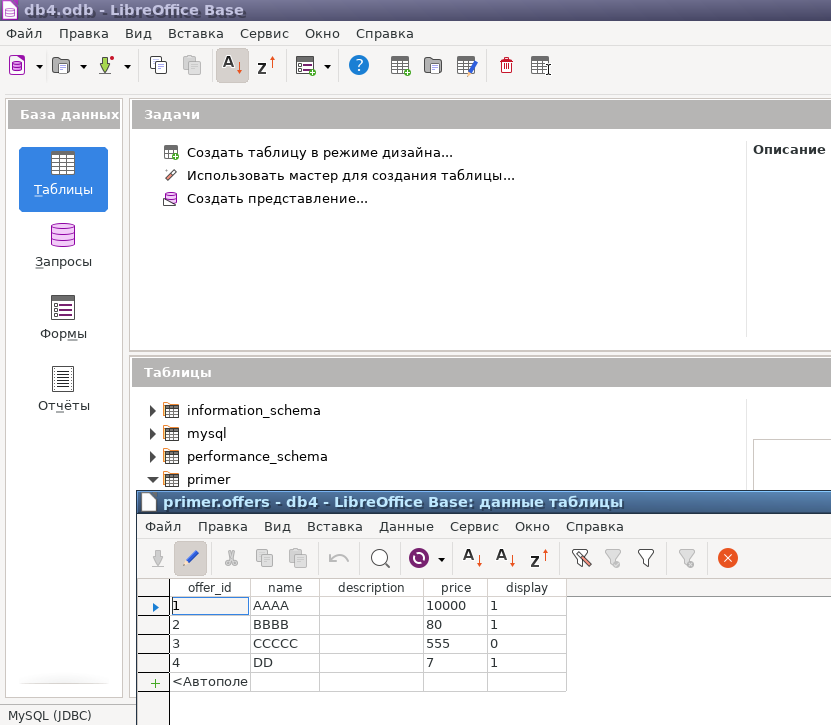
The result differs from the ODBC option - all databases are visible, including system ones (since the connection is with the root user). Ignoring the database name is, in my opinion, a disadvantage of the JDBC connector compared to connecting via ODBC.

jdbc-result

MySQL tables via JDBC can also be opened in LibreOffice Base for viewing or editing.
JDBC. Don't forget to save the LibreOffice Base database to disk as a *.ODB file.

Conclusion

The article discusses two methods of connecting from LibreOffice Base to the database MySQL-ODBC and JDBC. Both methods work.

Next article


Related publications

