10
July
2026
Disk partitioning to install Sparky Linux (Debian) on an old PC with BIOS in GPT mode
14:31

Disk partitioning to install Sparky Linux (Debian) on an old PC with BIOS in GPT mode

10 July 2026 14:31

How to partition a hard drive for installation Sparky Linux 8.3(based on Debian), if:

  • The PC has an outdated version of BIOS (Legacy BIOS),
    *Uses GPT format for hard disk partitioning.

Introduction

A decommissioned Core2Duo / RAM 4Gb computer with an 80 GB hard drive appeared. I decided to use it as a test layout.

This PC uses the Legacy BIOS system, i.e. outdated. Selected operating system Sparky Linux- because it is as lightweight as antiX, but cleaner for training on installing Nvidia drivers. 😄

I downloaded the current version of Sparky 8.3.1 with the XFCE desktop from the website https://sourceforge.net/projects/sparkylinux/ and burned it onto a blank DVD-R disc. The LiveCD was loaded from a DVD drive, because... The USB ports on the motherboard are not working. After launching the LiveCD, I clicked on the “Install Sparky” icon - it became clear that the operating system (OS) was Sparky, like Linux Mint, supports installation in BIOS mode with a GPT (UEFI) disk partition style, which is what is required for this PC.

Features of disk partitioning for Debian

1)single efi-boot partition

Compared to partitioning the disk for installing Linux Mint, Debian (and Sparky Linux based on it) Debian uses an EFI-BOOT partition (/boot mount point, eft and boot flags), which I made 1000 MB in size.

Comment. in a previous installation of Sparky Linux, I tried that you can create a small 100 MB partition with a file system for EFI and in the Sparky Linux installer manually specify a mount point for it (/boot/efi), but after installation on a computer with Legacy BIOS, this partition is practically not used (several megabytes of 100 MB are occupied). Therefore, if there is no dual boot with Windows OS, there is no point in creating a separate partition EFI partition (with mount point /boot/efi), formatted in FAT32, because he not needed for the only Sparky Linux operating system installed on this PC.

2) several larger bios-grub partition size compared to Linux Mint.
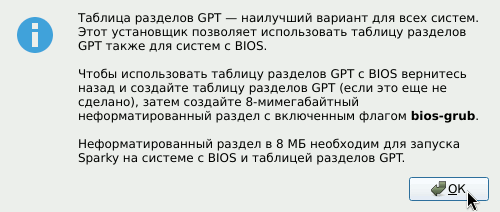
The first partition on the hard drive "bios-grub" should be 8 MB rather than 1 MB in size. The Sparky Linux installer tells you that the first partition size needs to be 8 MB.
sparky18

Other features of disk partitioning

1)using only primary partitions(Primary)

The GPT disk layout style allows you to create up to 128 partitions of the "Primary" type, which allows you not to save the number of primary partitions (unlike MBR, where it was necessary to transfer some partitions to logical partitions). A GPT partition table consists only of main sections.

Disk partitions:

*bios-grub* 8MB capacity - BIOS backup boot area - stores the bootloader for booting from the BIOS (type - primary), at the beginning of the disk. Not formatted. Flag corresponding to bios-grub.
boot-efi 1000 MB in size to store grub bootloader files and Linux kernels (kernels) in the boot directory and files for efi BIOS (UEFI) compatibility. EXT4 file system, boot and efi flags.
swap(swap partition). Type linux-swap, swap flag.
"/"**(root or root). It also contains the user folders /home and the directory with data for programs /var, and the auxiliary components folder /opt.

2)I didn’t separate the “/” (root), /var and /home folders into different partitions (volumes).
I decided not to separate the /, /var and /home folders in order to quickly partition the disk and increase space for the /home folder.

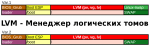
3) Use LVM(Logical Volume Manager) - not covered in this article.
The GParted disk partitioning program cannot create LVM volume groups and LVM volumes on them. Partially capable of the Calamares installer, which Sparky Linux uses.
LVM is intended more for servers. The console commands vgcreate, lvcreate, etc. are responsible for managing LVM.
See how to install Sparky Linux (Debian) on LVM next article.

Documentation

Sparky Linux- the operating system comes from Poland, but the main problem is Cloudflare, Inc. hosting, with which there are difficulties when accessing websites SparkyLinux.org and Wiki.SparkyLinux.org/ from the territory of the Russian Federation. Hosted by Cloudflare, Inc. does not comply with Russian laws regarding the “landing” of its office on the territory of the Russian Federation.

Web address of the page with documentation on disk partitioning for installing Sparky Linux:
*https://wiki.sparkylinux.org/doku.php/ru:partitioning

How to partition a disk and install the OS on them

Partitioning of the hard drive must be done after booting from the Live-CD media by running the program in the "Start" - "System" menu gparted or run the command from the Terminal:

sudo gparted

How to install Sparky Linux on a manually created disk partition?

In Sparky Installer, after selecting your language and time zone, you will be prompted to select your storage device and installation type:

  • Install nearby
  • Replace partition
  • Erase partition
  • Manual marking

During installation of Sparky, you must refuse to remove partitioning or automatically partition the disk into partitions. Select option "Manual marking".

Hard drive partitioning diagram

The diagram is shown for a computer with Legacy BIOS or UEFI, but the hard drive has a GPT partition table.

Section Type Size Mount point Description Flags Format
biosgrub P 8MB Backup BIOS Boot partition. bios_grub no
boot P 1000MB /boot System partition for installing the Grub boot loader and Linux Kernel kernels boot, esp ext4
linux swap P 4GB Paging file (size equal to RAM size) swap swap
/ P Remaining disk / System partition for EFI-shell, required for installing Linux Mint. ext4

Clarifications:

  • This time I did not separate the /var, /home directories from the root / in separate sections, although it is advisable to do this to protect the / folder from overflowing. The lack of separation simplifies installation and saves space.
  • ПWith this option, I did not create an efi partition with a mount point /boot/efi (Файловая система раздела efi - fat32. Флаги раздела "efi" - boot и esp). Для компьютера с устаревшим (Legacy) BIOS раздел efi не требуется. Раздел /boot/efi only needed for PCs with UEFI.
  • A single 1 GB boot partition is used to boot Linux kernels and contains the /boot and /boot/esp folders, has the boot, esp flags
  • The order of logical partitions in the hard disk partition table, except biosgrub, is not important.The following options are equivalent:
    biosgrub, boot, swap, "/"or
    biosgrub, boot, "/" , swap.
  • If you plan to use lvm, use console commands to create a physical lvm disk (sudo pvcreate /dev/sda4) and a volume group (sudo vgcreate myvg /dev/sda4). In the Calamares installation program, we create logical lvm disks for "/" and a boot partition boot. We install the OS. Installation of Sparky Linux on a logical volume in the LVM Logical Volume Manager subsystem is described in the article Installing Sparky Linux (Debian) on an LVM partition).


Related publications