9
August
2025
How to update the firmware of the ATS-Mini receiver
0:16

How to update the firmware of the ATS-Mini receiver

9 August 2025 0:16

The method with Esptool is considered - utilities for installing firmware for Espressif chips.

The source of the firmware

*GITHUB-ESP32-SI4732/ATS-Mini: ATS Mini Firmware Fork

ATS-Mini firmware conditions

  • A receiver with the ESP32 controller and the SI4732 chip of a small form factor, the so-called "baby".

    Amnvolt

The version will be installed using the Esptool utility, which we install from PIP

sudo apt update
sudo apt install python3-pip -y
python3 -m pip install --upgrade pip
pip install esptool

(Sources:pip.pypa.io,Pypi.org)

We provide the right to write to the sequential port for the user not Root:

sudo usermod -a -G dialout $USER

(Source).

Add the path /home/user/.local/bin to a change of environment Path.
To do this, edit .bashrc file in a home folder ~/.

sudo nano ~/.bashrc

Add the line:

PATH="$HOME/.local/bin:$PATH"

Or three lines

 if [-d "$ home/.local/bin"]; that
 PATH="$HOME/.local/bin:$PATH" 
FI  Pre>

We save and go out.
Ctrl+S, Ctrl+X

(Text .bashrc in the archive:[Bashrc.zip](bashrc.zip)).

We finish the Linux session and enter the user session again.

We connect the receiver to the computer with the Linux OS Cable USB Type C - USB A and turn on the power on the left edge of the device case.

Follow the command to find the name of the COM port of the receiver:

    ls /dev/ttyA*

The result of the team should be as follows:

/dev/ttyacm0

!!! The name of the sequential port can take the value /DEV /TTYACM1, then replace all the entries in the instructions /DEV /TTYACM0 on /DEV /Ttyacm1.

Define the type of memory: OSPI or QSPI.

    esptool -p /dev/ttyACM0 flash-id

Result:

 Esptool -p /DEV /Ttyacm0 Flash -id
Esptool v5.0.2
Connected to ESP32-S3 ON /DEV /TTYACM0:
Chip Type: ESP32-S3 (QFN56) (Revision V0.2)
Features: Wi-Fi, BT 5 (LE), Dual Core + LP Core, 240MHZ, EMBEDEDDED PSRAM 8MB (AP_3V3)
Crystal Frequency: 40MHz
USB Mode: USB-Serial/JTAG
Mac: 94: A9: 90: 26: 36: BC

Stub Flashher Running.

Flash Memory Information:
============================
Manoufacturer: 46
Device: 4018
DETECTED FLASH SIZE: 16MB
Flash Type Set in Efuse: Quad (4 Data Lines)
Flash Voltage Set by Efuse: 3.3v

Hard Resetting Via RTS PIN ... 

We check with [table](https://esp32-si4732.github.io/ats-mini/flash.html#firmware-files). If the volume is larger or equal to 8 MB - OSPI chip.

The AMNVOLT receiver is 16 GB flash volume, therefore, the type of memory of Octal SPI (OSPI).

Download the firmware from the site:[ATS Mini Fork (ESP32-Si4732 / ATS-Mini)](https://github.com/esp32-si4732/ats-mini?tab=readme-ov-file) -> раздел [Releases](https://github.com/esp32-si4732/ats-mini/releases). Since memory ** ospi **, downloaded the firmware archive

 * **ats-mini-v2.30-ospi.zip**  

We unpack into the folder, for example, "ATS-Mini" 

We launch the terminal and go into the firmware folder

    cd ~/Загрузки/ATS-mini/ats-mini-v2.30-ospi

### ATS-Mini firmware

Esptool firmware utility for chips ([Espressif Esptool](https://docs.espressif.com/projects/esptool/en/latest/esp32/)) installed in the ~/.local/bin folder and is available for call without specifying the path, because Added to the path Path.

Esptool utility without indicating the speed of the port works fine.
(If desired, you can add the firmware speed key:
-b 115200 or -b 230400 or -b 460800, which is the same as --baud 115200 or --boud 230400 or --boud 460800

Also, I did not indicate the type of chip --chip ESP32 and works without it).

There are several files in the firmware folder. We are interested in 3 files
 *** ats-mini.ino.botloader.bin ** - bootloader (bootloader) at ** 0x0 ** 
 *** ats-mini.ino.partitions.bin ** - Table of sections at ** 0x8000 ** 
 *** ats-mini.ino.bin ** - System section with firmware at ** 0x10000 ** 

 ** For firmware ATS-Mini receiver executed three commands: ** 

    esptool -p /dev/ttyACM0 write-flash 0x0 ats-mini.ino.bootloader.bin
    esptool -p /dev/ttyACM0 write-flash 0x8000 ats-mini.ino.partitions.bin
    esptool -p /dev/ttyACM0 write-flash 0x10000 ats-mini.ino.bin

I put these commands, after each command, the receiver is rebooted.
The third team was lasting longer. At its end, he waited for the start of the receiver and pressed the Valcoder button.

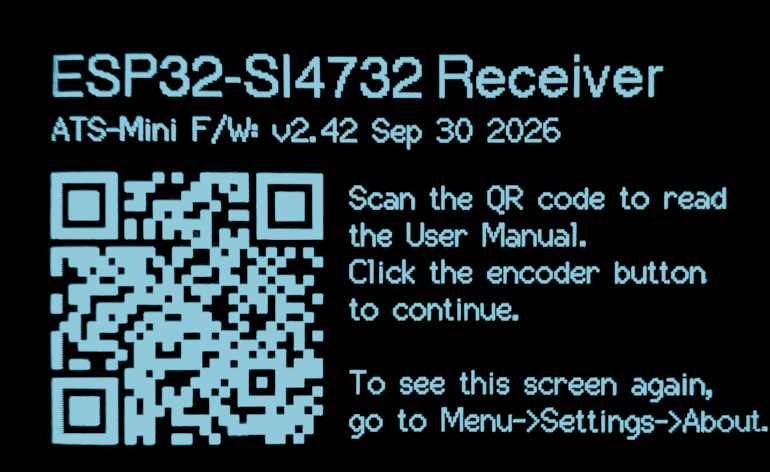
!!! The receiver instead of the QR code displayed the frequency in the VHF range (FM) and began to take the radio.

After the firmware for resetting the settings, I recommend that the settings are reset to the initial values.
* Turn off the receiver
* Press the settings handle and turn on the receiver.
* Let the settings handle.

### Documentation for the firmware

The developer adds new opportunities to each new version. Recognize the QR code in ** menu - settings - ABOUT ** and the smartphone will be redirected to the user manual.

### Ethtool documentation

*[ESPTOOOL DOCUMENTATION](https://docs.espressif.com/projects/esptool/en/latest/esp32/) на английском языке.

----

_Data of the last change: 11.08.2025_


Related publications

