21
February
2025
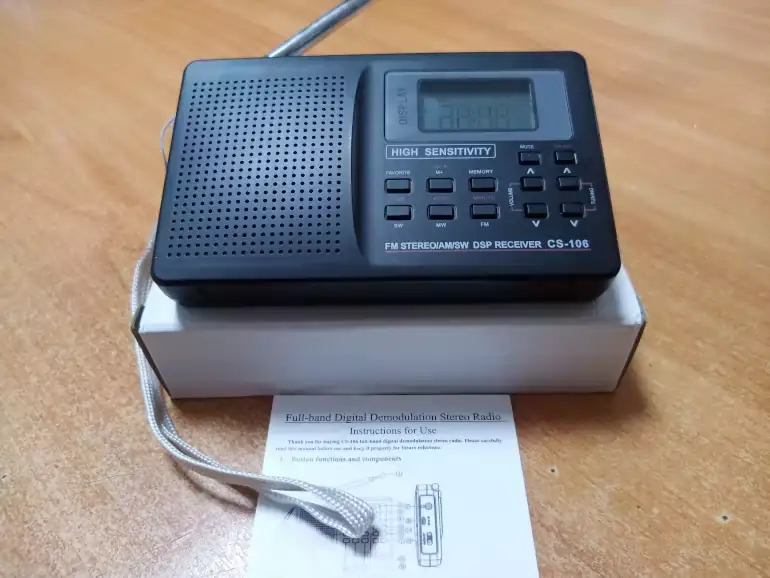
User manual for radio CS-106
11:24

User manual for radio CS-106

21 February 2025 11:24

The CS-106 IO is a copy of RETEKESS V-111. He translated the instructions of the CS-106 into Russian and supplemented it in the missing moments (clones of the receiver, adjustment of the alarm clock, sleep mode).

Advantages of the radio CS106

  1. All-wave radio receiver: support of Medium Waves (520-1710 kHz), High Frequency (3.2-21.875 MHz), Soviet VHF - OIRT (66-74 MHz) and FM radio (87-108 MHz) bands.
  2. Price 1200 rubles On AliExpress.
  3. Very high sensitivity and selectivity in the ranges of medium and short waves, high sensitivity on VHF (FM).
  4. FM Stereo into headphones, with the separation of the left and right channels on> = 32 DB. There is an indication of the presence of the stereo regime radio station.
  5. Three settings modes - manual, semi -automatic and scanning in memory
  6. 29 Memory Memory for each range + quick challenge to the "beloved" radio station with one click
  7. Food from two AA batteries 1.5 volts.
  8. The ability to connect external power 5V to current 1A - charging with micro USB.
  9. There is a power switch - to turn off the display in order to save. At the same time, the clock goes.
  10. No internal interference from the display and microprocessor.
  11. Uses DSP technology.
  12. Good AGC operation on HF (no rapid volume level fluctuations typical of DSP).
  13. There is a clock and an alarm clock.
  14. Memory cells and the clock are not reset when replacing batteries.
  15. White display backlight
  16. There is a folding stand.
  17. Small dimensions and weight.
  18. Headphones included.

Similar radio receivers

  • Retekess V111
  • Tivdio V-111
  • VITE VT-111
  • AIKO CS-106
  • Basbon DS-858
  • Coolvox CS-106
  • Happy CS106
  • Semier CS106
  • Vbestlife CS-106

Operations and functions

Installation of nutrition elements and the inclusion of the radio receiver

  1. Install two AA - 2x1.5V batteries, observing polarity and close the cover of the battery compartment
    The clock should be displayed on the display. If this does not happen, translate the bokova switch PWR on/OFF to the lower position (ON).
  2. Press and hold the ON/OFF button on the front panel to turn on the radio and listening to radio programs. To turn off the radio receiver, press and hold the ON/OFF button.
  3. The MUTE button is designed to temporarily turn off the sound from the speaker. When you press the Mute, the inscription ZZZ will light up on the LCD display. To turn on the sound, click Mute, the sound will turn on and the ZZZ indication will disappear.

Replacement of batteries

  1. It is recommended to transfer the side circuit breaker PWR on/OFF to the OFF position, as In this case, the display is disconnected to save
  2. Replace batteries
  3. Turn the side switch to the ON position.

Stand

On the back of the receiver there is a stand for installing the receiver on the table.

Switching ranges

  1. When the radio is turned on, click one of the buttons to select the corresponding range:
    • SW - short waves (kV),
    • MW - medium waves (SV),
    • FM - ultra -short waves (VHF).
  2. The VHF range is divided into two:
    • FM1 - 67-87 MHz,
    • FM2 - 87-108 MHz,
      switch between which you can shortly press the FM button.
  3. MV - range of medium waves:
    • 522-1710 kHz (MW), uses a set of 9 kHz settings.
  4. SW - range of short waves.
    The band of reception of short waves is 3.2 - 21.85 kHz and is divided for convenience into 7 subbands:
    • SW1 - 4.75 MHz (60 meters)
    • SW2 - 5.95 MHz (49 meters)
    • SW3 - 9.5 MHz (31 meter)
    • SW4 - 11.65 MHz (25 meters)
    • SW5 - 15.10 MHz (19 meters)
    • SW6 - 17.15 MHz (16 meters)
    • SW7 - 21.45 MHz (13 meters)
      Select the band by pressing the SW button.

Settings for frequency

There are three settings in the receiver:

  1. manual
  2. Semi-automatic
  3. Automatic scanning with radio stations in memory cells
Manual setting

Click on Tuning ^ or Tuning V to change the frequency of reception up or down to the minimum setup step (9 kHz on St., 5 kHz per square meter and 50 kHz on VHF - approx).

Semi-automatic settings

Press and hold Tuning ^ or Tuning V to launch a semi -automatic search for radio stations up or down the frequency. The display will quickly change the numbers of reception. When the radio station is detected, the search will stop and sound reproduction from this channel will begin.

Fully automatic setting and saving

Click the Memory button for 2 seconds, and the receiver will begin a fully automatic search for radio stations. The channels on which the signal is found will be listed in memory.

The indicated three settings can be used in combination for a faster search for radio stations.

Manual preservation of frequency in memory

Complete the radio station in one of the methods described above. To preserve the settings in memory:

  • Briefly press the Memory button. On the display, the number of the memory cell lights up.
  • To change the number of the memory cell to save, press tuning ^ or tuning v. For each range there are 29 memory cells 1-29.
  • To save in the memory cell again briefly press Memory.
    The frequency will remain in the indicated cell, while the old frequency stored in it will be replaced by a new one.

The total number of memory cells: 29 MW, 29 SW and 29 FM, only 87 channels.

Calling frequency from memory

After a fully automatic or manual entry of frequencies in memory, as described above, you can cause frequencies for configuration on them.

  • Briefly press the M+ button to go to the channel mode.
  • You can move through the channels stored in your memory, sequentially pressing the M+ button
  • You can also press M+ once to switch to channels and then use the Tuning ^ or Tuning V buttons to quickly move up or down the channels. In memory channels, the symbol "M" will be displayed on the display. After three seconds of inaction, the symbol "M" and the channel address will disappear from the display.

Preservation and call of favorite radio stations

The preservation of your favorite channels in memory is intended for those users who often listen to their favorite radio station.
To use this mode:

  • Tune in to the desired frequency using tuning ^ or tuning v buttons
  • Press and hold the Favorite button. If the inscription Favorite flashes once on the display, then this frequency was successfully saved on the list of loved ones.

Being in any mode, you can call your favorite station with a short click on the Favorite button. The radio will switch to playing your favorite radio station.

Volume adjustment

Press the Volume ^ or Volume V buttons to change the volume level.

How to block the receiver

In the mode when the clock is displayed or when the radio is turned on, press the Lock button for 2 seconds. The "key" symbol will light up on the display. In this mode, all buttons are blocked, with the exception of the ON/OFF power button and the mute sound disconnect. Unlock the receiver is carried out in hours or when the radio is turned on by pressing the Lock button for 2 seconds. The "key" icon will disappear from the screen and the functioning of the radio receiver buttons will go into normal mode.

Connection of an external power supply of constant voltage 5V

Food in external power mode is supplied through the DC in 5V nest.

Connection: Connect an external power supply with a voltage of 5V with a connectormicro usb to the receiver. Now external food works and the radio is ready for use from it.

Disconnect: Disconnect the power plug from the nestmicro usb.

Recommendation: Use a charger with a DC 5V/1A DC. Otherwise, the radio will not function normally, and if 5V voltage exceeds, it will be damaged.

Note: if batteries are already installed in the receiver, before connecting to an external power source:

  • If the clock is displayed on the display, turn off the receiver (by the switch on the side - approx.
  • Then connect the external food of the receiver
  • Turn on the receiver power (switch on the side - approx.

Installation of time (clock)

When you first installed batteries, hours with the wrong time are displayed on the display.

To set the time, you need to translate the receiver in the clock display mode with the ON/PFF button:

  • Press and hold the Time (SW) button. Hours and minutes will begin to flash on the display
  • Press and hold the Hour (MW) button to configure the clock, then install for the right hour a short click on the Hour (SW) button
  • Press and hold the Minute (FM) button to set up the clock, then install the right hour with a short click on the Minute button (FM)
  • To exit the clock, shortly press the Time (SW) button.

To quickly translate the clock for 1 hour ahead or back, press the Time (SW) keys, then translate the clock for an hour up or down. Then press the Time (SW) button briefly. The receiver uses a 24-hour time format.

Installation of the alarm clock

The radio receiver has a alarm function. First, set the exact time as described above. Then, you can configure the alarm clock, which at a given time will turn on the receiver, with the reproduction of the radio station in the ranges of SV, KV or VHF.

Installation of the alarm

To set the time of the alarm (hours and minutes):
1) side switch and button on/off, transfer the receiver into a clock display mode
2) briefly press the Time (SW) button
3) When a symbol of the alarm clock appears on the display, perform a long press on the Time (SW) button
4) When the symbol of the alarm clock brings up, configure the clock and minutes by the Hour (MW), minute (FM) buttons.
5) Shortly press Time (SW) to get out of the adjustment mode of the alarm clock.

Inclusion of the alarm clock

To turn on the alarm clock:
1) Put the receiver into a clock display mode.
2) briefly press the Time (SW) button. If the symbol of the alarm clock burns on the display, the alarm clock will work.
3) Turn on the radio with a long click on the ON/OFF key, select the desired range and tune in to the radio station that broadcasts around the clock, configure the desired volume with the Volume ^ and Volume V button.
4) Disconnect radio on/off.

Disconnecting the alarm

1) The side switch and the ON/OFF button transfer the receiver to the clock display mode.
2) briefly press the Time (SW) button. If the symbol of the alarm clock does not burn on the display, the alarm does not work.

Sleep timer

The CS-106 radio does not have a sleep timer function (unlike RETEkess V111, где он настраивается короткими нажатиями на клавишу ON/OFF in the off state).

Using the antenna

In the ranges of short waves (SW) and ultra -short waves (FM), use 360 ​​degrees a pin antenna, stretching it over the entire length. If, due to severe reception, distortions or overlap of radio stations appear, add one of the sections of the pin antenna.

Listening to medium waves (MW):
The receiver is built -in the magnetic antenna for taking medium waves (MW), which has the orientation when taking radio signals, so you can rotate the radio body to improve the reception of the radio station.

Display backlight

For use especially at night, the receiver display is equipped with backlight. Pressing any button lights the display for 5 seconds, then in the absence of presses the backlight goes out automatically to maintain energy.

Switching step 9/10 kHz in medium wave mode (MW)

To switch a step of 9 or 10 kHz, in the off state, press the MW key for 3 seconds. On the display, the number will light up - the current installed step in the range of medium waves. Change the step as necessary, using the Tuning ^ and Tuning V buttons. After 2 seconds of waiting for the selected, the step will remain.

The step of radio stations in the range of medium waves of 10 kHz is used in the USA, Canada, Mexico and other countries of the North and South America, and 9 kHz in the remaining parts of the world. By default, step 9 kHz is set and you do not need to switch it - the translator's note.

Attention!

  1. If the radio is not used for a long time, please remove the batteries from the receiver
  2. If the sound is quiet, distorted or dull backlight, please replace the batteries.
  3. Please do not use strong pressure, take care of the receiver from collisions, blows, avoid falling and getting water.
  4. Do not place the receiver in the rays of direct sunlight, in places with high temperature and humidity. Do not use the device and do not store it at a temperature below -5 degrees Celsius and above 50 degrees Celsius.
  5. Do not use chemistry to clean the receiver, to avoid damage to the receiver and display coatings.
  6. Do not disassemble the receiver body and do not try to change the parameters of the built -in components yourself.