
14
May
2025
Control the transmission of a radio station via the COM port using RTS or DTR signals
19:23

Control the transmission of a radio station via the COM port using RTS or DTR signals

An article about how to control a radio station from a computer using a USB-COM adapter.

Introduction

B previous article I told you how I connected a USB-COM adapter to a personal computer running Linux.

In this article I talk about an experiment to prepare to control the Yaesu FT-7800r radio station for APRS or SSTV using the RTS signal of the serial COM port.

АвтVHF car radio Yaesu FT-7800r installed in my home as a stationary one. This radio station does not support CAT commands, unlike the Yaesu FT-817, FT-857, FT-897 series. (Previously I launched Direwolf and Xastir with Yaesu FT-857 and the HamLib library via CAT commands).

The FT-7800r radio station is controlled using a connector like mini DIN 6 on the rear panel, when the PTT contact is shorted to ground, transmission is activated. Many portable radios that have a headset with a PTT button are controlled in the same way. When the contact in the PTT button is closed, the transmit (TX) mode is activated instead of the receive (RX) mode.

In this article I will only consider preparation for the implementation of PACKET / APRS or SSTV modes - namely, an experiment in controlling TX/RX modes using a command line utility rigctl, которую можно выполнять в Терминале Linux. Также, вместо RIGCTL можно использовать rigctld с таким же синтаксисом команд, и работать через него в WSJT-X (Настройки - Радио - Модель - rigctld). Утилита rigctl included in the hamlib package.

sudo apt install libhamlib4

Pinout of the Yaesu FT-7800r connector, responsible for transmitting APRS or SSTV packets

The general connection diagram for the rear panel of the Yaesu FT-7800R is given in the user manual.

*APRS connection diagram for Yaesu

Third party schematics for PACKET/SSTV and Yaesu digital interface

Article I6IBE
*I6IBE: homemade PACKET interface for Yaesu FT-7800(c) I6IBE

A useful article for transmitting audio and controlling the transceiver, from which you can take the audio and PTT diagram:
*VP-digi

RS232 COM port connector pinout (DB-9)

Male connector
db9m

Connector "Mother"
db9f

Running the ttyUSB0 converter on the system

If there is no radio in HamLib (CAT interface does not exist), transmission control occurs using the DTR or RTS levels on the appropriate pins.

To access the adapter "for writing", you need to give permissions

sudo usermod -aG dialout username
sudo chmod 777 /dev/ttyUSB0

Controlling the transceiver using the rigctl utility, the HamLib library, when switching reception and transmission is performed by a signal from the RTS or DTR COM port

For this type of control, HamLib provides a transceiver with model No. 1 - “Dummy”.

Command to call rigctl

rigctl -m 1 -p /dev/ttyUSB0 -P RTS

where:
-m 1- the radio station model is always 1, i.e. fictitious or "dummy".
-p /dev/ttyUSB0- port through which we control transmission, RTS level
-P RTS- selected the COM connector pin through which rigctl will output the transfer signal.

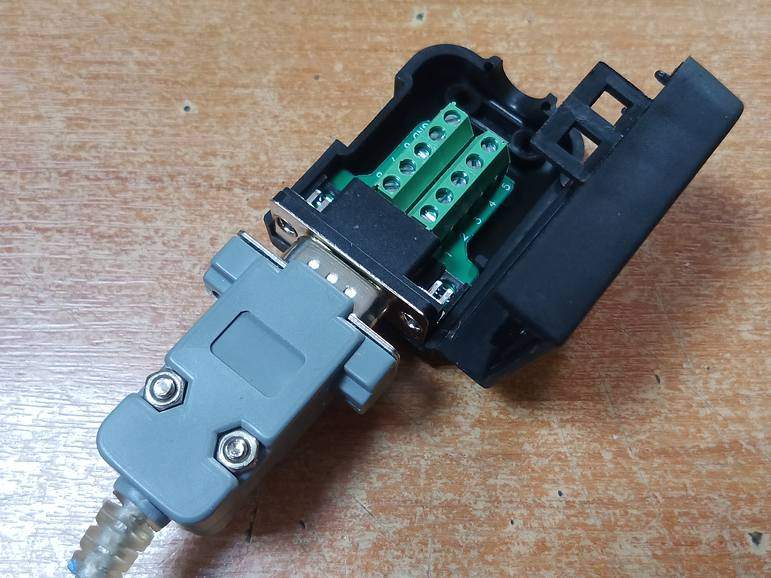
It is convenient to connect pins 5 (GND) and 7 (RTS) using such a connector - a block.
rs232

Experience result

Both transmission control options - DTR and RTS - have been tested. The only differences are in the rigctl launch commands:

Method "DTR"(COM pin #4)

rigctl -m 1 -p /dev/ttyUSB0 -P DTR

With such a call, transmission control will occur on the DTR pin.

Method "RTS"(COM pin #7)

rigctl -m 1 -p /dev/ttyUSB0 -P RTS

With such a call, transmission control will occur on the RTS pin.

Rigctl commands - receive/transmit from the Terminal

Execute one of the commands above.

The program requests a command to the transceiver in interactive mode:

Rig command:

Enter one of two options (capital Latin letter T and number):

*man rigctl(1)

T, set_ptt 'PTT'
Set 'PTT', 0 (RX), 1 (TX), 2 (TX mic), 3 (TX data).

T 1- go to transmission (TX),
T0- go to receive (RX).

Transmission, RTS signal:
T1

Reception, RTS signal:
T0

The result of the experiment in the form of a table

The meaning of the signals relative to GND (pin No. 5) when issuing RIGCTL commands:
Control method DTR - pin 4 RTS - pin 7.

Mode RTS or DTR voltage, Volts
Without control +3.46
Transmission T=1 0
Reception T=0 +3.46

Conclusion

In rigctl, on transmit (T=1), the RTS or DTR signal is transferred from high to low level (0 volts), which is what is required for YAESU radios. But to close the PTT-GND circuit in the transceiver you need a transistor.

Switch transistor type n-p-n in circuit I6IBE needed to work in key mode:

  • The collector has a constant voltage from the Yaesu "PTT" contact, which is always about +5 Volts (idle).
  • in receiving mode on a PC, a positive voltage of +3.46 Volts is supplied to the base of the transistor from the COM port and nothing happens, and the radio station is located at the reception.
  • when the COM port shows RTS or DTR voltage relative to ground equal zero, the transistor begins to pass the voltage of the PTT contact of the transceiver to ground, the transceiver sees a “short circuit” between the PTT and GND contacts and goes to transmission.

All we have to do is wait. When will the 9-pin connector for Yaesu arrive from China?
yaesu-7800-pinout


Source:
Example syntax for the rigctl, rigctld command for the NO-CAT transceiver:
*https://groups.io/g/winfldigi/topic/help


Related publications