
6
September
2021
About updating Debian 10 "Buster" to 11 "Bullseye" and testing "Bookworm"
16:44

About updating Debian 10 "Buster" to 11 "Bullseye" and testing "Bookworm"

6 September 2021 16:44

From August 2021 it is possible to upgrade from Debian 10 to Debian 11, as well as all Debian-based distributions. For example, MX Linux.

Editing the sources.list file

On Debian OS you need to fix it using a text editor in the "/etc/apt/" directory sources.list В MX Linux нужно в каталоге /etc/apt/sources.list.d отредактировать файл debian.list

1) old lines with the word buster comment or delete. In their place add lines as written in article on how2shout.com/linux/.

deb http://deb.debian.org/debian/ bullseye main contrib non-free

deb-src http://deb.debian.org/debian/ bullseye-updates main contrib non-free

deb http://security.debian.org/debian-security bullseye-security main

deb-src http://security.debian.org/debian-security bullseye-security main

deb http://ftp.debian.org/debian bullseye-backports main contrib non-free

Example "debian.list" file:
debian

2) Execute the commands sequentially

apt-get update
apt-get full-upgrade

3) Perform cleaning:

apt-get autoremove && apt-get autoclean

If a dependency error occurs during the package update step

When upgrading MX Linux while running apt-get upgrade A dependency resolution error occurred. I solved the problem with the command:

sudo apt --fix-broken install

Updating version 11 "Bullseye" to 12 "Bookworm"

This action is optional and can be done as desired.

  1. In Debian to a file /etc/apt/sources add line

    deb http://mirror.corbina.net/debian/ bookworm main contrib non-free

and put a comment sign in front of the rest#.

List of official Debian repository mirrors -https://www.debian.org/mirror/list

  1. On Debian or MX Linux in the directory /etc/apt/sources.list.d можно создать файл, например, testing.list with content:

    deb http://deb.debian.org/debian testing main contrib non-free

    deb http://deb.debian.org/debian testing/updates main contrib non-free

    deb http://security.debian.org/ testing-security main contrib non-free

Source:OSradar.

  1. After updating the package cache with the command apt-get update и обновления системы командами apt-get upgrade, apt-get dist-upgrade, apt-get full-upgrade the system will be updated to the latest, test version of Debian Sid!

Note: this will generate one error - a warning that Release updates are not available:

"Error: 10 http://deb.debian.org/debian testing/updates Release"

404 Not Found

and

"E: The repository http://deb.debian.org/debian testing/updates Release does not contain a Release file

How to remove this error - see Errata below.

Errata - Note on security updates for Bookworm

Security updates for bookworm are now available. I added the following text to the "testing.list" file after all the lines:

deb http://deb.debian.org/debian bookworm-proposed-updates main contrib non-free

!Source:errata.ru.html on debian.org

Thus, the file looks like testing.list in the /etc/apt/sources.list.d directory" looks like in the screenshot:
testing

Adjustment

Then, on October 12, 2021, I had to correct the file again testing.list. The reason is the message "Cannon update APT list: " repository no longer has a Release file" the final version of the file testing.list next:

# Debian Testing

deb http://deb.debian.org/debian testing main contrib non-free

deb http://security.debian.org/ testing-security main contrib non-free

deb http://security.debian.org/ bookworm-security main contrib non-free

deb http://deb.debian.org/debian bookworm-proposed-updates main contrib non-free

proposed

After executing the commands 'sudo apt update' и 'sudo apt upgrade', about 500 MB of packages were downloaded and installed - most of them changed their versions to the update branch "bookworm-proposed-updates" and the date - the real month, i.e. October 2021.
The system rebooted and started normally, I did not notice any side effects from switching to Debian Bookworm with the latest updates.

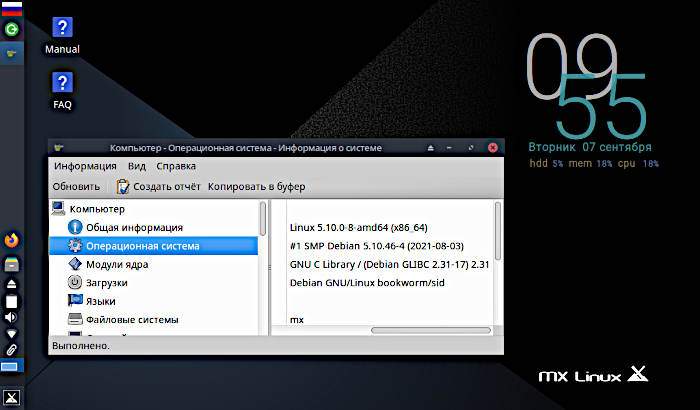
team lsb_release -a shows that only "Release" has changed to "testing-proposed-updates" of the sid branch. The Debian version remains the same: Debian GNU/Linux bookworm/sid.

Updating MX Linux to v.21

ВерThe version of MX Linux installed on my computer is the latest one today 19.4 "patio feo". From the site mx linux you can download the official ISO image of version 19.4. The next version 21 is in beta testing and downloads are available in the form of images, see.article on the Distrowatch website, which contains links to ISO files for the beta version of MX 12 beta1, which is based on Debian 11 "Bullseye". Second beta version (beta 2) of MX Linux 21 came out september 5, 2021 - the article contains links to MX 12 beta 2 images.
There is no official way to migrate from version 19.4 to version 21 yet. Obviously, it will be communicated before the release of MX 21.

МойThe experiment is aimed at obtaining the latest package database and possibly an “early” update to MX v.21. 😀

When correcting a file mx.list названия дистрибутива с buster на bullseye, при обновлении apt-get update GPG keys error "key not found" occurs. The reason may be that the MX Linux v.21 repository does not yet have a PGP key, because version 21 is in beta testing:

Чтение списков пакетов… Готово

W: Ошибка GPG: http://mirror.truenetwork.ru/mxlinux/mx/repo bullseye InRelease: Следующие подписи не могут быть проверены, так как недоступен открытый ключ: NO_PUBKEY F942E0D4E1C726CD

E: Репозиторий «http://mirror.truenetwork.ru/mxlinux/mx/repo bullseye InRelease» не подписан.

N: Обновление из этого репозитория нельзя выполнить безопасным способом, поэтому по умолчанию он отключён.

N: Информацию о создании репозитория и настройках пользователя смотрите в справочной странице apt-secure(8).

At the same time, an attempt to obtain the F942E0D4E1C726CD key from the server using the command
"sudo apt-key adv --keyserver keyring.debian.org --recv-keys F942E0D4E1C726CD"
fails with the error:

gpg: не найдено данных формата OpenPGP.

gpg: Всего обработано: 0

Obviously, the key F942E0D4E1C726CD is not posted on a public trusted source of public keys. Apparently, this is the personal key of the MX Linux v.21 developer.

Этоnot a big problem, because basic things have been updated along with the Debian "Bookworm" test case. For example, the new kernel is 5.10, as in MX Linux 21. Therefore, I left the old version of the file mx.list with mention of an older version of Debian "Buster".

As written above, and in MX Linux site blog, the official way to get MX Linux version 21 is to download an ISO image file, install beta version 2 from scratch: https://mxlinux.org/blog/
mx-21-beta-2-now-available-for-testing-purposes/

MX-21 is built on top of Debian-11 "Bullseye" and the MX repositories. The MX repositories contain additional MX-specific programs such as:

  • "MX Tools",
  • "MX Package Installer",
  • "MX User's Guide",
  • "MX Network Assistant",
  • "MX Boot Options", "MX Cleanup",
    *"MX Conky"
  • "MX Date & Time",
  • "MX Fix GPG Keys",
  • "MX Live USB Maker",
    *"MX Tweak"
  • "MX Bootloader Recovery",
  • "MX Select sound card",
  • "MX Sound Theme",
  • "MX User Manager",
  • "MX Repository Manager",
  • "MX Greeting",
  • "MX Menu Editor",
  • "MX System Snapshot",
  • "MX Codec Installer",
  • "MX Package Installer",
  • "MX Remastering Center",
  • "Brightness systray"
  • and others.

These programs still remain in the operating system from MX Linux version 19.4 and are “waiting” for an update to V.21.

What's new in Debian 11 Bullseye (released August 14, 2021)

  • New Linux Kernel 5.10 with long support cycle (LTS)

  • Added 11924 new packages to the repository (can be installed at the user's discretion)

  • Updated 42821 packages - 72% of the total in Debian 10 "Buster".

  • LibreOffice office suite update - 7.1.5.2

  • Newer version of GIMP, etc.

  • Supports exFAT file system (lightweight file system for USB flash drives) - does not require installation of additional drivers

  • Scan and print without drivers (new package ipp-usb)

  • other changes - see full list of changes in Debian 11 on the official website Debian.org.

    What awaits in Debian 12 Bookworm (testing)
    *no information yet. Based on Debian 11 Bullseye, the codebase will evolve over time to be ready for Debian 12's scheduled 2023 release.

    What's new in the MX-21:

  • New and updated applications

  • support for lvm volumes in the installer

  • new boot menus for UEFI boot systems.

  • mx-fluxbox 3.0 configurations have been added to Xfce 4.16, Plasma 5.20, fluxbox 1.3.7 shells

  • Password enabled (sudo) for administrative tasks by default. You can change this in mx-tweak->Other tab.

Update from September 7: Replacing the MX "buster main" repository with "buster test"

If you correct the lines in the mx.list file by placing a comment before the first one (“buster main non-free”)
and adding the following:

deb http://mirror.truenetwork.ru/mxlinux/mx/testrepo/ buster test

At the same time, I updated 10 MX Linux packages:

sudo apt list --upgradable

Вывод списка… Готово

bc/testing 1.07.1-3+b1 amd64 [может быть обновлён с: 1.07.1-2+b2]

dc/testing 1.07.1-3+b1 amd64 [может быть обновлён с: 1.07.1-2+b2]

libgcrypt20/testing 1.9.4-2 amd64 [может быть обновлён с: 1.8.7-6]

libhttp-message-perl/testing,testing 6.33-1 all [может быть обновлён с: 6.29-1]

liblocale-codes-perl/testing,testing 3.68-1 all [может быть обновлён с: 3.67-1]

libnet-http-perl/testing,testing 6.21-1 all [может быть обновлён с: 6.20-1]

mlocate/testing,testing 1.1.11-1 all [может быть обновлён с: 1.1.10-2]

ntfs-3g/testing 1:2021.8.22-2 amd64 [может быть обновлён с: 1:2017.3.23AR.3-4]

plocate/testing 1.1.11-1 amd64 [может быть обновлён с: 1.1.10-2]

testdisk/testing 7.1-5+b2 amd64 [может быть обновлён с: 7.1-5+b1]

Вывод списка… Готово

As you can see, the packages in the MX 'testing' repository are newer.
After executing the command upt-get upgrade, the computer downloaded 2.5 MB of packages, which installed quite quickly.
Changes were added by the program update-initramfs to the initrd file of the Initramfs component, which is responsible for loading the operating system.

sudo reboot

After rebooting, the operating system "turned on" normally. The OS release is in the testing branch:

lsb_release -a

No LSB modules are available.

Distributor ID: Debian

Description: Debian GNU/Linux bookworm/sid

Release: testing

Codename: bookworm

and after connecting to Debian updates "proposed-updates" (see addition "Adjustment" above):

lsb_release -a

No LSB modules are available.

Distributor ID: Debian

Description: Debian GNU/Linux bookworm/sid

Release: testing-proposed-updates

Codename: sid

Where sid is the Rolling Release version of the Debian distribution that contains the latest package changes.

Bookworm appears to be the latest Debian distribution at the end of 2021.

If you do not want to move to the testing or sid branch, you simply do not need to use “unstable” repositories, such as those indicated in my testing.list file - the lines should be commented out or deleted.

I attach my files "/apt/sources/list.d" for the test version of SID in MX Linux:
testing.zip

Check:

You can check the current version of any package, for example LibreOffice-Common, and compare with the latest one on the website
https://repology.org/project/libreoffice/versions
For autumn 2021, the latest version of LibreOffice in Debian Unstable sid/main is libreoffice 7.2.2,
and dpkg -s libreoffice-common | grep Version gives the same version 7.2.2-1.

Regarding amateur radio packages, WSJTX will also be updated to the latest version:

dpkg -s wsjtx | grep Version

Version: 2.5.0+repack-1

Result:

ОпеThe rational MX Linux system on my netbook received, after an update, the latest version of the Debian 12 "Bookworm" OS package base, based on the Debian 11 "Buster" OS with all the changes made to the operating system after its release on 08/14/2021. It is not possible to return to the stable release of Debian 11 OS, but you can test the innovations of Debian 12 among the first users.

--
Links:
Wikipedia
Debian

Final testing.list file for Debian and MX Linux:
testing.zip

*!Note from 12/07/2021: Final version MX Linux 21 “Wildflower” released October 21, 2021. There is no way to painlessly migrate from 19 to 21. You must install version 21 from scratch. For example, installation from USB Flash to the same hard drive partitions as 19, but format them before installation. Version 21 is based on the Debian 5.10 kernel and the Debian 11 "Bullseye" package base. Later, on November 22, 2021, a version was released MX Linux 21 "AHS" - Advanced Hardware Support, based on kernel 5.14. The "AHS" version has support for modern hardware, such as video cards. You can also connect the AHS repositories to version 21. So far I have not updated the version of MX 19 to MX 21. My kernel version is due to the Debian package database "bookworm/sid" and the "testing-proposed updates" patch, also 5.14.0.2. The desktop environment on MX 19 on a work PC (systemctl status display-manager) is a lightweight LightDM shell, whereas MX 21 has been released in three other editions - XFCE, FluxBox and KDE Plasma, although the “shell” can be changed after installing the operating system.

Addition about updating Sparky Linux


Related publications

