---
title: 'Setting up video playback in FireFox for a weak PC'
url: 'https://ra1ahq.blog/en/nastroika-vosproizvedeniya-video-v-firefox-dlya-slabogo-pk'
markdown: 'https://ra1ahq.blog/en/nastroika-vosproizvedeniya-video-v-firefox-dlya-slabogo-pk.md'
lang: en
date: '2020-12-11'
description: 'For a colleague, I made a home computer from the organization’s decommissioned equipment (motherboard on an 865 chipset, socket 775) and upgraded the PC for little money. Due to poor performance, it was necessary to optimize the viewer settings for video playback. Video'
taxonomy:
category:
- blog
tag:
- video
- soundtrack
- windows
- youtube
- firefox
archives_month:
- dec_2020
archives_year:
- '2020'
---
# Setting up video playback in FireFox for a weak PC
11
December
2020
10:18
### Setting up video playback in FireFox for a weak PC
[video](https://ra1ahq.blog/en/tag:video), [soundtrack](https://ra1ahq.blog/en/tag:soundtrack), [windows](https://ra1ahq.blog/en/tag:windows), [youtube](https://ra1ahq.blog/en/tag:youtube), [firefox](https://ra1ahq.blog/en/tag:firefox)
11 December 2020 10:18
For a colleague, I made a home computer from the organization’s decommissioned equipment (motherboard on an 865 chipset, socket 775) and upgraded the PC for little money. Due to poor performance, it was necessary to optimize the viewer settings for video playback.
### Video for verification
`https://www.youtube.com/watch?v=HcQJzFzZfVI`
### Background
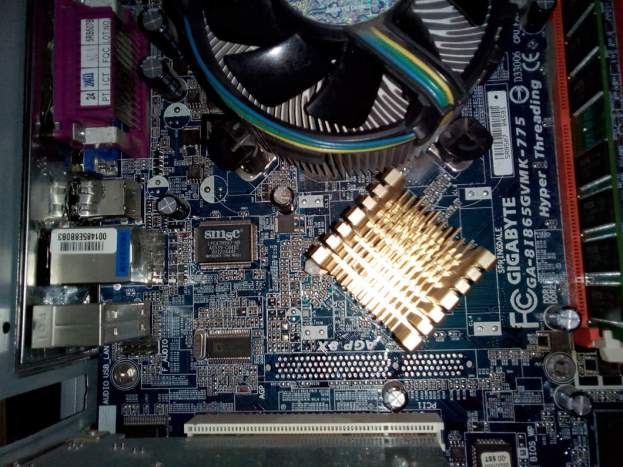
The office computer had an Intel Celeron 2.5 GHz processor and an IDE hard drive. RAM 2 GB. All web pages opened for a long time and slowly - the computer was loaded at 100% when browsing the WWW. I replaced the processor with an Intel Pentium 4 with socket 775, frequency 3.2 GHz, with support for HyperThreading technology (price 300 rubles - $4.1), replaced the 80 GB IDE hard drive with a solid-state SSD 120 Gb (price 1750 rubles - $23.9). After this, web browsing began to be tolerable - without pauses for content to be displayed on the screen.
However, playback from YouTube did not satisfy me. The built-in video card in a PC in Windows 7 is defined as "Standard VGA Graphics Adapter". The external video card connector on the GA-8I865GVMK-775 motherboard is not soldered. There are only free PCI slots, but video cards for them have not been produced for a long time. Therefore, upgrading the video card is not possible. Next, I'm trying to improve the performance of my PC using system and Internet browser settings.
[ ](https://ra1ahq.blog/images/e/7/d/f/9/e7df9577b58fb63072ff7c9e20e5b2b51136ebbc-komp.jpg)
### Why did I choose the Firefox browser?
The FireFox browser is famous for its fine-tuning capabilities using about:config. Therefore, FireFox was taken as a basis. The latest version 83.0 (*32-bit*) was used.

### Setting up FireFox for smooth video playback
Let's move on to the essence of the setup.
1. The system has set the color depth to 24 bits.
2. Installed on Windows **DirectX for Windows 7** [https://www.microsoft.com/ru-RU/download/details.aspx?id=34429](https://www.microsoft.com/ru-RU/download/details.aspx)
3. Installed on Windows **K-Lite Codec Pack Standard** [https://www.codecguide.com/download\_kl.htm](https://www.codecguide.com/download_kl.htm)
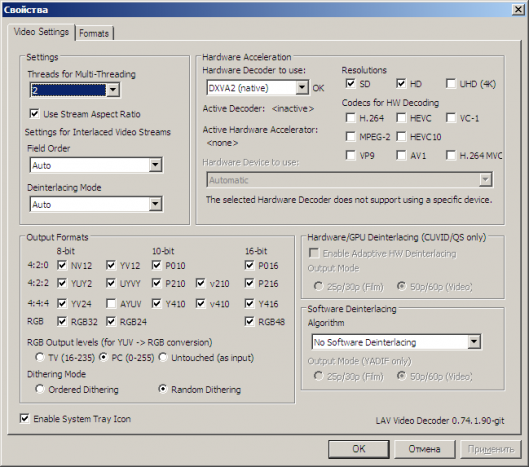
4. In the K-Lite Codec Pack configuration (Start - K-Lite Codec Pack - Configuration - LAV Video) in the "Hardware Acceleration" section, select the item **DXVA2 (native)** and saved the changes (OK). The number of threads selected is 2 (equal to the maximum number of threads that this processor supports).
[ ](https://ra1ahq.blog/images/3/d/c/a/0/3dca00a94a821f75e09ec7cdad9ba1c5b5ad4f20-k-lite.png)
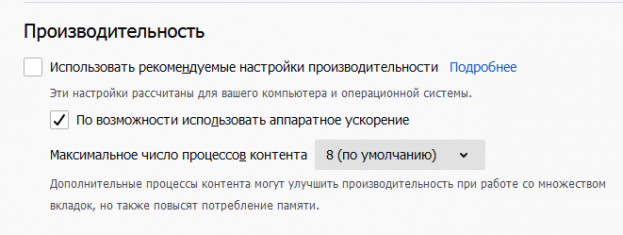
5. Launched the FireFox browser. In the Settings menu - Performance -**"Use hardware acceleration whenever possible"**.
[ ](https://ra1ahq.blog/images/2/e/e/0/6/2ee06f557da94bf15458de42488e88550d984ace-performance.png)
6. Then I configured the FireFox browser (the same for Windows and Linux). Entered settings **about:config**
7. Changed the following parameters:
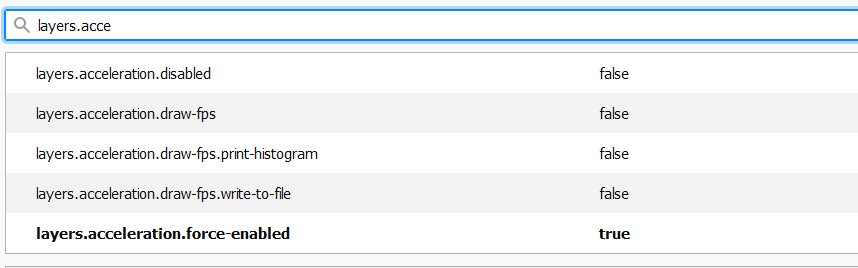
- **layers.acceleration.force-enabled** = true
- **layers.force-active** = true
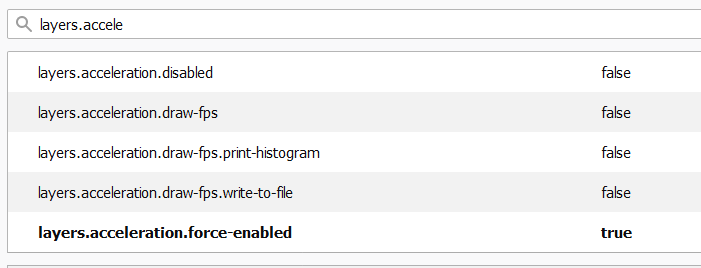
These two options enable Hardware acceleration in the FireFox web browser. Note: on some PCs it is better to leave the default value: layers.acceleration.force-enabled=false if it reduces the CPU load.
Hardware acceleration of 2D graphics (DOM: HTML/CSS) in a web browser using an external processor (GPU) or integrated graphics card (iGPU):
- **browser.preferences.defaultPerformanceSettings.enabled**= true (default)
- **gfx.webrender.all**= true (instead of false)
- **gfx.webrender.software**= false (default, disable software decoding)
- **layers.gpu-process.enabled**= false (by default, responsible for creating a separate process)
- **layers.gpu-process.force-enabled**= false (by default, responsible for creating a separate process)
- **dom.webgpu.enabled**= true
Hardware acceleration of video decoding using the video card processor (GPU):
- **gfx.x11-egl.force-enabled**= true
- **media.hardware-video-decoding.enabled**= true (default)
- **media.hardware-video-decoding.force-enabled**= true
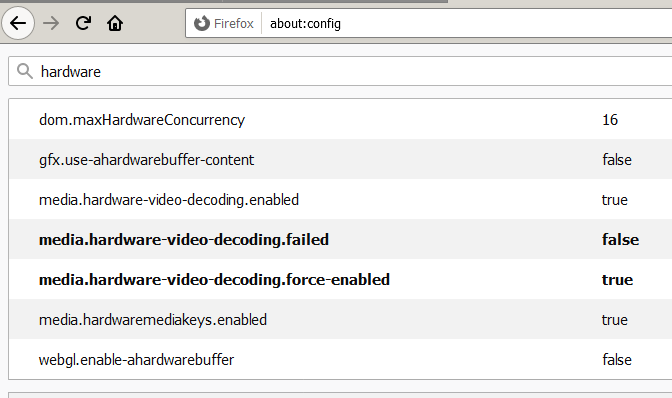
- **media.rdd-ffmpeg.enabled**= true (default)
- **widget.dmabuf.force-enabled**= true
- **media.gpu-process-decoder**= false (default)
Source:[firefox\_gpu\_acceleration.shtml)](https://alephnull.net/software/firefox_gpu_acceleration.shtml).
Check:
Restart the FireFox browser and log in
**`about:support`**
View parameter values
- HW\_COMPOSITING
- WEBRENDER
- HARDWARE\_VIDEO\_DECODING
### Comparison "before" and "after"
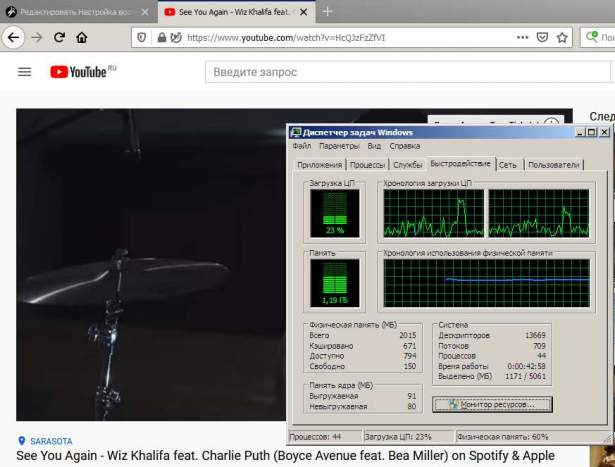
CPU load decreased from 100% to 20%. Frame dropouts have become noticeably less.
[ ](https://ra1ahq.blog/images/f/2/3/a/1/f23a1a7d1bb193a828d92755eb972c75d2aa08fb-video.jpg)
The RuTube video on the AMC C-30 processor runs with slight jerks in 360p resolution.
### A note about H.264, VP9 and WEBM formats
If, when playing a video on YouTube, especially in FullHD resolution, a reduced frame rate is observed, a possible reason is the lack of hardware decoding of the VP9 codec by the video card (used by YouTube by default since 2014). The previous method with the h264ify add-on for selecting h.264 video does not work.
Google then switched YouTube to the more modern WebM video format, which is a container for the VP8, VP9 and the new AV1 codecs. The use of the AV1 codec increased the demands on the processor.
Video hosting RuTube has lower requirements for PC power for decoding. RuTube video codec - AVC/H.264 (developed by MainConcept). If there is an accelerator only for H.264 and after enabling hardware acceleration in FireFox, 360p video playback works in full screen on a 2011 AMD C-30 processor (1 core, 1 thread) with a built-in AMD Radeon HD 6250 graphics accelerator. As a rule, videos in the H.264 encoding format can be played by all old video cards, even 10-15 years ago.
### Update from November 2025
Before starting FireFox or using the profile loading script (.bashrc)
It is recommended to set the environment variable
```
nano ~/.bashrc
```
And add to the end of the file, for X11:
For X11:
```
export MOZ_DISABLE_RDD_SANDBOX=1
export MOZ_X11_EGL=1
```
For Wayland:
```
MOZ_DISABLE_RDD_SANDBOX=1
MOZ_ENABLE_WAYLAND=1
```
For nVidia:
```
LIBVA_DRIVER_NAME=nvidia
```
For Radeon:
```
LIBVA_DRIVER_NAME=radeonsi
```
For Intel graphics accelerators (intel-media-va-driver package for VAAPI acceleration for Intel processors generation 9 and above, such as Gen11 Rocket Lake, Alder Lake, Raptor Lake, Tiger Lake):
```
LIBVA_DRIVER_NAME=iHD
```
For *old* integrated graphics chipsets (Intel HD and UHD Graphics video chips for Intel processors up to the 8th generation inclusive: Sandy Bridge, Ivy Bridge, Haswell, Broadwell, Skylake, Kaby Lake, mobile Coffee Lake, Cannon Lake):
```
LIBVA_DRIVER_NAME=i965
```
Ctrl+O, Enter, Ctrl+X
Check. Log out of your session and log in again.
```
printenv | grep -E "MOZ|LIBVA"
```
eglinfo -B | grep -C2 'EGL vendor string:'
## If the driver is installed correctly and nvidia-drm.modeset=1 is enabled, it should look like this:
`GBM platform:
EGL API version: 1.5
EGL vendor string: Mesa Project
EGL version string: 1.5
EGL client APIs: OpenGL OpenGL_ES`
## X11 platform:
EGL API version: 1.4
EGL vendor string: NVIDIA
EGL version string: 1.4
EGL client APIs:
Device platform:
EGL API version: 1.4
EGL vendor string: NVIDIA
EGL version string: 1.4
EGL client APIs:
### Recommendation for choosing a processor and video card
A comparison of several PC configurations showed that software playback of YouTube videos requires support for SSE4 instructions and Single Core performance (per core) of at least 2000 in the GeekBench 3 test. For example, AMD Athlon 240GE, AMD Athlon 3000G processors, which also have an integrated graphics core, are well suited.
At the same time, a “gaming” video card designed for 3D cannot cope with FullHD playback for three reasons:
1. **A significant portion of video decoding is performed on the CPU cores**. See comparison - in my experience, the Pentium G840 processor with an nVidia 430 video card copes with 1920x1080 video at 30% load, while the AMD Phenom-II-X3-710 does not have an external video accelerator.
2. **The processor is required to support instructions to accelerate multimedia processing - SSE4, SSE4.1 and SSE4.2**.
Suitable processors:
**\*Intel\* *from the "Nahalem" generation - Core i3-530 and higher - from 2012, "Sandy Bridge" Pentium G620T...G870, Core i3 2100 and higher.*** AMD\*\* FX-4100...FX-8100 ("Bulldozer")
\***AMD** FX-4300...FX-9590 ("Piledriver")
- A4-4000...A10-6800K ("Piledriver")
- Athlon X4 - any ("Piledriver")
- Ryzen - any (architectures "Zen", "Zen+", "Zen2", etc.).
3. **For RuTube** the video card requires support for hardware video decoding is **H.264/MP4/AVC** - video accelerators such as **nVidia Pure Video**(4 generations and above) or **AMD Avivo**. Suitable video cards starting from **nVidia GeForce** **GT 240** geForce **GT 220** and GeForce **210/G210**("Tesla 2.0" architecture),**GT 520**/**GT 610** and **GT 530**/**GT 620**,**GT 440**/**GT 630**("Fermi" architecture) and **nVidia GeForce** series **600**/**700**("Kepler" architecture), or video cards **AMD** with support [UVD](https://en.m.wikipedia.org/wiki/Unified_Video_Decoder) starting with some models of the series **HD 2000**-**AMD Radeon HD 2400**,**HD 2600** and **HD 2900XT**, subsequent AMD Radeon series \*\*HD 3000 - HD 8000\* **and higher, codenames Radeon** RX 200**-**RX 800 **and newer, Radeon** RX Vega **radeon** RX 5000/6000 **and more recent. Mid-range video cards** nVidia GTX 750**/**GTX 750Ti\*\* and newer ones can also help a weak processor play FullHD (2K) video.
4. For **RuTube**, if used ***built-in*** to processor (**iGPU**) video card, it is subject to the same requirements as an external one. Will fit **Intel GMA X4500** and above,**Intel HD Graphics** "Ironlake" generation greater than or equal to 5.75 (*that is, newer than 2010*),**Intel HD 2000**(built into the Intel processor generation **"Sandy Bridge"**) and **AMD Radeon RX Vega 3**(video cards built into cores **Athlon 240GE**,**AMD Athlon 3000G** and **AMD Ryzen 3 3200G**- 2019 and newer).
5. For **YouTube**- support for hardware codec decoding is desirable **VP9**. Video cards **NVIDIA** geForce GTX **1050 Ti** NVIDIA GeForce GTX **1650**,**AMD** radeon **RX 470**. Processors: Intel Kaby Lake (Intel Core i3/i4/i7 **7th generation**, for example Core i7-7700).
6. For **YouTube** and video 1080p60 and 4K/8K/HDR format **AV1 (in WebM container)** need modern video cards **NVIDIA RTX 4070 Ti**,**AMD RX 7600** and higher. AV1 decoding using processors: 11th generation **Intel Core ("Tiger Lake" and "Rocket Lake")**, for example, Intel Core i5 11400H, Core i5 11600K;**AMD**- video cards and processors supporting the architecture **RDNA2** and **RDNA3**, such as **Radeon RX 6000 Series**,**Radeon RX 7000 Series**, processors **AMD Ryzen 4000**(Vermeer), for example AMD 4300GE, 4300G, 4600G, 4700G, 4350G, 4650G, AMD Athlon Gold PRO 3125GE, 3150GE; laptop processor Ryzen 7840HS, mobile gaming video cards Radeon 890M and 880M.
7. **Chipset drivers** and **Video card driver** must support hardware video acceleration. For example, on Linux Debian you will need to install special packages ([more about the VA driver and VPAU drivers in Debian](https://wiki.debian.org/HardwareVideoAcceleration)).
**Sources:**
\*[https://comp-security.net/Which processors support SSE 4.1 and SSE 4.2/](https://comp-security.net/%D0%BA%D0%B0%D0%BA%D0%B8%D0%B5-%D0%BF%D1%80%D0%BE%D1%86%D0%B5%D1%81%D1%81%D0%BE%D1%80%D1%8B-%D0%BF%D0%BE%D0%B4%D0%B4%D0%B5%D1%80%D0%B6%D0%B8%D0%B2%D0%B0%D1%8E%D1%82-sse-4-1-%D0%B8-sse-4-2/)
\*
---
**Note:**
- The title of the article uses the video *See You Again - Wiz Khalifa feat. Charlie Puth* (Boyce Avenue feat. Bea Miller).
All rights reserved.
---
*Last change: 11/20/2025*
### Related publications
[  Checklist for checking your web browser before visiting sites that collect information about visitors ](https://ra1ahq.blog/en/cheklist-dlya-proverki-veb-brauzera-pered-posesheniem-saitov-sobirayushikh-informaciyu-o-posetitelyakh)
[  Замена веб-браузеров Firefox и Firefox ESR на Firefox-Nightly ](https://ra1ahq.blog/en/zamena-veb-brauzera-firefox-esr-na-firefox-nightly)
[  Enabling Mozilla Firefox to support the EGL API for hardware graphics acceleration ](https://ra1ahq.blog/en/vklyuchenie-v-mozilla-firefox-podderzhki-api-egl)
[  Script for restarting a service in MS Windows ](https://ra1ahq.blog/en/skript-dlya-perezapuska-sluzhby-v-ms-windows)
[  Internet browsers for Linux ](https://ra1ahq.blog/en/internet-browsers-linux)
[ Backward](https://ra1ahq.blog/en/chto-novogo-v-wsjt-x-versii-2-3 "Previuous page")
[ Forward ](https://ra1ahq.blog/en/kak-szhat-umenshit-razmer-faila-pdf "Next page")
## Languages
- [Русский](https://ra1ahq.blog/posts/nastroika-vosproizvedeniya-video-v-firefox-dlya-slabogo-pk)
- [English](https://ra1ahq.blog/en/nastroika-vosproizvedeniya-video-v-firefox-dlya-slabogo-pk)
- [Deutsch](https://ra1ahq.blog/de/posts/nastroika-vosproizvedeniya-video-v-firefox-dlya-slabogo-pk)
- [Français](https://ra1ahq.blog/fr/posts/nastroika-vosproizvedeniya-video-v-firefox-dlya-slabogo-pk)
- [中文 (简体) (cn)](https://ra1ahq.blog/zh-cn/posts/nastroika-vosproizvedeniya-video-v-firefox-dlya-slabogo-pk)
## Theme
## RSS feeds
[ Atom 1.0](https://ra1ahq.blog/en/.atom) [ RSS](https://ra1ahq.blog/en/.rss)
## Popular tags
[APRS](https://ra1ahq.blog/en/tag:APRS) [CW](https://ra1ahq.blog/en/tag:CW) [DX](https://ra1ahq.blog/en/tag:DX) [FM](https://ra1ahq.blog/en/tag:FM) [Linux](https://ra1ahq.blog/en/tag:Linux) [VHF](https://ra1ahq.blog/en/tag:VHF) [antennas](https://ra1ahq.blog/en/tag:antennas) [firefox](https://ra1ahq.blog/en/tag:firefox) [morse](https://ra1ahq.blog/en/tag:morse) [soundtrack](https://ra1ahq.blog/en/tag:soundtrack) [video](https://ra1ahq.blog/en/tag:video) [windows](https://ra1ahq.blog/en/tag:windows) [youtube](https://ra1ahq.blog/en/tag:youtube) [КВ](https://ra1ahq.blog/en/tag:%D0%9A%D0%92) [ТВ](https://ra1ahq.blog/en/tag:%D0%A2%D0%92) [УКВ](https://ra1ahq.blog/en/tag:%D0%A3%D0%9A%D0%92) [антенны](https://ra1ahq.blog/en/tag:%D0%B0%D0%BD%D1%82%D0%B5%D0%BD%D0%BD%D1%8B) [безопасность](https://ra1ahq.blog/en/tag:%D0%B1%D0%B5%D0%B7%D0%BE%D0%BF%D0%B0%D1%81%D0%BD%D0%BE%D1%81%D1%82%D1%8C) [длинные волны](https://ra1ahq.blog/en/tag:%D0%B4%D0%BB%D0%B8%D0%BD%D0%BD%D1%8B%D0%B5%20%D0%B2%D0%BE%D0%BB%D0%BD%D1%8B) [путешествия](https://ra1ahq.blog/en/tag:%D0%BF%D1%83%D1%82%D0%B5%D1%88%D0%B5%D1%81%D1%82%D0%B2%D0%B8%D1%8F) [религия](https://ra1ahq.blog/en/tag:%D1%80%D0%B5%D0%BB%D0%B8%D0%B3%D0%B8%D1%8F) [соревнования](https://ra1ahq.blog/en/tag:%D1%81%D0%BE%D1%80%D0%B5%D0%B2%D0%BD%D0%BE%D0%B2%D0%B0%D0%BD%D0%B8%D1%8F) [спутники](https://ra1ahq.blog/en/tag:%D1%81%D0%BF%D1%83%D1%82%D0%BD%D0%B8%D0%BA%D0%B8) [средние волны](https://ra1ahq.blog/en/tag:%D1%81%D1%80%D0%B5%D0%B4%D0%BD%D0%B8%D0%B5%20%D0%B2%D0%BE%D0%BB%D0%BD%D1%8B) [схемы](https://ra1ahq.blog/en/tag:%D1%81%D1%85%D0%B5%D0%BC%D1%8B) [тесты](https://ra1ahq.blog/en/tag:%D1%82%D0%B5%D1%81%D1%82%D1%8B) [трансивер](https://ra1ahq.blog/en/tag:%D1%82%D1%80%D0%B0%D0%BD%D1%81%D0%B8%D0%B2%D0%B5%D1%80) [управление](https://ra1ahq.blog/en/tag:%D1%83%D0%BF%D1%80%D0%B0%D0%B2%D0%BB%D0%B5%D0%BD%D0%B8%D0%B5) [фотографии](https://ra1ahq.blog/en/tag:%D1%84%D0%BE%D1%82%D0%BE%D0%B3%D1%80%D0%B0%D1%84%D0%B8%D0%B8)
## Random post
[ I'll be lucky!](https://ra1ahq.blog/en/random)
## Archive of posts
- [ October 2026 ✒ 5 ](https://ra1ahq.blog/en/archives_month:oct_2026)
- [ September 2026 ✒ 9 ](https://ra1ahq.blog/en/archives_month:sep_2026)
- [ August 2026 ✒ 6 ](https://ra1ahq.blog/en/archives_month:aug_2026)
- [ July 2026 ✒ 13 ](https://ra1ahq.blog/en/archives_month:jul_2026)
- [ June 2026 ✒ 8 ](https://ra1ahq.blog/en/archives_month:jun_2026)
- [ May 2026 ✒ 2 ](https://ra1ahq.blog/en/archives_month:may_2026)
- [ April 2026 ✒ 6 ](https://ra1ahq.blog/en/archives_month:apr_2026)
- [ March 2026 ✒ 3 ](https://ra1ahq.blog/en/archives_month:mar_2026)
- [ February 2026 ✒ 7 ](https://ra1ahq.blog/en/archives_month:feb_2026)
- [ January 2026 ✒ 8 ](https://ra1ahq.blog/en/archives_month:jan_2026)
- [ December 2025 ✒ 12 ](https://ra1ahq.blog/en/archives_month:dec_2025)
- [ November 2025 ✒ 9 ](https://ra1ahq.blog/en/archives_month:nov_2025)
- [ October 2025 ✒ 8 ](https://ra1ahq.blog/en/archives_month:oct_2025)
- [ September 2025 ✒ 5 ](https://ra1ahq.blog/en/archives_month:sep_2025)
- [ August 2025 ✒ 8 ](https://ra1ahq.blog/en/archives_month:aug_2025)
- [ July 2025 ✒ 6 ](https://ra1ahq.blog/en/archives_month:jul_2025)
- [ June 2025 ✒ 10 ](https://ra1ahq.blog/en/archives_month:jun_2025)
- [ May 2025 ✒ 4 ](https://ra1ahq.blog/en/archives_month:may_2025)
- [ April 2025 ✒ 4 ](https://ra1ahq.blog/en/archives_month:apr_2025)
- [ March 2025 ✒ 4 ](https://ra1ahq.blog/en/archives_month:mar_2025)
- [ February 2025 ✒ 11 ](https://ra1ahq.blog/en/archives_month:feb_2025)
- [ December 2024 ✒ 8 ](https://ra1ahq.blog/en/archives_month:dec_2024)
- [ November 2024 ✒ 2 ](https://ra1ahq.blog/en/archives_month:nov_2024)
- [ October 2024 ✒ 8 ](https://ra1ahq.blog/en/archives_month:oct_2024)
- [ September 2024 ✒ 3 ](https://ra1ahq.blog/en/archives_month:sep_2024)
- [ August 2024 ✒ 5 ](https://ra1ahq.blog/en/archives_month:aug_2024)
- [ July 2024 ✒ 9 ](https://ra1ahq.blog/en/archives_month:jul_2024)
- [ June 2024 ✒ 6 ](https://ra1ahq.blog/en/archives_month:jun_2024)
- [ May 2024 ✒ 7 ](https://ra1ahq.blog/en/archives_month:may_2024)
- [ April 2024 ✒ 5 ](https://ra1ahq.blog/en/archives_month:apr_2024)
- [ March 2024 ✒ 5 ](https://ra1ahq.blog/en/archives_month:mar_2024)
- [ February 2024 ✒ 5 ](https://ra1ahq.blog/en/archives_month:feb_2024)
- [ January 2024 ✒ 6 ](https://ra1ahq.blog/en/archives_month:jan_2024)
- [ December 2023 ✒ 7 ](https://ra1ahq.blog/en/archives_month:dec_2023)
- [ November 2023 ✒ 4 ](https://ra1ahq.blog/en/archives_month:nov_2023)
- [ October 2023 ✒ 8 ](https://ra1ahq.blog/en/archives_month:oct_2023)
- [ September 2023 ✒ 7 ](https://ra1ahq.blog/en/archives_month:sep_2023)
- [ August 2023 ✒ 4 ](https://ra1ahq.blog/en/archives_month:aug_2023)
- [ July 2023 ✒ 7 ](https://ra1ahq.blog/en/archives_month:jul_2023)
- [ June 2023 ✒ 7 ](https://ra1ahq.blog/en/archives_month:jun_2023)
- [ May 2023 ✒ 5 ](https://ra1ahq.blog/en/archives_month:may_2023)
- [ April 2023 ✒ 6 ](https://ra1ahq.blog/en/archives_month:apr_2023)
- [ March 2023 ✒ 5 ](https://ra1ahq.blog/en/archives_month:mar_2023)
- [ February 2023 ✒ 2 ](https://ra1ahq.blog/en/archives_month:feb_2023)
- [ January 2023 ✒ 5 ](https://ra1ahq.blog/en/archives_month:jan_2023)
- [ December 2022 ✒ 7 ](https://ra1ahq.blog/en/archives_month:dec_2022)
- [ November 2022 ✒ 8 ](https://ra1ahq.blog/en/archives_month:nov_2022)
- [ October 2022 ✒ 6 ](https://ra1ahq.blog/en/archives_month:oct_2022)
- [ September 2022 ✒ 9 ](https://ra1ahq.blog/en/archives_month:sep_2022)
- [ August 2022 ✒ 8 ](https://ra1ahq.blog/en/archives_month:aug_2022)
- [ July 2022 ✒ 4 ](https://ra1ahq.blog/en/archives_month:jul_2022)
- [ June 2022 ✒ 9 ](https://ra1ahq.blog/en/archives_month:jun_2022)
- [ May 2022 ✒ 7 ](https://ra1ahq.blog/en/archives_month:may_2022)
- [ April 2022 ✒ 3 ](https://ra1ahq.blog/en/archives_month:apr_2022)
- [ March 2022 ✒ 4 ](https://ra1ahq.blog/en/archives_month:mar_2022)
- [ February 2022 ✒ 6 ](https://ra1ahq.blog/en/archives_month:feb_2022)
- [ January 2022 ✒ 7 ](https://ra1ahq.blog/en/archives_month:jan_2022)
- [ December 2021 ✒ 7 ](https://ra1ahq.blog/en/archives_month:dec_2021)
- [ November 2021 ✒ 7 ](https://ra1ahq.blog/en/archives_month:nov_2021)
- [ October 2021 ✒ 7 ](https://ra1ahq.blog/en/archives_month:oct_2021)
- [ September 2021 ✒ 10 ](https://ra1ahq.blog/en/archives_month:sep_2021)
- [ August 2021 ✒ 6 ](https://ra1ahq.blog/en/archives_month:aug_2021)
- [ July 2021 ✒ 7 ](https://ra1ahq.blog/en/archives_month:jul_2021)
- [ June 2021 ✒ 7 ](https://ra1ahq.blog/en/archives_month:jun_2021)
- [ May 2021 ✒ 7 ](https://ra1ahq.blog/en/archives_month:may_2021)
- [ April 2021 ✒ 4 ](https://ra1ahq.blog/en/archives_month:apr_2021)
- [ March 2021 ✒ 4 ](https://ra1ahq.blog/en/archives_month:mar_2021)
- [ February 2021 ✒ 3 ](https://ra1ahq.blog/en/archives_month:feb_2021)
- [ January 2021 ✒ 4 ](https://ra1ahq.blog/en/archives_month:jan_2021)
- [ December 2020 ✒ 8 ](https://ra1ahq.blog/en/archives_month:dec_2020)
- [ November 2020 ✒ 2 ](https://ra1ahq.blog/en/archives_month:nov_2020)
- [ October 2020 ✒ 3 ](https://ra1ahq.blog/en/archives_month:oct_2020)
- [ September 2020 ✒ 3 ](https://ra1ahq.blog/en/archives_month:sep_2020)
- [ August 2020 ✒ 5 ](https://ra1ahq.blog/en/archives_month:aug_2020)
- [ July 2020 ✒ 5 ](https://ra1ahq.blog/en/archives_month:jul_2020)
- [ June 2020 ✒ 8 ](https://ra1ahq.blog/en/archives_month:jun_2020)
- [ May 2020 ✒ 10 ](https://ra1ahq.blog/en/archives_month:may_2020)
- [ April 2020 ✒ 4 ](https://ra1ahq.blog/en/archives_month:apr_2020)
- [ March 2020 ✒ 2 ](https://ra1ahq.blog/en/archives_month:mar_2020)
- [ January 2020 ✒ 1 ](https://ra1ahq.blog/en/archives_month:jan_2020)
- [ December 2019 ✒ 2 ](https://ra1ahq.blog/en/archives_month:dec_2019)
## Search
## Weather forecast
[На 14 дней](https://world-weather.ru/pogoda/russia/saint_petersburg/14days/)
[world-weather.ru](https://world-weather.ru/)
---
## Navigation
- Parent: [RA1AHQ](https://ra1ahq.blog/en/index.md)
- Previous: [How to compress (reduce the file size) pdf](https://ra1ahq.blog/en/kak-szhat-umenshit-razmer-faila-pdf.md)
- Next: [What is new in WSJT-X version 2.3?](https://ra1ahq.blog/en/chto-novogo-v-wsjt-x-versii-2-3.md)