26
August
2021
Putty Terminal Settings for access to DX Cluster CW Skimmer
11:51

Putty Terminal Settings for access to DX Cluster / CW Skimmer

26 August 2021 11:51

I set myself the task - when clicking on a link to the web page, the terminal should open and connect to the DX cluster.

Introduction

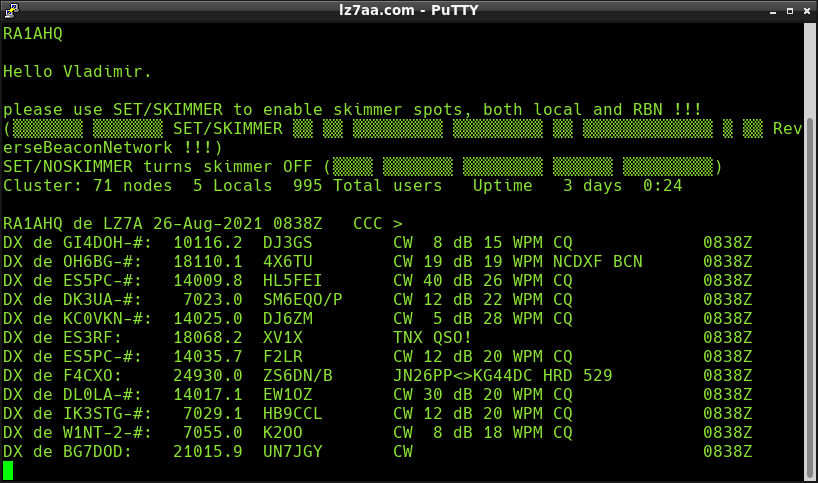
In order to quickly find working stations on the air, DX clusters were invented. Most of them are based on the Telnet protocol. The principle of the Telnet cluster amateur amateurs connected to the Telnet protocol server is reported by the calls to the sign of rare stations (DX STAS) operating on air at the moment to facilitate the search for rare or DX stations. Some of the DX clusters receive data directly from the air - using a multichannel decoder program that listens to the CW transmission (Morze's ABC) in the amateur radio range and translates it from the sound format to the text, the so -called CW Simmer (the name arose from the program CWSkimmer из пакета DX Atlas).

Task: When opening a link to the web page, run dx cluster

The opening of the terminal window by the link is described in RFC1738. Syntax is as follows: Telnet: // SErver:port

*Example: telnet: // cluster.lz7aa.com: 7300

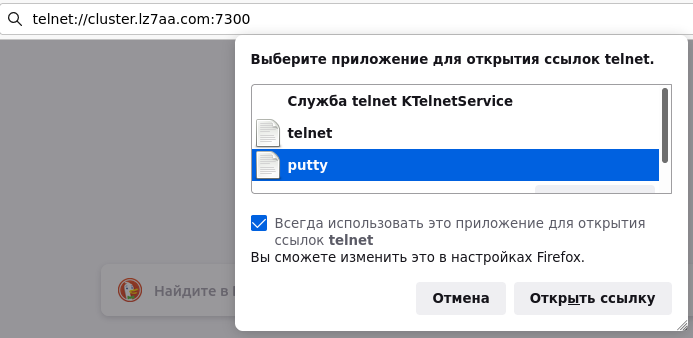
When opening this link from a personal computer in Mozill browsera Firefox запрашивается выбор приложения, при помощи которой будет открываться ссылка вида telnet://.

Installation of the Putty program - for access to Telnet or SSH protocols

In Linux Mint and other Debian-like distributions, we perform a command

sudo apt-get update
sudo apt-get instaLL PUTTY

In Fedora, Centos and other distributions should help commands

dnf update
dnf install putty

In other versions of Linux - see documentation.

Putty Terminal Settings: Task of Color and Font size, Configuration Save

Through the application menu, we launch Putty - usually in section "Internet" there is a item:

* Putty ssh client

  1. Indication of your font and size (Kelah):
    Window - Appearance - Fonts - "Font used for ordinary text" - Change
    указываем нужный шрифт, например: Hack - Regular - 12
    нажимаем OK
  2. Photo and foreground color task
    Window - Appearance - ColorS
  • Default ForegrOUND: R: 138, G: 226, B: 52
  • Default Bold ForegrOUND: R: 237, G: 212, B: 0
  • Default BackgrOUND: R: 0, G: 0, B: 0
  • Default Bold BackgrOUND: R: 89, G: 154, B: 6
  • Cursor Text: R: 204, G: 0, B: 0
  • Cursor Color: R: 0, g: 255, b: 0
  1. Putty settings saving:

session - Default Settings - нажимаем кнопку SaVE .

  1. We leave the program. (Close the window with a cross or Cancel button)

Choosing a Putty program for opening Telnet links: // in a browser

Introduce (copy and insert) to the target line of the browser link Telnet: // CluSter.lz7aa.com: 7300
And click Enter. Choose Putty as a client to open such links.

The Telnet Putty window opens with the proposal of entering its login (call sign). The setting is completed.
Putty

List of working European CW skimmers

available on the protocol Telnet: //

  1. 1.Telnet: // CluSter.lz7aa.com: 7300 - CW скиммер работает в Reverse Beacon Network, records only “CQ” spots, all the Ranks of KV, Qth Loc Kn12qq near the capital of Bulgaria Sofia
  2. 2.Telnet: //dxspots.com - после входа выполнить команду set/skimmer
  3. 3.Telnet: // Ik4icz-5.dyndns.orG: 7300 - после входа выполнить команды set/cw, set/skimmer. There are skimmers for CW, FT4, FT8 and PSK31.
  4. 4.Telnet: // Ik5pwj-6.dyndns.orG: 8000 - итальянский CW скиммер IK2PWJ
  5. 5.Telnet: // on0dxk.dyndns.orG: 8000 - хороший CW скиммер, много CW спотов. После входа выполнить команду set/skimmer
  6. 6.Telnet: // Nolcluster.on8ar.eu: 7300 - бельгийский DX кластер с функцией CW скиммера. После входа выполнить команду set/skimmer

List of working European DX clusters

accessible to the protocol Telnet: //, bez functions CW Skimmer

  1. 1.Telnet: //dxfun.com: 8000 - крупнейший мировой DX кластер
  2. 2.Telnet: //db0sue.de: 8000 - DX кластер в Германии
  3. 3.Telnet: //dx.iz7auh.net: 8000 - итальянский DX кластер IZ7AUH
  4. 4.Telnet: //dx.iz8mbw.net: 7300 - итальянский DX кластер IZ8MBW на Raspberry PI и программе DXspider (QTH Napoli) - подключен к мировой сети "Worldwide PacketCluster Network". После подключения выполнить команду UNSET/Echo
  5. 5.Telnet: //dx.iz7auh.net: 8000 - итальянский DX кластер IZ7AUH в QTH TaraNTO
  6. 6.Telnet: //dx.iz8mbw.net: 7300 - итальянский DX кластер IZ8MBW. Выполнить команду UNSET/ECHO
  7. 7.Telnet: // CluSter.iz3mEz.it:8000 - итальянский DX кластер IZ3MEZ
  8. 8.Telnet: //it9esi.ddns.net: 7373 - европейский DX кластер в Италии, подключенный к большой сети 438 узлов (в онлайне >3500 человек). После подключения выполнить команду UNSET/ECHO.
  9. 9.Telnet: //OH1Ab.dy.fi: 8000 - европейский DX кластер в Финляндии (Pori) подключен к большой сети 428 узлов (в онлайне >3500 человек). После подключения выполнить команду UNSET/Echo .
    10.10.Telnet: //oz5bbs.dk: 8000 - европейский DX кластер в Дании (Odense). Подключен к 442 узлам, имеет >3500 радиолюбителей, читающих его в режиме онлайн.
    11.11.Telnet: // pa1rbz.dyndns.orG: 9000 - европейский DX кластер в Нидерландах. Подключены 447 узлов, >3500 радиолюбителей читают его в режиме онлайн.
    12.12.Telnet: //dxc.pi4cc.nl: 8000 - DX кластер в Нидерландах. Также подключен к обширной сети DX кластеров.
    13.13.http: //kh6am.no-ip.org:7550/ - CW скиммер в Швейцарии (позывной KH6AM). Спотов не много.
    14.14.Telnet: //dx.net.ua:7300/ - работающий украинский DX кластер (Киев, Украина) - 432 узла, >4000 пользователей, но спотов не очень много.
    15.15.Telnet: //dx.feerc.rU: 8000 - Российский DX кластер ODXC.RU, город Обнинск в Московской области, с 1999г.

List of FT8 Skimmeres working on Telnet

Telnet: //dm4x.ddns.net: 8500 - центральный скиммер www.pskreporter.de
Use filters:
set/noecho
ACCEPT/SPOTS CALL_DXCC <Префикс страны>

Например: ACCEPT/SPOTS CALL_DXCC OE - фильтр включающий отображение спотов радиостанций только из Австрии.

List of DXCC countries in Europe and the countries of the former USSR

oe Austria,
4K Azerbaijan,
za Albania,
C31 Andorra,
ek Armenia,
eu Belarus,
on Belgium,
lz Bulgaria,
e7 Bosnia and Herzegovina,
hv Vatican,
g, m Great Britain,
ha Hungary,
DL Germany,
sv Greece,
4l Georgia,
oz Denmark,
ei Ireland,
tf Iceland,
ea Spain,
I Italy,
un Kazakhstan,
5b Cyprus,
ex Kyrgyzstan (Kyrgyzstan)
yl Latvia,
Ly Lithuania,
hb0 Liechtenstein,
LX Luxembourg,
9h Malta,
z3 Macedonia,
Er Moldova,
3a Monaco,
PA Нидерланды,
la Norway,
sp Poland,
ct Portugal,
ua Russia,
yo Romania,
t7 San Marino,
yu Serbia,
ok Slovakia,
S5 Slovenia,
ey Tajikistan,
EZ Turkmenistan,
Ta Türkiye,
Ut Ukraine,
uk Uzbekistan,
oh Finland,
f France,
9a Croatia,
4O Montenegro,
OK, OL Чехия,
hb Switzerland,
SM Sweden,
ES Estonia.

DXCC List of the Middle East

a9 Bahrain,
su Egypt,
4x Israel,
jy Jordan,
OD Lebanon,
E4 Palestinian National Administration,
yk Syria,
yi Iraq,
ep Iran,
7O Yemen,
a7 Qatar,
9k Kuwait,
A6 United Arab Emirates (UAE),
A4 Oman,
Hz Saudi Arabia

DXCC list of North Africa countries

7x Algeria,
s0 Western sugar,
5a Libya,
5t Mauritania,
cn Morocco,
3V Tunisia

DXCC List of East Africa countries

9u Burundi,
J2 Djibuti,
9j Zabia,
5z Kenya,
7Q Malawi
9x Rwanda,
t5 Somalia,
st Sudan,
5h Tanzania,
5x Uganda,
E3 Eritrea,
et Ethiopia,

DXCC list of Western Africa countries

type Benin
XT2 Burkina-Faso
C5 Gambia
9g Gana
3x Guinea
J5 Guinea-Bisau
D4 Cabo-Verde
tj Cameroon
tu cat-d’Ivoire
el Liberia
5t Mauritania
tz Mali
5u Niger
5n Nigeria
zd7 The island of St. Helena
ZD8 Island of Ascension
zd9 Island Tristan da Kunia
6W Senegal
9l Sierra Leone
5V7 TO

DXCC list of Central Africa countries

d2 Angola
9u Burundi
tr Gabon
9j Zabia
tj Cameroon
tn Republic of Congo
9Q Democratic Republic of Congo
9x Rwanda
S9 San Tome and Principia
tl Central African Republic
tt Chad
3c Equatorial Guinea

DXCC List of South Africa countries

A2 Botswana
z2 Zimbabwe
D6 Comory
7p Leso
3b8 Mauritius island
5r Madagascar
7Q Malawi
C9 Mozambique
v5 Namibia
ZS South African Republic (South Africa)

List of DXCC Asian countries - Iaru Region 3

ya Afghanistan
S2 Bangladesh
v8 Brunei
A5 Butane
4W East Timor
3W, XV Vietnam
vu India
yb Indonesia
XU Cambodia
by China
p5 Korea North
hl, ds - Korea South
XW Laos
9M6 - Malaysia East
9M2 - Malaysia West
8Q of the Maldives
jt Mongolia
XZ2 Myanmar
9n Nepal
AP Pakistan
9v Singapore
hs Thailand
BV Taiwan
du Philippines
4s Sri Lanka
ja Japan

List of Region 2 countries - North America

v2 Antigua and Barbuda,
C6 Bahamas,
8p Barbados,
v3 Belize,
hh Haiti,
tg Guatemala,
hr Honduras,
J3 Grenada,
J7 Dominica,
hi Dominican Republic,
VE Canada,
ti Costa Rica,
Co Cuba,
XE Mexico,
yn Nicaragua,
hp Panama,
ys Salvador,
J8 Saint-Vinadin and Grenadino,
v4 St. Cristopher and Nevis,
J6 Saint Lucia,
K, W USA,
9y Trinidad and Tobago,
6y Jamaica

List of Region 2 countries - South America

lu Argentina
CP Bolivia
py Brazil
yv Venezuela
8r Gayana
hk Colombia
ZP Paraguay
oa peru
Pz Surinam
CX Uruguay
CE Chile
HC Ecuador

List of Region 3 countries - Oceania

vk Australia
yj islands Vanuatu
t30, t31, t32 Kiribati
v7 Marshalls of the island
v6 Micronesia
C21 Island of Nauru
zl New Zealand
t8 Palau archipelago
p29 Papua - New Guinea
5W Western Samoa
h44 Solomon Islands
A3 TOGA islands
t2 Islands to Tuvalu
3D2 Fiji


DX spots (these are the callsigns of DX radio stations that fall into the DX cluster from correspondents) are in the _mal of the left column:
dxs

Basic DX Cluster Management Teams

Unset/echo - Disabling for duplication of the input ("echo") keyboard

dx call sign frequency - transfer DX spot to the server

dx the frequency of the call sign - transfer DX spot to the server

set/Noskimmer - Disable the display of the spots from CW Skimmer (if any)

set/skimmer - enable the display of spots from CW Skimmer (if any)

sh/dx - Show a list of the last 30 spots once

SH/DX 20 - Show the list of the last 30 spots in the range of 20 meters once

Sh/dx 40 - once show the list of 30 last spots in the range of 40 meters

bye - completion of work with DX cluster (exit).

Full list of DX cluster commands

There are three types of DX clusters, they differ in management commands:

  • Ar CluSter Пример фильтра по коду страны: set/filter OH/paSS
  • Dxspider. Пример фильтра по коду страны: accept/spots call_dxccc oh
  • VE7CC CLUSTEr. Пример фильтра по коду страны: set/filter OH/paSS

Do not forget to execute the BYE command to exit, otherwise other servers may not let your call sign. If there is a need to be simultaneously on several clusters, add SSID to the call sign, for examplera1aa-1, ra1aa-2, etc.

Links


Related publications